VHD-V71U2
DATASHEET - MANUAL
Protocol: Control protocol type, optional items:
AUTO, VISCA, PELCO-D, PELCO-P.
V_Address: Optional items: 1 ~ 7.
P_D_Address: Optional items: 0 ~ 254. (Effective
only in PELCO-D protocol).
P_P_Address: Optional items: 0 ~ 31. (Effective
only in PELCO-P protocol).
V_AddrFix: If you can change through the serial
port of infrared switch, optional items: On,
Off (When set to On, useless in 88 30 01 FF
Command).
Net Mode: Set the serial port control networking,
optional items: Serial, Paral.
Baudrate: Serial port baud rate, optional items:
2400, 4800, 9600, 38400.
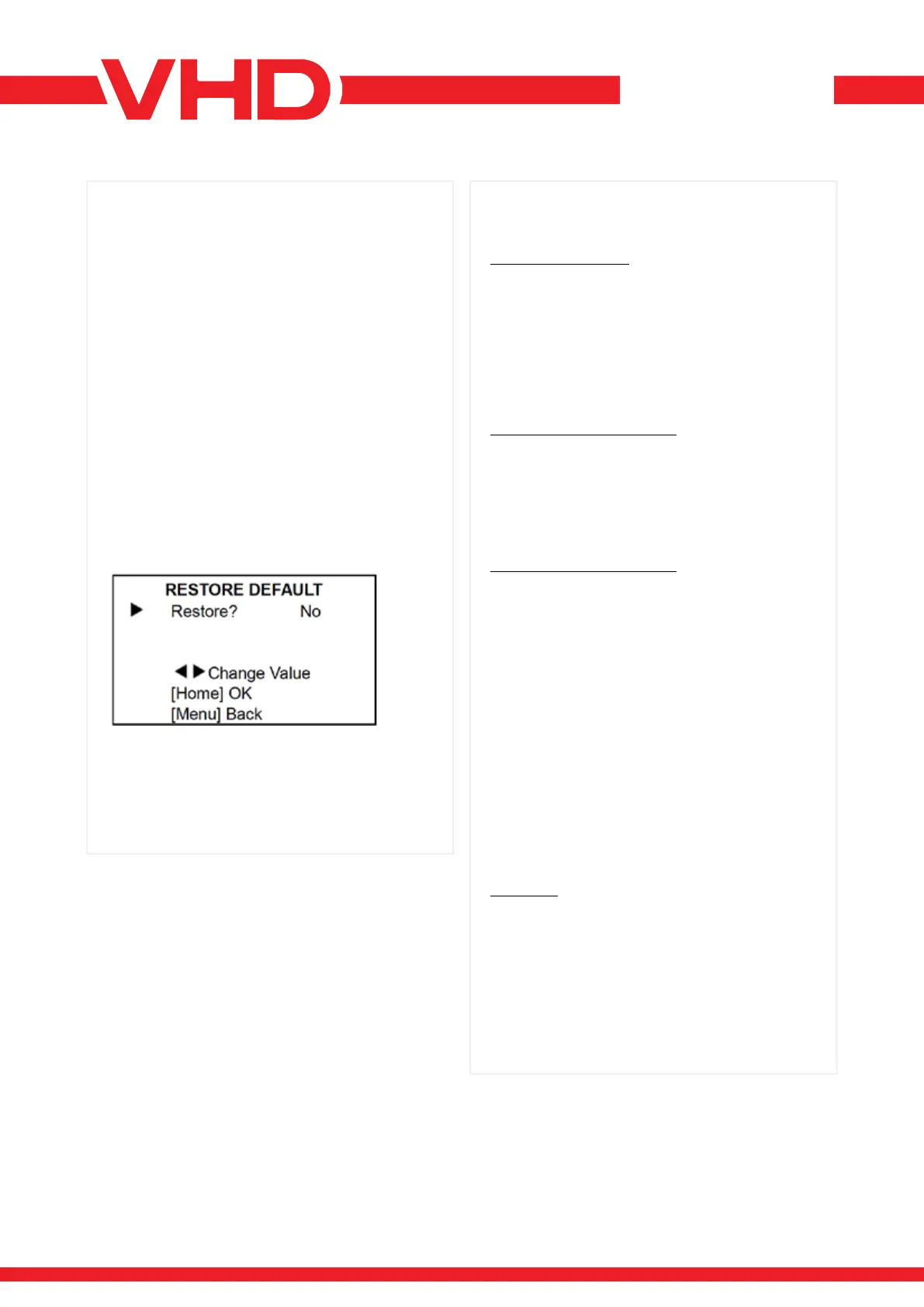
Move the main menu cursor to [RESTORE
DEFAULT], and press [HOME] key enter the restore
default page, as shown in the following gure.
Restore: Conrm restore factory settings, optional
items: Yes, No.
Note: Press [HOME] button to conrm, all
parameter restore default, include IR Remote
address and VISICA address.
> RESTORE DEFAULT
CAMERA MAINTAINS
• If camera will not be used for a long time, please
turn off the power switch, disconnect AC power
cord of AC adaptor to the outlet.
• Use soft cloth or tissue to clean the camera cover.
• Please use the soft dry cloth to clean the lens. If
the camera is very dirty, clean it with diluted neuter
detergent. Do not use any type of solvents, which
may damages the surface.
UNQUALIFIED APPLICATION
• No shooting extreme bright object for a long
period of time, such as sunlight, light sources, etc.
• No operating in unstable lighting conditions,
otherwise image will be ickering.
• No operating close to powerful electromagnetic
radiation, such as TV or radio transmitters, etc.
TROUBLESHOOTING IMAGE
• The monitor shows no image:
1) Check that the camera power supply is
connected, the voltage is normal, and the power
indicator light is always on.
2) Turn off the power switch to check whether the
camera is self-testing.
3) Check the cable of video platform and TV
whether correct connection.
• Sometimes without the image:
Check the cable of video platform and TV whether
correct connection.
• Image have jitter when the camera lens at
max multiple:
1) Check whether the camera installed position
be stabled.
2) Check whether have vibrating machinery or
object near the camera.
CONTROL
• Remote control can not control:
1) Check and replace the new battery for the
remote controller.
2) Check whether the camera working mode
is correct.
• Series port can not control:
1) Check whether the camera protocol, address
such is the same.
2) Check whether the control line is connected well.
> MAINTENANCE AND
TROUBLESHOOTING


 To Previous Page
 Loading...