VHD-V71U2
DATASHEET - MANUAL
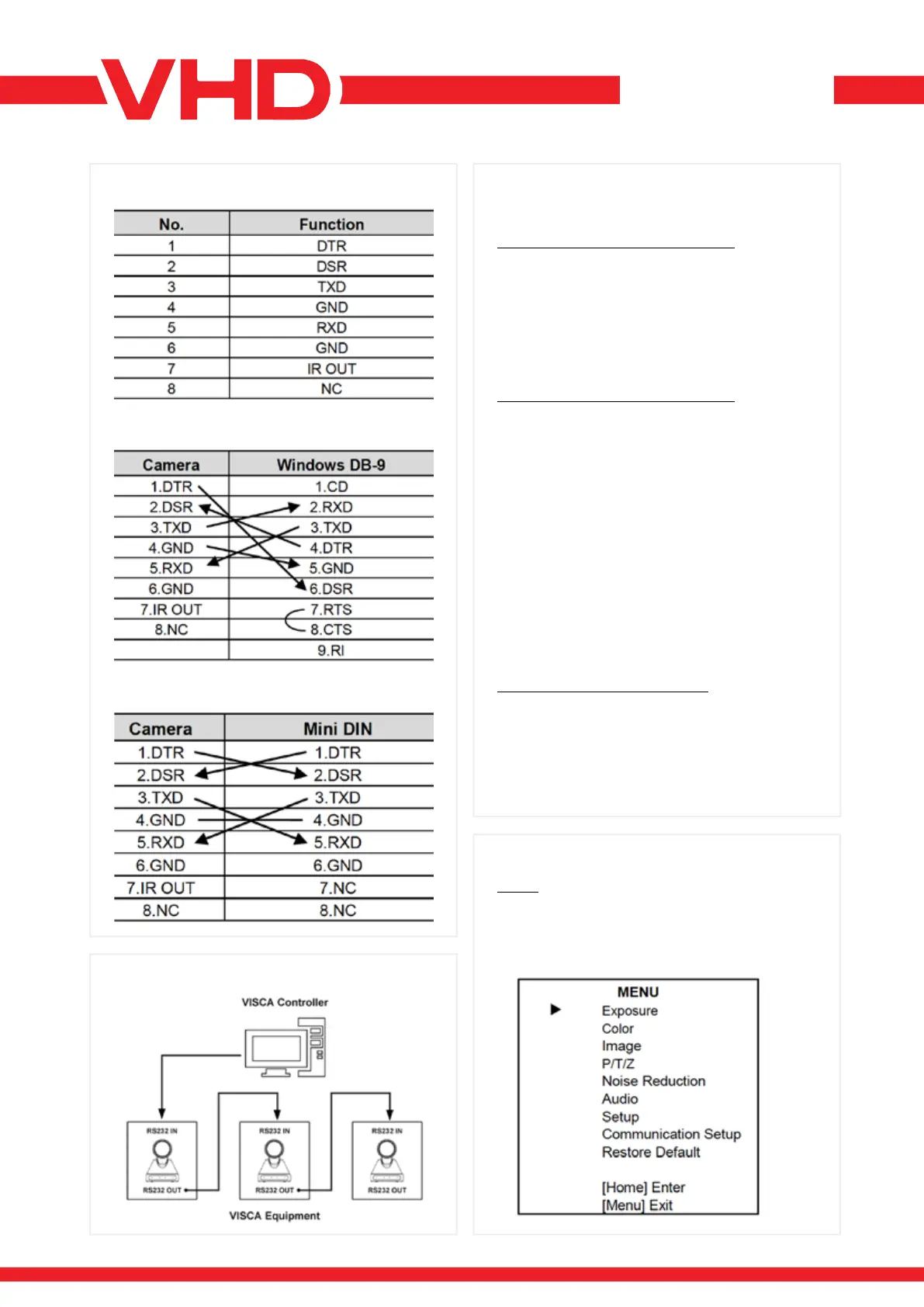
> RS-232 INTERFACE > SERIAL COMMUNICATION
CONTROL
> VISCA NETWORK
> GUI SETTINGS
The correspondence between the camera and
Windows DB-9 pin:
The correspondence between the camera and the
Mini DIN pin:
RS232 COMMUNICATION CONTROL
The camera is controlled via RS232.
The RS232 serial port parameters are as follows:
Baud rate: 2400/4800/9600/38400 bit/s;
Starting Position: 1 bit
Data bit: 8 bits
Stop bit: 1 bit
Check digit: None
RS485 COMMUNICATION CONTROL
Control camera via RS485, half duplex mode:
Baud rate: 2400/4800/9600/38400 bit/s;
Starting position: 1 bit
Data bit: 8 bits
Stop bit: 1 bit
Check digit: None
After power on, the camera goes to the upper
right limit and then back to the middle position.
The zoom lens is pulled to the farthest position,
auto focus, and the aperture is adjusted to the
default value. If the camera has preset 0 saved,
the camera will be set to position 0 after the
initialization is completed.
At this point, the user can use the serial port
command to control the camera.
LIST OF PROTOCOLS (OMITTED)
The serial port of the camera follows the VISCA/
Pelco-D/Pelco-P standard protocol. If secondary
development is required, the camera can be
controlled according to the standard protocol.
For a detailed list of VISCA/Pelco-D/Pelco-P
protocols, contact the manufacturer.
MENU
Press [MENU] button to display the main menu on
the normal screen, using arrow button to move
the cursor to the item to be set. Press the [HOME]
button to enter the corresponding sub-menu.


 To Next Page