VHD-V71U2
DATASHEET - MANUAL
> P/T/Z
> NOISE REDUCTION
> AUDIO
> SETUP
> COMMUNICATION SETUP
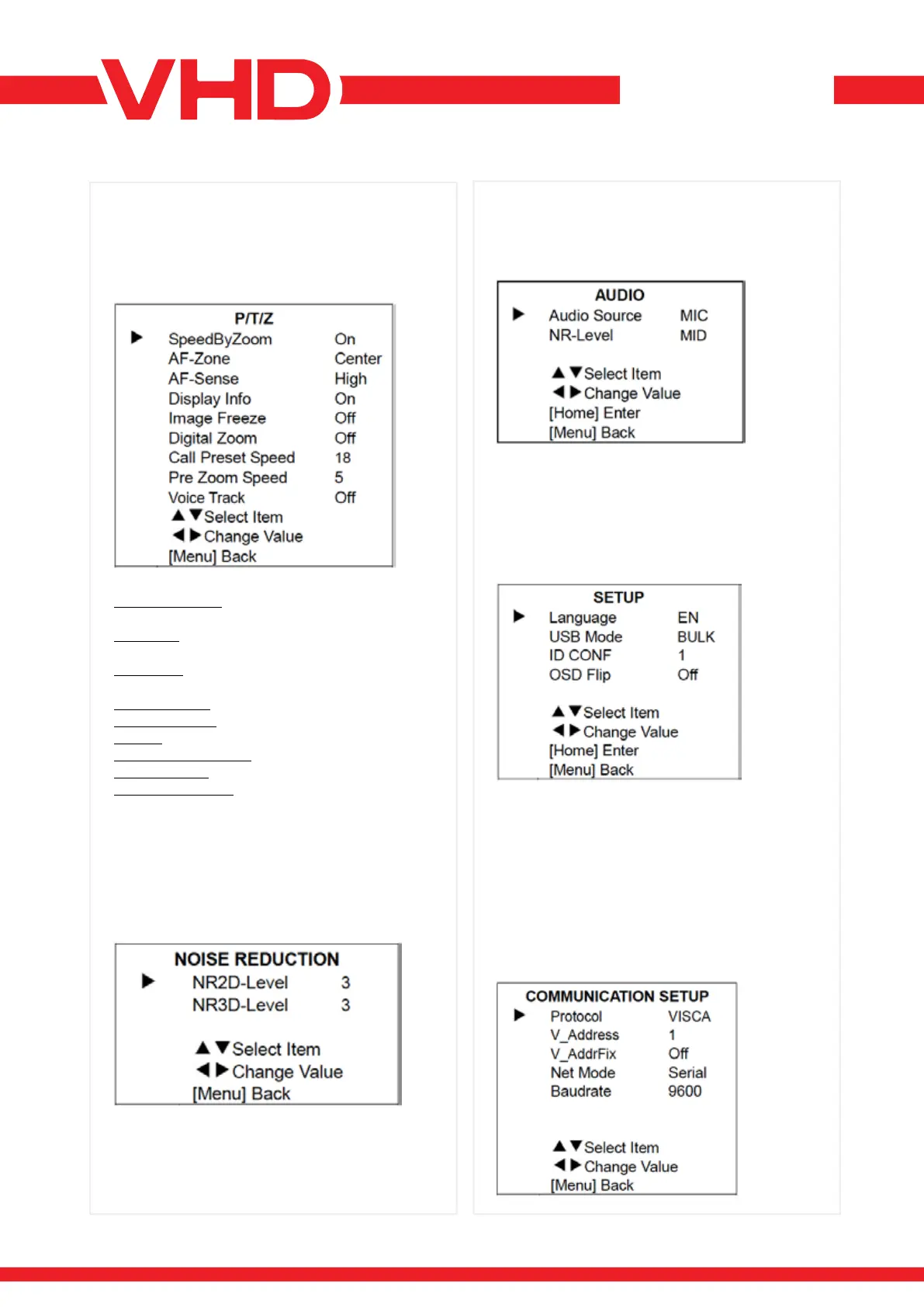
Move the main menu cursor to [P/T/Z], and press
[HOME] key enter the P/T/Z page, as shown in the
following gure.
Move the main menu cursor to [NOISE
REDUCTION], and press [HOME] key enter
the noise reduction page, as shown in the
following gure.
NR2D Level: 2D noise reduction, optional items:
Off, Auto, 1 ~ 5.
NR3D Level: 3D noise reduction, optional items:
Off, 1 ~ 8.
SPEEDBYZOOM: the depth of eld scale switch,
optional items: On, Off.
AF-ZONE: interested in focusing area, optional
items: Top, Center, Bottom.
AF-SENSE: automatic focusing sensitivity options,
optional items: Low, Medium, High.
DISPLAY INFO: optional items: On, Off.
IMAGE FREEZE: optional items: On, Off. Digital
ZOOM: optional items: Off, 2x, 4x, 8x, 16x.
CALL PRESET SPEED: optional items: 1 ~ 24.
ZOOM SPEED: optional items: 0 ~ 7.
OPTIONAL ITEMS: On, Off.
Move the main menu cursor to [AUDIO], and press
[HOME] key enter the audio page, as shown in the
following gure.
Move the main menu cursor to [SETUP], and press
[HOME] key enter the setup page, as shown in the
following gure.
Move the main menu cursor to
[COMMUNICATION SETUP], and press [HOME]
key enter the communication setup page, as
shown in the following gure.
Language: Optional items: EN, Chinese, Russian.
USB Mode: Optional items: BULK, ISOC.
ID CONF: Optional items: 1, 2.
OSD Flip: Optional items: On, Off.
Audio Source: Optional items: MIC, LINE. NR-
Level: Optional items: LOW, MID, HIGH.


 To Next Page