Chapter 11 Smart Access Anywhere
Connection modes
User Manual 78100000202 Rev. 003 123
USB/WIFI
connection
through 3G
Smartphone
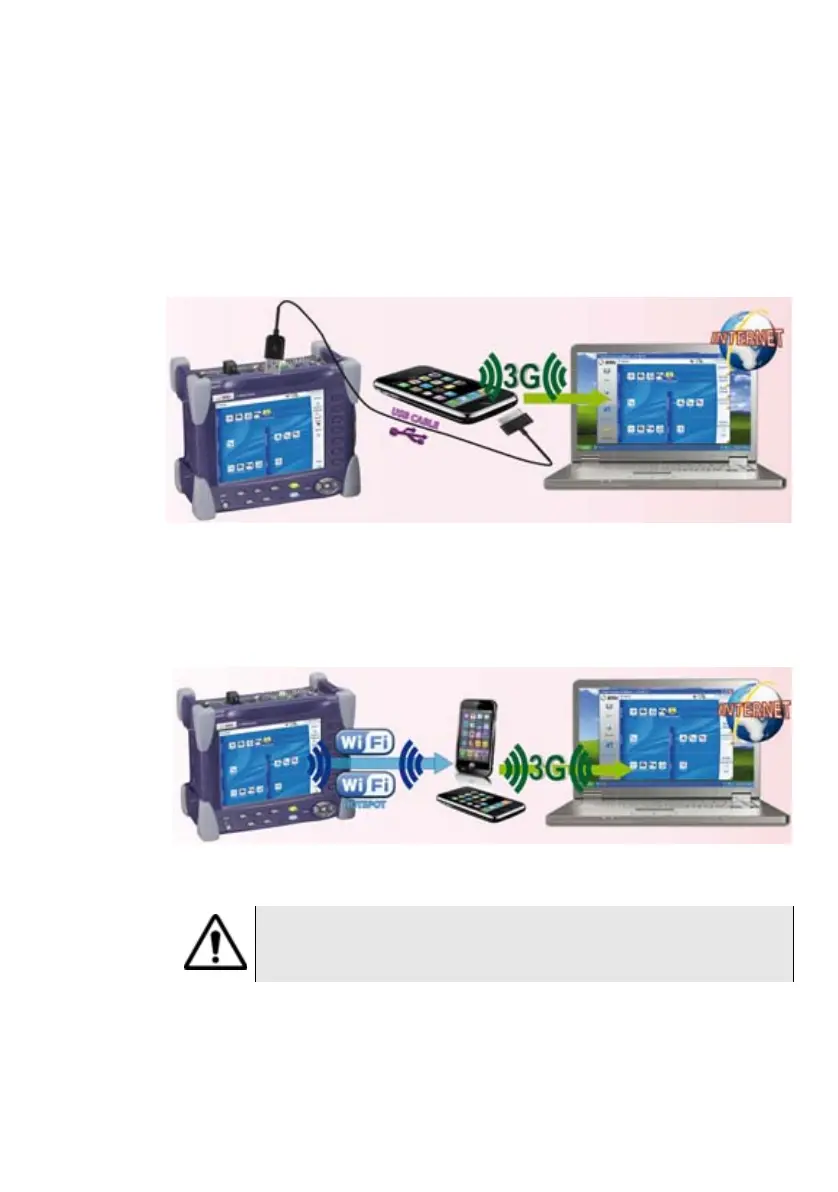
To access to a Platform remotely, the connection between the unit and
the Viavi application can be established via a USB cable or WIFI, and
through a 3G Smartphone, having Internet Sharing capability via USB or
WIFI.
1 To establish connection between 8000 V2 Platform and Smartphone
using USB, connect the USB cable on 8000 V2 Platform and on 3G
Smartphone connector.
2 To establish connection between 8000 V2 Platform and 3G Smart-
phone using WIFI, the WIFI option must be installed onto the
8000 V2 Platform.
Fig. 93 USB connection through 3G Smartphone
Fig. 94 WIFI connection through 3G Smartphone
The smartphone which have been fully qualified are HTC Desire
and Samsung Galaxy Ace models.







 To Next Page