Chapter 16 Maintenance and Troubleshooting
Maintenance procedure
170 User Manual 78100000202 Rev. 003
Upgrading begins. The 8000 V2 Platform is automatically rebooted.
Upgrading takes several minutes. Finally, the 8000 V2 Platform is
automatically restarted.
Checking new
upgrade on JDSU
Server
If the JDSU Server is selected for upgrade (see Figure 125 on
page 166), the parameter Check new release can be defined to auto-
matically inform user of a new upgrade available for Platform.
1 In the System Settings screen, select Upgrade parameters
2 Check the Address Type is set to JDSU Server.
3 Define the parameter Check new release to Enable.
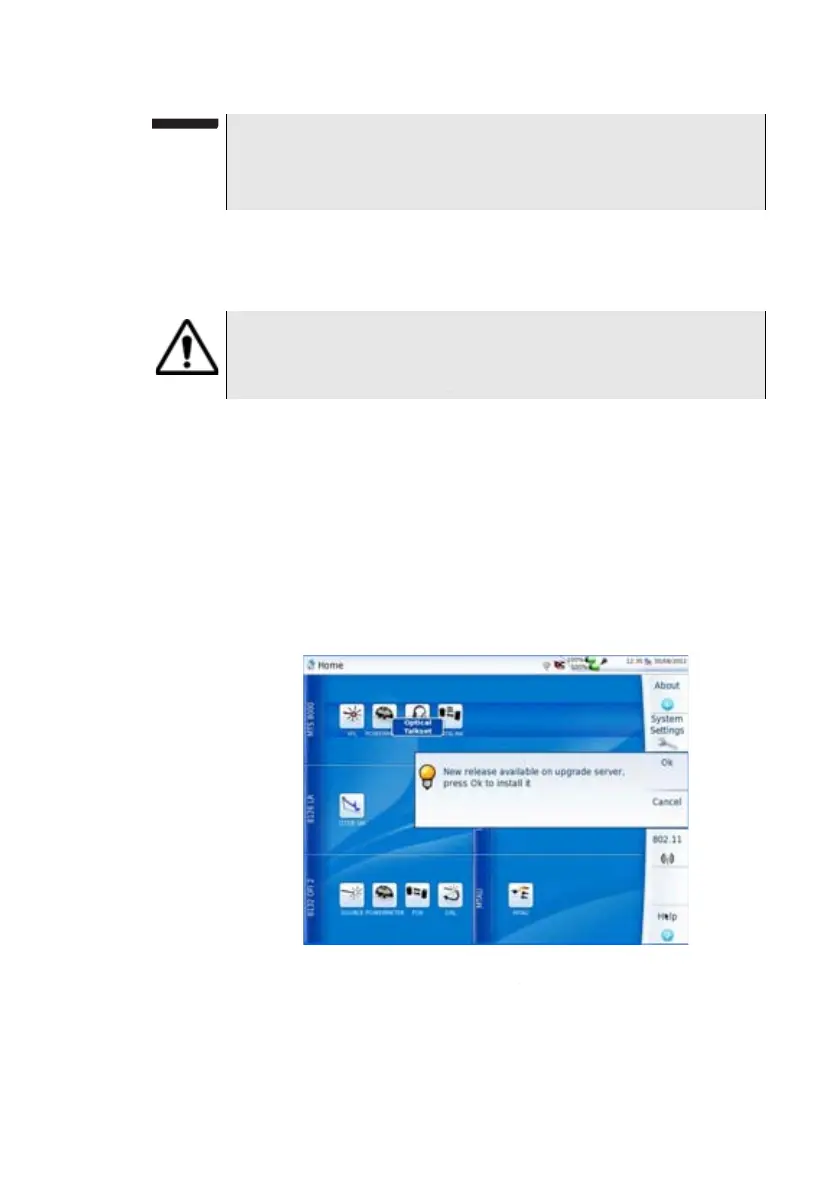
If the parameter is set to Enable, a message displays, at any time,
when one update is available on server.
4 Press Ok to display the list of software versions available (see
Figure 127 on page 169) and follow instructions “Launching the
upgrade” on page 169.
NOTE
The software versions list does not always appear (cf previous ver-
sions) as well as the Previous / Next Choice buttons and the Con-
firm/Continue key. In this case, the upgrading starts automatically.
During the upgrade, the Testing indicator is lit in red. Do not
push any button or remove the USB memory stick while the
indicator is lit. The USB stick can be removed if necessary once
the Testing indicator is off.
Fig. 128 Checking new release







 To Next Page