EasyManua.ls Logo

Vibra SJ-E Series - User Manual

Vibra SJ-E Series
37 pages
Print Icon
To Next Page IconTo Next Page
Loading...
210002M01
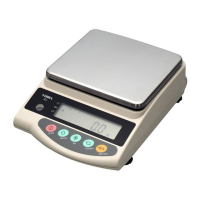
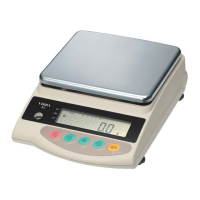
High-Precision Tuning Fork
Electronic Balance
SJ-E Series
Operation Manual
IMPORTANT
To ensure safe and proper use of the balance, please read
this manual carefully.
After reading this manual, store it in a safe place near the
balance, so you can review it as needed.

SHINKO DENSHI CO., LTD.

Questions and Answers

  • C
    Casey Anderson MDJul 31, 2025
    What to do if [?????] appears before capacity on Vibra SJ-E Scales?
    • K
      ksaundersJul 31, 2025
      If the [?????] appears on your Vibra Scales before reaching capacity, it could be because the gross weight exceeds the balance's capacity (container + sample weight). Verify that the total weight is within the specified limits. Alternatively, a section of the mechanism might be damaged. In this case, it is best to contact our Technical Service Division or your local dealer.
  • H
    hahnjasmineAug 5, 2025
    Why does the weight indication contain an error on my Vibra SJ-E?
    • J
      jensenphillipAug 5, 2025
      If the weight indication on your Vibra Scales contains an error, there are several potential causes: * A mistake during tare subtraction: Review the tare subtraction procedure to ensure it was performed correctly. * Incorrect leveling: Ensure the adjusters are not lifted and check the level of the scales. * Inconsistent values: If the indication values are inconsistent after extended use or after moving the balance, perform a span adjustment on the balance.
  • B
    bradshawbrianAug 10, 2025
    Why is the display unstable on my Vibra SJ-E Scales?
    • K
      Kelly JonesAug 11, 2025
      If the display on your Vibra Scales is unstable and [M] remains flashing, it could be due to a few reasons: * Air currents or vibration: Ensure the balance is not subject to air currents or vibration. * Unstable surface: Verify the balance is situated on a stable surface. * Contacting object: Check that nothing is contacting the sample, measuring pan, or tare.
  • C
    Christie FarrellAug 15, 2025
    What to do if Vibra SJ-E indication disappears during battery installation?
    • A
      Adam FloresAug 15, 2025
      If, during battery installation, the indication disappears, [ ] flashes, or no indication is produced on your Vibra Scales, the automatic power-off function may have been activated. Switch the power on again and deactivate the automatic power-off function if needed. Another possibility is that the battery capacity is low. In this case, recharge the battery.
  • A
    Amanda WillisAug 20, 2025
    Why doesn't the limit function work on my Vibra Scales?
    • M
      Maria BergAug 20, 2025
      If the limit function is not working on your Vibra Scales, it may be because the limit function is not selected. Check the operation of the limit function. Also, the limit value may have been entered incorrectly, so checking the operation of the limit function is also advised.
  • B
    Bryan SnyderAug 26, 2025
    Why is [?????] displayed during span adjustment on Vibra Scales?
    • J
      Jamie GilmoreAug 26, 2025
      If, during span adjustment, [?????] is displayed on your Vibra Scales, it could be due to several reasons: * Using a weight heavier than the capacity. * The reference weight being less than 50% of the capacity. * Calibration producing an error of 1.0% or more. Check that the span adjustment procedure was performed correctly.

Summary

Precautions on the Use

Names of Component Parts

Basic Operations

Installation

Covers positioning the pan, leveling the balance, and connecting the AC adapter.

Operation for Tare Subtraction

Explains the procedure for zeroing the balance with a container.

Functions

Setup and Checking of Functions

Guides the user through invoking, selecting, and changing balance functions.

Switching Function for Units of Measurement

Counting Pieces

Sampling

Explains the process of sampling for piece counting.

Increasing the Counting Accuracy (Memory Update Method)

Details the Memory Update Method to improve counting accuracy.

Measuring Percentage

Limit Function

Limit Function Setup

Provides steps for setting up the limit function.

Setup of Limit Values by Actual Quantity Loads

Guides setting limit values using actual samples.

Setting up Limit Values by Inputting Values

Guides setting limit values by manually entering numeric values.

Calibrating the Balance

Troubleshooting

Vibra SJ-E Series Specifications

General IconGeneral
BrandVibra
ModelSJ-E Series
CategoryScales
LanguageEnglish

Related product manuals