Note
Note
Note
Note
T
o keep the calibrator in a designed accuracy, it needs warming
up 5 minutes before it is put into operation.
I f any user requires a higher accuracy of the calibrator, he
should make contact with our manufacturer.
I f the automatic reference-junction temperature compensation
of the calibrator deviates from its designed accuracy, the user
is requested to make contact with our manufacturer.
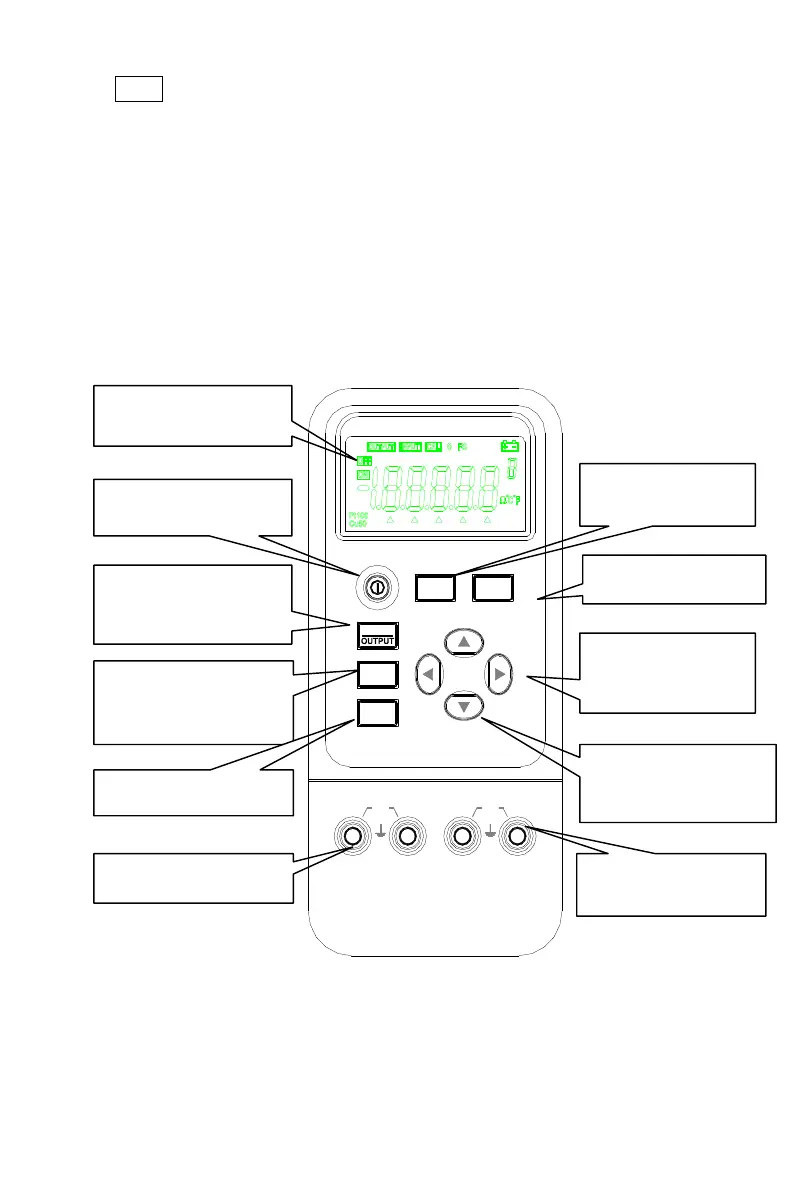
2.
2.
2.
2.
Instrument
Instrument
Instrument
Instrument
Panel
Panel
Panel
Panel
Layout
Layout
Layout
Layout
and
and
and
and
Function
Function
Function
Function
output value
s etting key
Input/Output
Input/Output
Input/Output
Input/Output
switching key
RANG
RANG
RANG
RANG
select
key
output
digit select key
OUTPUT
INPUT
Lo
°
°
°
°
C/
C/
C/
C/
°
°
°
°
F
F
F
F
Hi
30V
MAX
ZERO
ZERO
ZERO
ZERO
INPUT
INPUT
INPUT
INPUT
Lo Hi
30V
MAX
RANG
RANG
RANG
RANG
FUN
FUN
FUN
FUN
RTD CALIBRATOR


 To Next Page