STEP ONE: WHAT SHOULD I PREPARE BEFORE USING?
> Preparation before Using
1.
The SD card, the batteries and the external power supply are not included in the package, you
need to prepare these things beforehand.
2.
Tips and Recommendation:
(1) For optimal performance, we recommend using a full set of eight rechargeable batteries of
high-quality to maintain maximum battery life. The recommended brands of batteries are
Energizer® or Duracell® branded batteries.
(2) External power supply output: 6V/2A; DC-IN plug size: 3.5 mm*1.35 mm/1.3 mm.
(3) Our cameras can support class 6 or faster SD card ranging from 4GB to 128GB. The
recommended brands of SD cards are Sandisk® or Kingston® branded card. Please do not
use the SD card which is adopted by the TF(micro SD) card. This might cause the file lost issue.
> Install the Batteries
1.
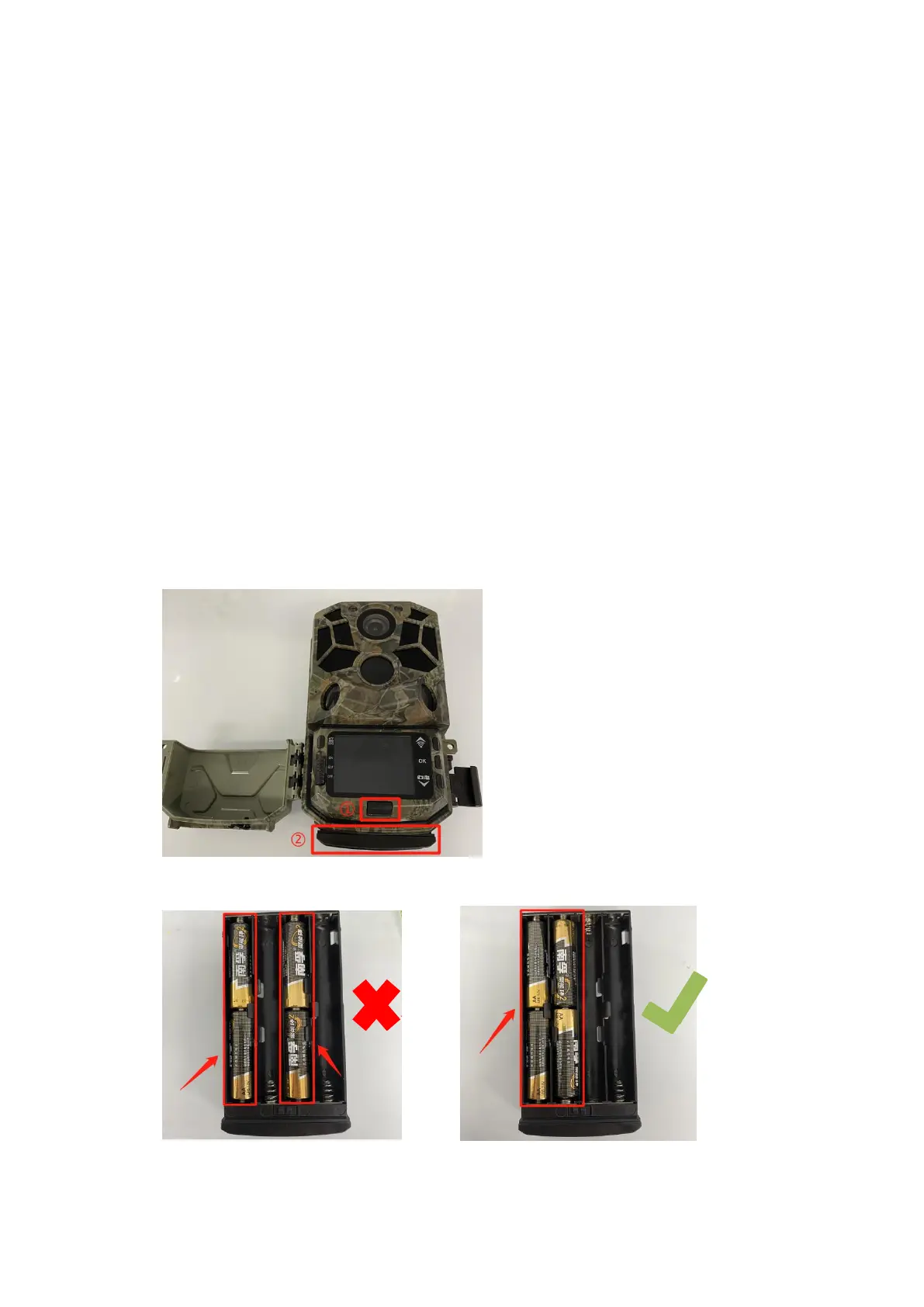
Press the button at the bottom of the display screen, the battery compartment will pop out, and
then pull it out firmly.
2.
When the camera uses only four batteries, please install the batteries in the correct position. As
shown below.


 To Next Page