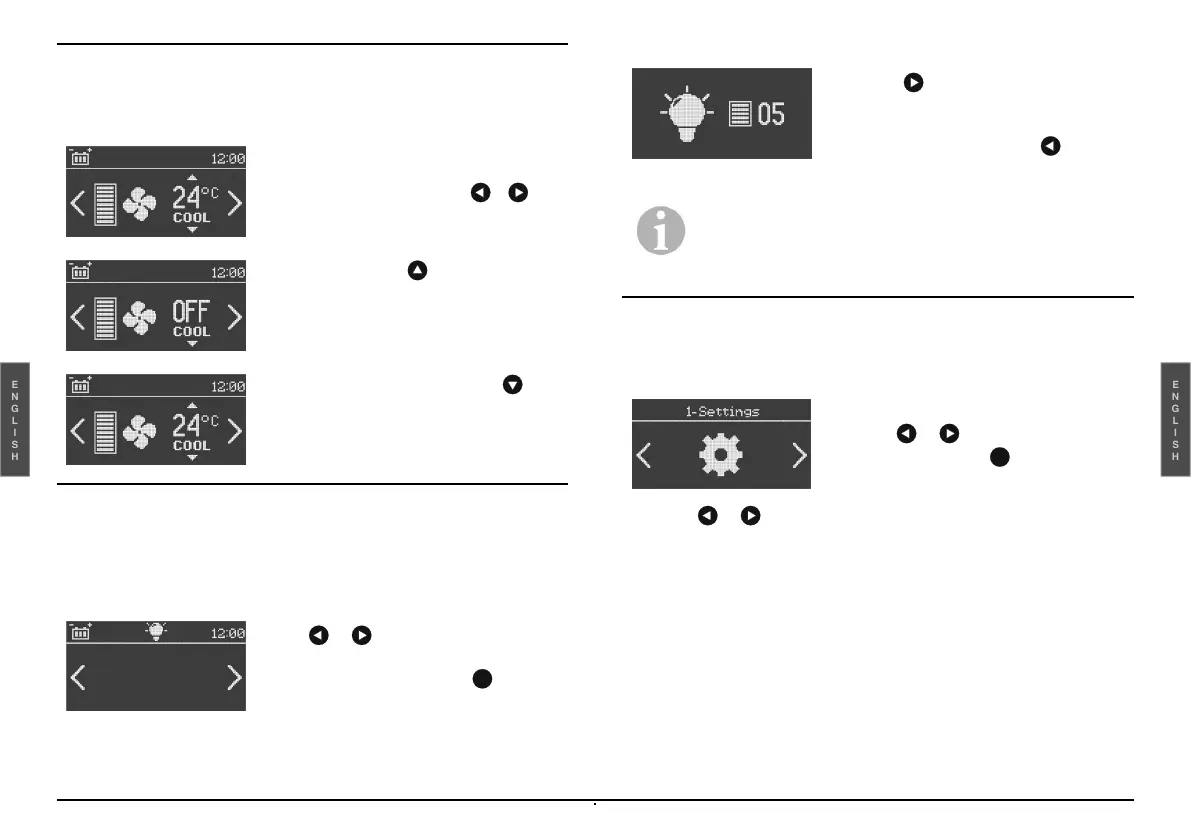
Fan Mode
It allows the unit to be used as a ventilator.
Courtesy light (optional)
It is possible at any time to activate the courtesy light from the main
screen (or on standby).
Settings
It allows you to change the settings of the various functions of the unit.
Select the or keys to access the various functions.
-
Setting the time
-
Setting the Date
-
Temperature measurement unit
-
Internal temperature
-
Key tone
-
Brightness
-
Contrast
-
System Information
-
Exit
-
To deactivate this mode, press .
-
Increase with the key up to the
maximum temperature (30°C), and
press again to activate the fan mode
(OFF COOL will be displayed).
-
With active cooling, select the
temperature indicator with o
temperature indicator.
-
To change the adjustment level, press
the or (1-5) key, to return to the
main screen and to confirm the
adjustments just press the key or
do not press any key for a few
seconds.
-
By pressing and holding 3 seconds
the key the courtesy light is
activated or deactivated.
-
To adjust the light intensity level press
and hold for 3 seconds the key
thus opening the appropriate menu.
Note: If the battery voltage is too low, the courtesy
light will automatically power off and it will be not
possible to power on it again until the battery charge
is restored.
-
Select or until you see
-
Settings and press to confirm


 To Next Page