19
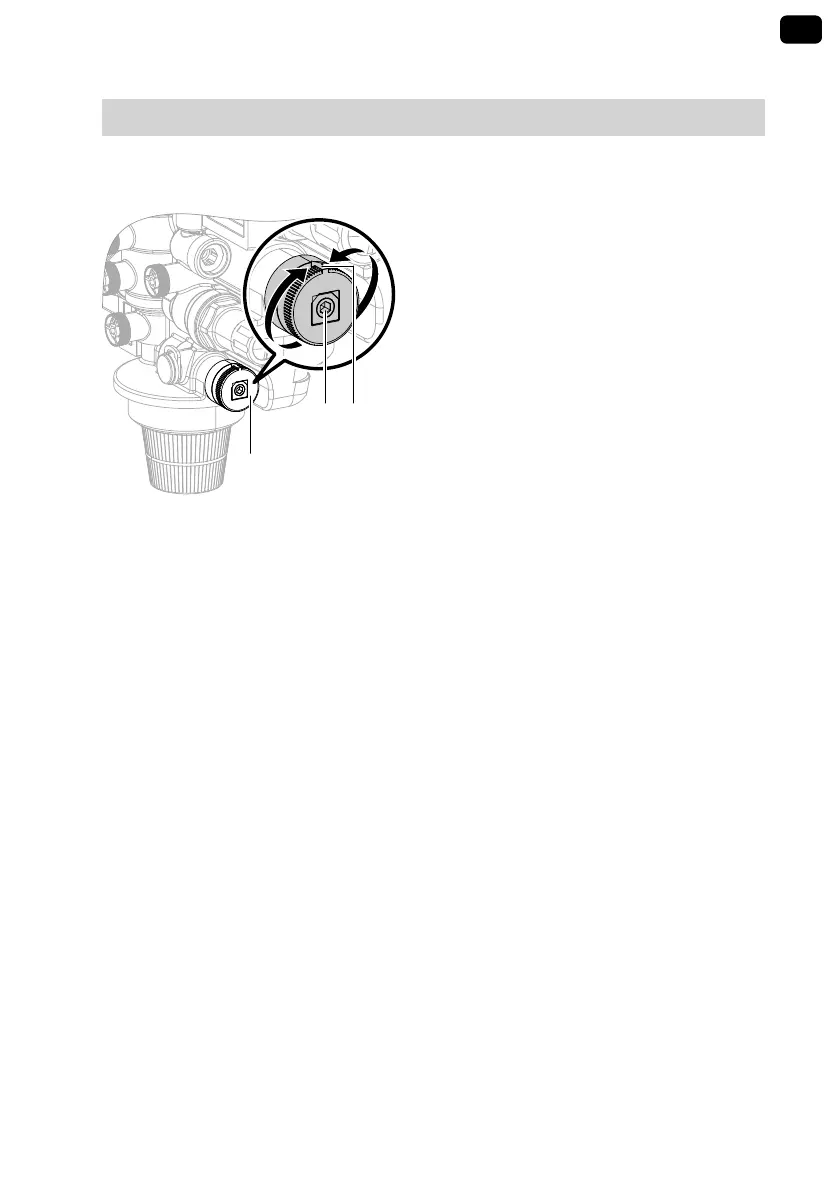
Adjusting the blending valve
For heating water softening:
■ Full softening is recommended for
normal operation: Blending valve
closed, setting to "Soft".
For heating water softening if blend-
ing is required:
■ Set the required blended water hard-
ness at blending valve
A
: For soft
water, turn towards "Soft", for harder
water turn towards "Hard".
■ The outlet water hardness can be
checked by drawing off water at the
drain valve.
■ The system can now be filled.
For heating water full desalination
■ Deactivate the blending valve by
turning spindle
B
clockwise with an
Allen key until it is all the way in.
When doing so, hold outer ring
C
(with indicator arrow) in place.
■ Note: When the blending valve is
closed, raw water will not be added.
■ The system can now be filled.
Displays
Flow rate
During filling, the flow rate is shown in
l/h.
If there is no throughput: Briefly press
OK. The volume recorded so far since
the cartridge was replaced is displayed
("F 100%")
Battery
"LOW bAT" display: Battery must be
replaced.
To replace the battery (CR-2032), undo
the cover. Ensure the correct polarity.
Cartridge
When the capacity of the cartridge is
almost depleted (residual capacity
between 10 and 1%), the message
"Cartridge nearly depleted" is shown.
When the cartridge is used up com-
pletely, the message "Cartridge deple-
ted" is displayed
The cartridge must be replaced.
GB
Operation
(cont.)
5593079



 To Next Page