22
Removing the system separator
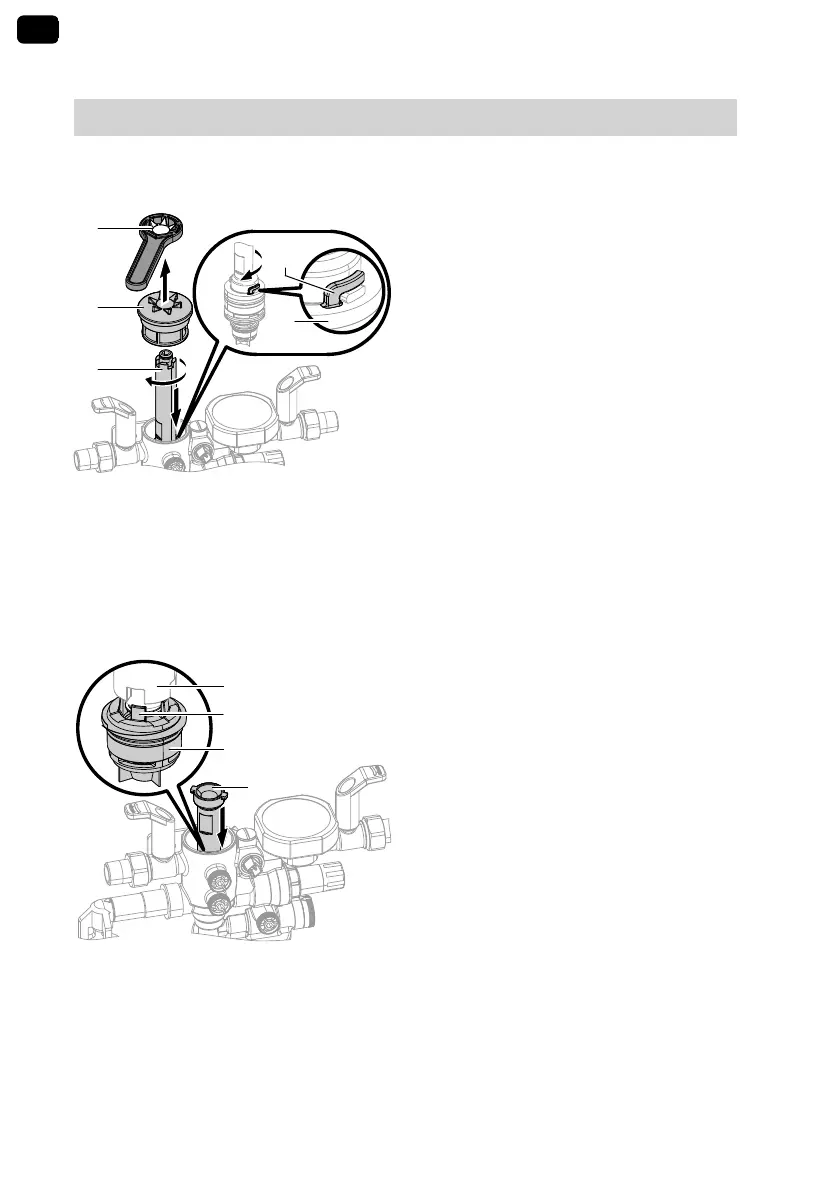
The system separator has to be
removed if there is a fault or if the sys-
tem separator cartridge needs to be
cleaned.
1. Close the shut-off valves on the inlet
and outlet sides and remove the
casing.
2.
Remove cap B with maintenance
key
A
.
3.
With replacement tool C, turn sys-
tem separator cartridge
D
clock-
wise and remove it.
When doing so, both pins of the tool
must grip tabs
E
on the cartridge.
4. Clean system separator cartridge
with clean water.
Dismantling RV 2
1.
Turn round replacement tool C and
from above, position it on non-return
valve 2 (RV 2)
F
. The tool must
engage with pin
G
of RV 2.
2. Unscrew RV 2 anti-clockwise.
3. Assemble in reverse order.
4. Re-open the shut-off valves on the
inlet and outlet sides.
GB
Maintenance
(cont.)
5593079



 To Next Page