U
U
n
n
i
i
c
c
o
o
s
s
D
D
i
i
g
g
i
i
t
t
a
a
l
l
R
R
e
e
f
f
r
r
a
a
c
c
t
t
o
o
r
r
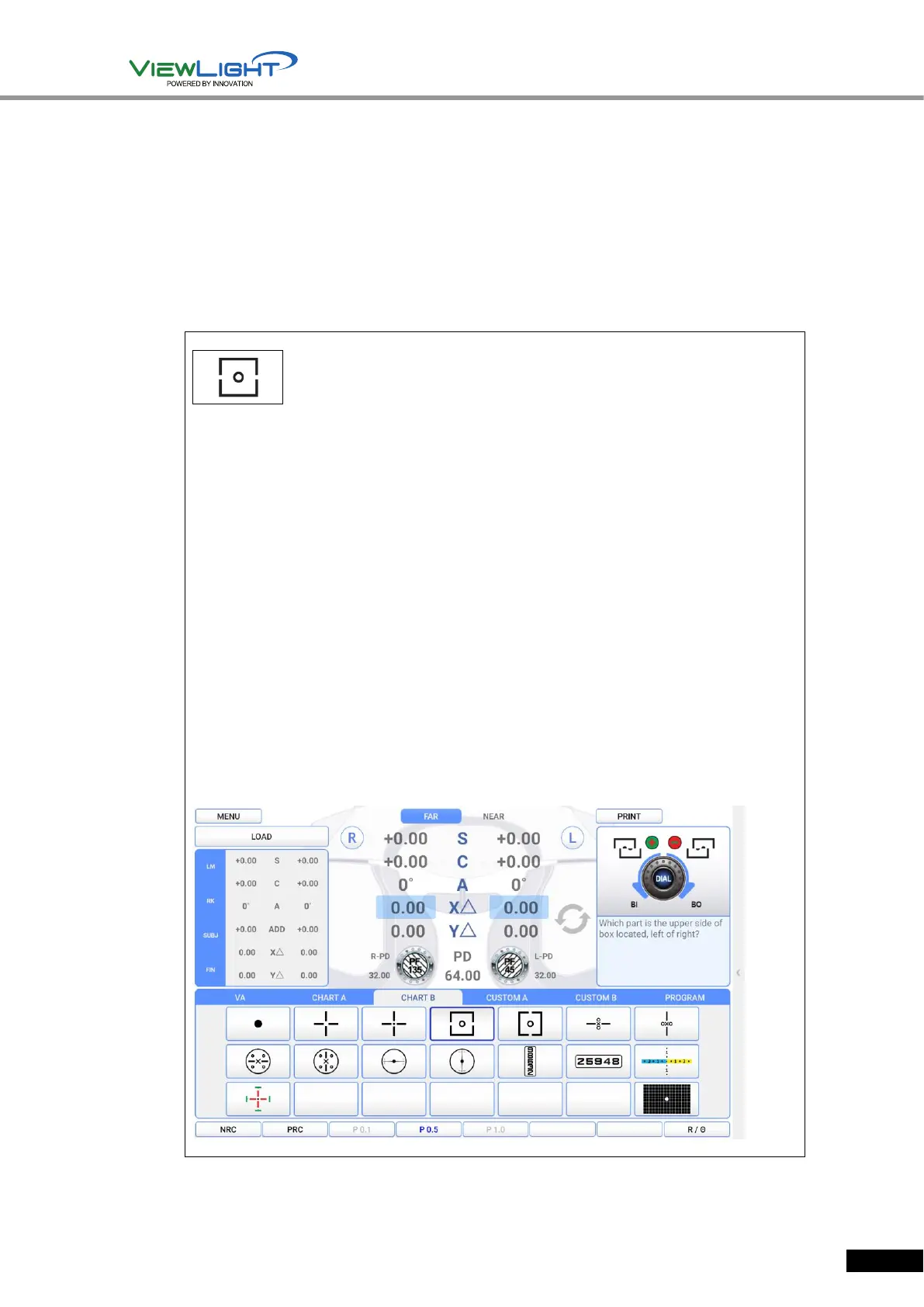
10.19 Horizontal Coincidence(Aniseikonia) Test
Purpose: Subjective test, process Aniseikonia and Horizontal Heterophoria by Coincidence
(Aniseikonia) Chart.
Chart: Horizontal Coincidence(Aniseikonia) Chart
Auxiliary Lens: Polarized Filter with 135 degrees for right eye, and 45 degrees for left eye.
Target: The upper half of the square seen with the right eye and the lower half of the square
seen with the left eye must be arranged as a regular square, with the standard of Fixation.
Way of Test
1. On Chart clause of main screen, press Aniseikonia Chart to enter the Heterophoria
Mode.
2. Ask the patient whether he sees the squared chart, and if yes, if that chart is tilted
towards left side and right side, or is arranged straight.
▶ In case the Square Chart is tilted towards left side: Turn the “Exophoria” dial
counterclockwise to increase the value of BI prism, until the Square Chart is arranged
straight.
▶
In case the Square Chart is tilted towards right side: Turn the “Esophoria” dial
clockwise to increase the value of BO prism, until the Square Chart is arranged straight.
3. As a final checkout, ask the patient whether he sees the dot in the middle and the
Square Chart, and if the sizes of the upper and lower square are same or different.
▶ If the sizes of the upper and lower square are the same, press [OK].
▶ It the sizes of the upper and lower square are different, press [NG].
4. When the test is over, press [OK] button of touch screen to save the result, or [X]
button to delete the result.
[Figure 10-19] Horizontal Coincidence(Aniseikonia) Test


 To Next Page