35
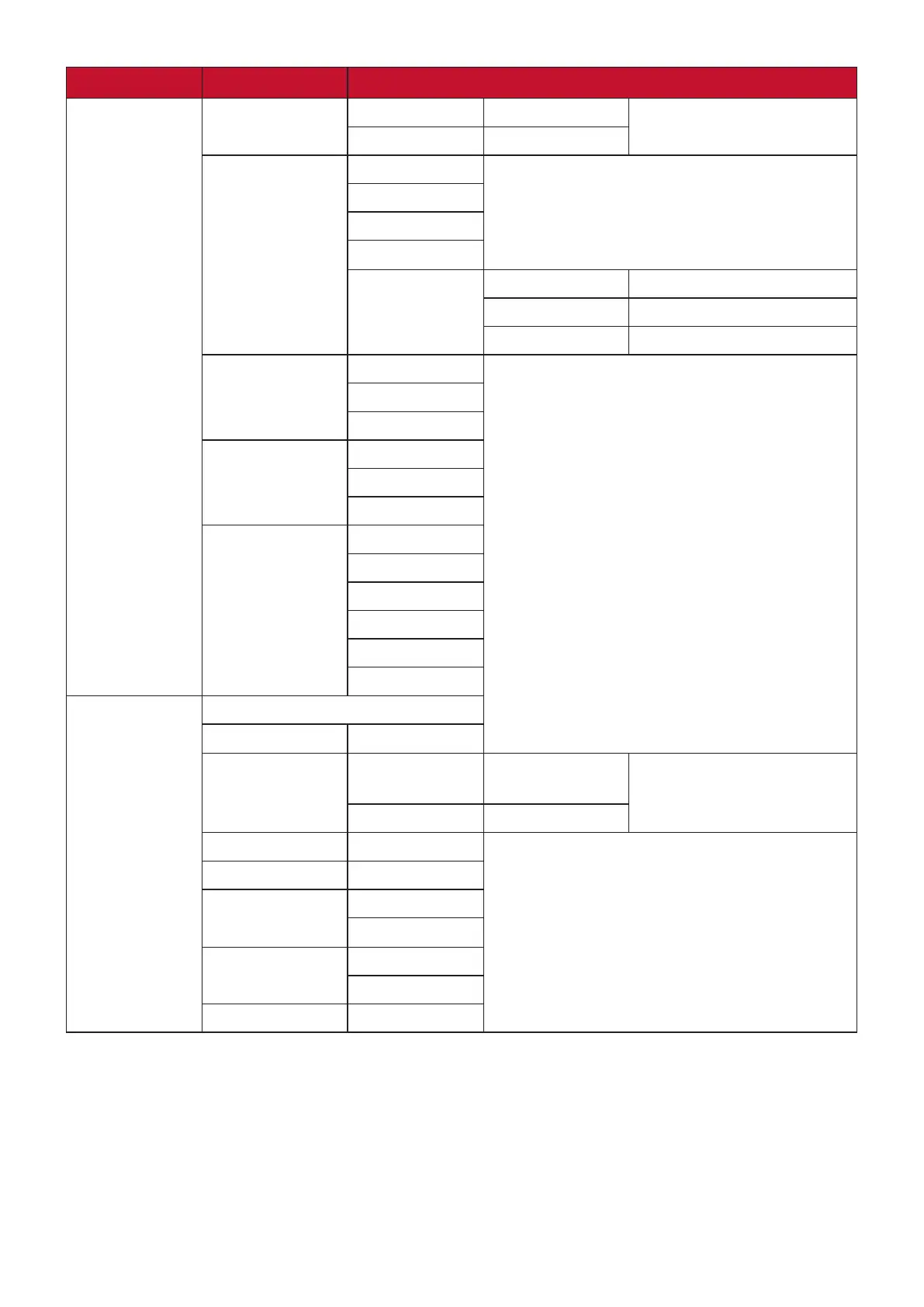
Main Menu Sub-menu Menu Opon
Color Adjust
Contrast/
Brightness
Contrast (-/+, 0~100)
Brightness (-/+, 0~100)
Color
Temperature
Bluish
Cool
Nave
Warm
User Color Red (-/+, 0~100)
Green (-/+, 0~100)
Blue (-/+, 0~100)
Color Space Auto
RGB
YUV
Color Range Auto
Full Range
Limited Range
Gamma 1.8
2.0
2.2
2.4
2.6
2.8
Manual Image
Adjust
Auto Image Adjust
Horizontal Size (-/+, 0~100)
H./V. Posion Horizontal
Posion
(-/+, 0~100)
Vercal Posion (-/+, 0~100)
Fine Tune (-/+, 0~100)
Sharpness (-/+, 0~100)
Aspect Rao 4:3
Full Screen
Overscan On
O
Blue Light Filter (-/+, 0~100)




 To Next Page