B. REMOTE CONTROLLER (Option)
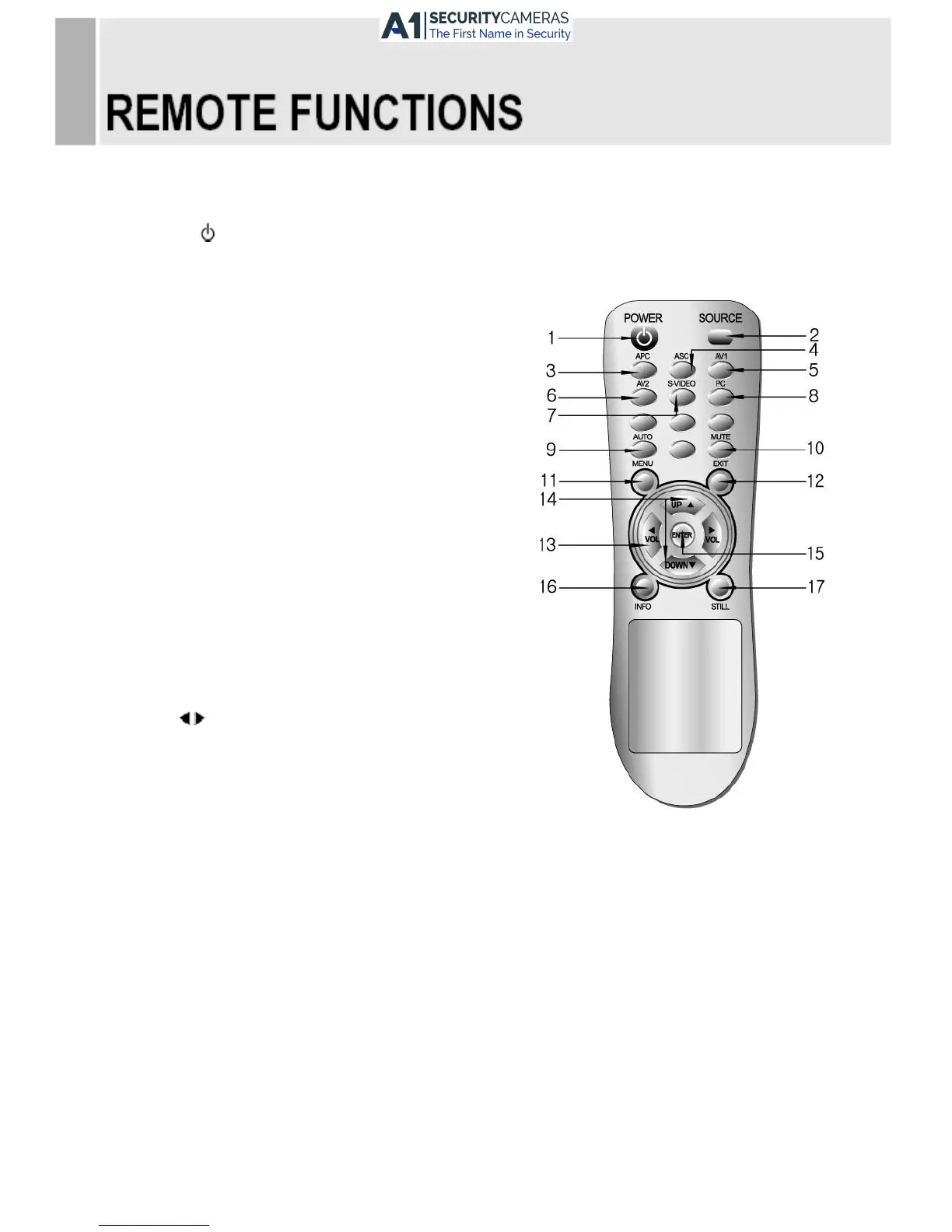
1. POWER( )
Turns the power ON or OFF. There will be a few seconds delay before the display appears.
2. SOURCE
Select pc or video( AV1 / AV2 / PC ) sources.
3. APC (Auto Picture Control)
Select picture mode.
4. ACC (Auto Colour Control)
Select Colour mode.
5. AV1
Select AV1 mode.
6. AV2
Select AV2 mode.
7. S-VIDEO
Not operating.
8. PC
Select PC mode
9. AUTO
Auto geometry adjustment in PC Source.
10. MUTE
Mute the sound.
11. MENU
Activates and exits the On Screen Display.
12. EXIT
Exit the On Screen Display.
13. VOL( )
Increases or decreases the level of audio volume.
14. UP/DOWN
Move to OSD menu.
15. ENTER
Accepts your selection or displays the current mode.
16. INFO
Not operating.
17. STILL
Not operating.
INSTRUCTION MANUAL ……………………………………………………………………. 7



 To Next Page