15
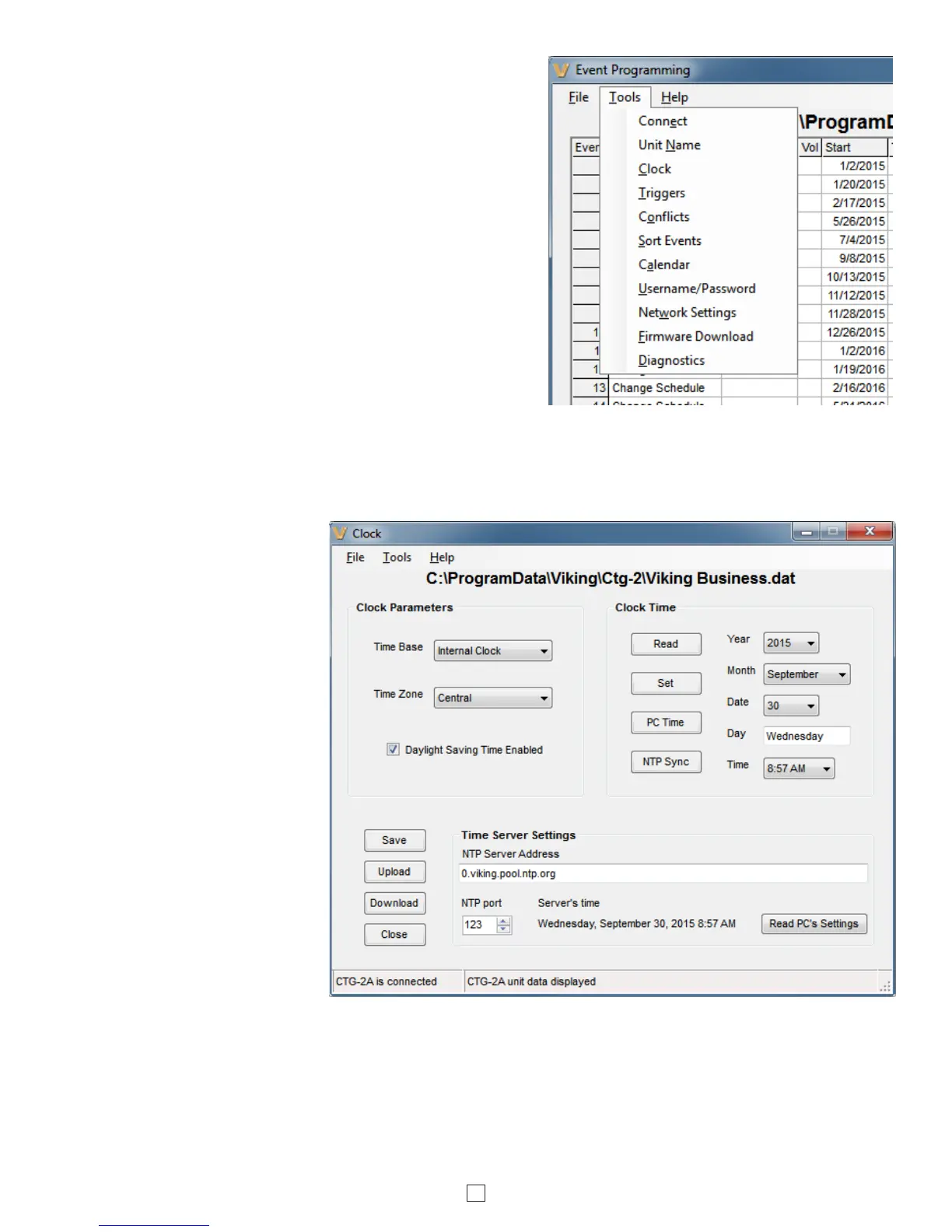
Sort Events: When you are finished programming all your events
in your dat file, you can select this feature to automatically sort all
of the events in chronological order starting with all your change
schedules events for schedule 1. In the “Event Programming”
screen select the “Tools” pull down menu and click “Sort Events”.
(right) Note: The “Sort Events” feature is irreversible.
Username/Password: Located in the “Event Programming”
screen’s “Tools” pull down menu. This feature allows you to
change the username and password used to login to the CTG-
2A. The username and password can be up to 32 characters
each (fewer if non-ASCII). These fields are Unicode, thus any and
all characters in any language are allowed. However usernames
containing non-English or special characters must be shorter. The
default username is “admin”. The default password is “viking”.
Network Settings: Located in the “Event Programming” screen’s
“Tools” pull down menu. This sets the network settings for the
CTG-2A. Do not change these settings unless instructed to by
your network administer.
Diagnostics: This section is password protected. Only access this area if directed to do so by Viking Technical Support
personnel (this allows you to view firmware memory, factory clock calibration, etc.)
Clock: Clicking the “Clock”
button will open the “Clock”
programming screen where you
can enter/program Clock
Parameters such as Time base
(Internal, 50 Hz or 60Hz), Time
Zone and Daylight Savings Time,
program Clock Time (Manual,
PC time or NTP Sync) and
program Time Server Settings.
Note: It is recommended that
you use the “Internal” time base
which has an accuracy of 2 ppm
(+/- 63 seconds per year).
Additional accuracy can be
achieved by programming
periodic “Time Sync” events in
the Event Programming screen.
“AC Line 50 or 60 Hz” time base
should only be used in legacy
applications where the AC
powered building clocks are
synchronized to the AC line
power frequency. Note: After
changing the Time Base AC line
frequency setting, momentarily
power down the unit.
Time Base: In the “Clock”
screen, click this pull down menu to select the CTG-2A’s time base. With “Internal Clock” selected the CTG-2A will
base its time off its internal crystal controlled (quartz) real time clock with an accuracy of approximately 2 ppm which is
+/- 63 seconds per year without NTP clock sync. Note: This accuracy can be greatly increased with periodic NTP
Synchronization or periodic manual clock corrections. With AC Line 50 or 60 Hz selected the CTG-2A will base its time
off the AC voltage powering the unit. The clock accuracy will then follow the power company fluctuations. This can be
useful for matching the CTG-2A time to existing AC powered clocks.



 To Next Page
 Loading...
