16
© 2012 Viking Preferred Service
Entering Service Test Mode
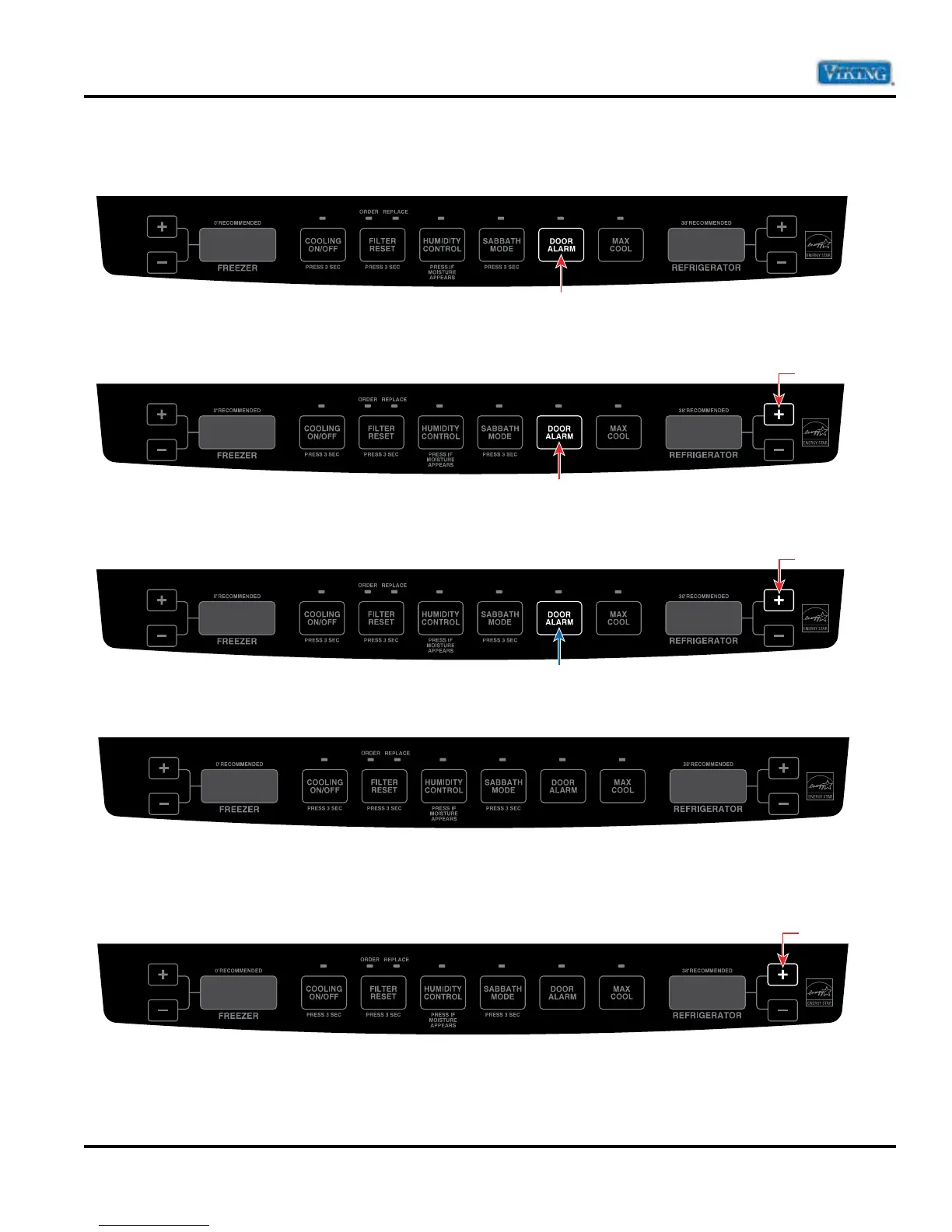
1. Press and hold the “DOOR ALARM” keypad.
2. Within three seconds, press and hold refrigerator temperature “+” (up) keypad. Both keypads are now being
held in.
3. While still holding the refrigerator temperature “+” (up), release the “DOOR ALARM” keypad and wait three
seconds.
4. When entered successfully, the freezer temperature screen will display SE.
5. Entry is confirmed by pressing the refrigerator temperature “+” (up) keypad. Freezer temperature screen
will display 101. Refrigerator screen will display OFF.
7. To exit Service Test Mode, open and close refrigerator door(s) or hold door alarm for 3 seconds.
Diagnostics
Press and Hold
Hold
Press and Hold
Release
Press and Hold
SE
101 OFF
Press






 To Next Page