10
Program Mode
Max Frz Run Time Duration
1. Press Max Frz pad. Max Frz light will
glow. One temperature indicator should
glow indicating present Max Frz run time
duration in 4 hour increments (indicator
1 means 4 hours, 2 means 8 hours, etc.)
Default delay is 24 hours.
2. Press Warmer pad to decrease Max Frz
duration by 4 hours.
3. Press Colder pad to increase Max Frz
duration by 4 hours.
Temperature Offset Calibration
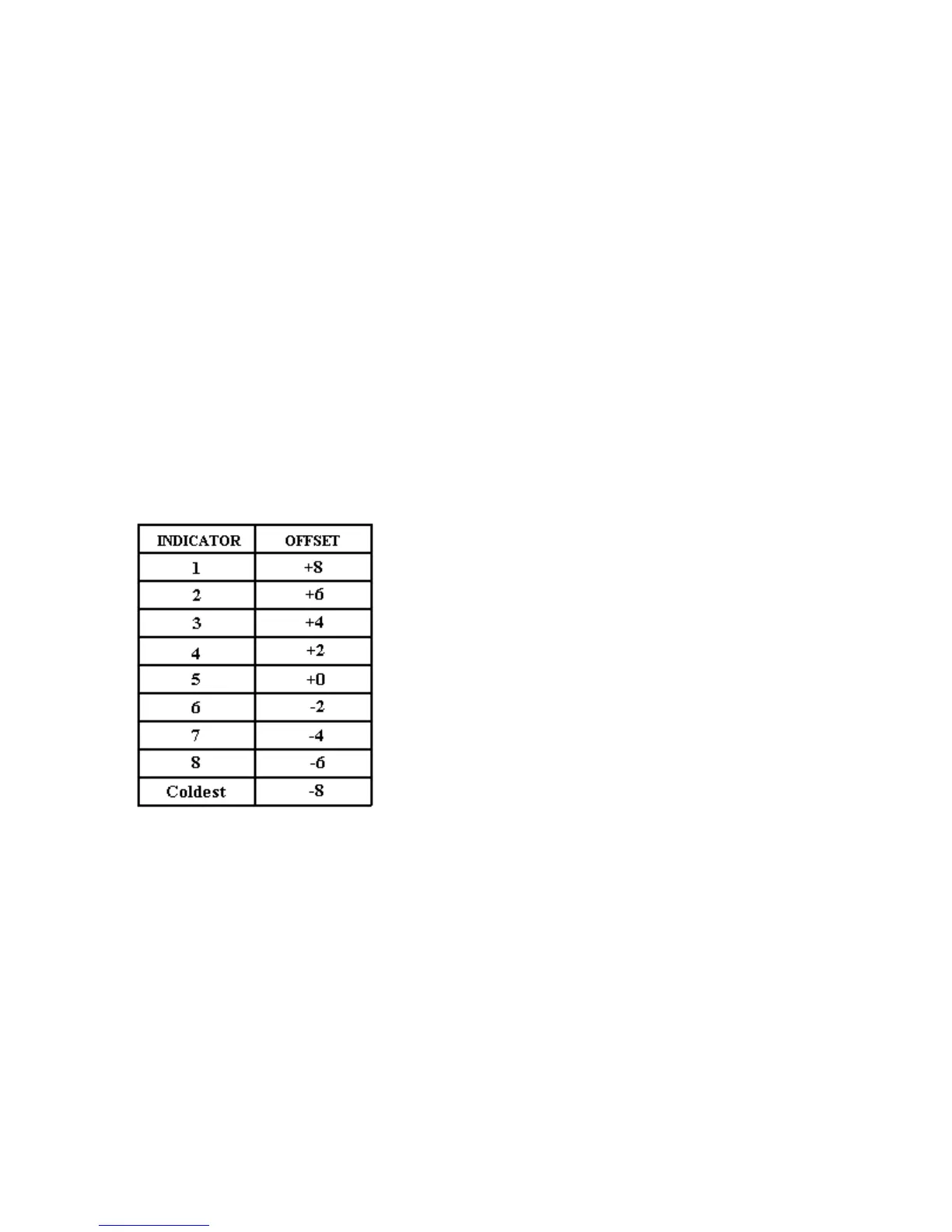
Offset amount adjusts temperatures for
refrigerator cut-ins and cut-outs by the amount
of offset. The chart below shows the indicator
and the amount of offset from the factory default
setting.
• Setting refrigerator Temperature Offset.
Press Ref Temp pad. Refrigerator
indicator and one indicator will glow.
Press Warmer pad to move offset to the
next warmer setting. Press Colder pad
to move to the next colder setting.
Factory default refrigerator offset is +2.
• Setting Freezer Temperature Offset
Press Freezer pad. Freezer temperature
indicator and one indicator will glow.
Press Warmer pad to move offset to the
next warmer setting. Press Colder pad
to move offset to the next colder setting.
Factory default freezer offset is 0.
Defrost Mode Selection
Toggle (*) pad to select adaptive or conventional
defrost mode. Vacation indicator glows when
adaptive defrost has been selected. If vacation
indicator is off, conventional defrost is selected.
Conventional defrost uses 8 hour CRDT value.
Forced Defrost
Defrost can be forced to start by pressing and
holding the Alarm Off pad for 3 seconds.
Program changes will be saved permanently in
EEPROM and program mode will exit to Run
Mode.
Forced Pull down (Compressor Start)
Compressor start can be forced by pressing and
holding Max Frz for 3 seconds. Program
changes will be saved permanently in
EEPROM. Compressor, evaporator fan, damper
heater, and condenser fan will come on.
Exiting Program Mode
Press Display On pad for 3 seconds to exit
Program Mode. Tone will sound three times.
Changes made in Program Mode will be
permanently saved in EEPROM.
Note: If no pad is pressed for 10 minutes,
Program Mode will be automatically exited.
However, no changes will be saved if Program
exits automatically.



 To Next Page