APPENDEX:
INSTRUCTIONS FOR FIELD INSTALLATION SOLID STATE AC CONTROLS ON VUAR140 / VRBD /
VUBD / VUAR150 / VUWC150 ONLY
TOOLS NEEDED: 5/16” NUT DRIVER AND PHILLIPS SCREW DRIVER
.
1. Before working on the unit unplug it first.
2. Using the Phillips screwdriver, remove
the screws from the grille on the front
of the unit.
3. Carefully pull the wires off of the old
thermostat.
F90571
15
4. Unscrew the thermostat from the
bracket.
5. Loosen the screw holding the
thermobulb clamp on.
6. Gently remove the thermobulb away
from clamp.
7. Go to rear of unit and gently pull the
capillary tube from the thermostat out
of the unit.
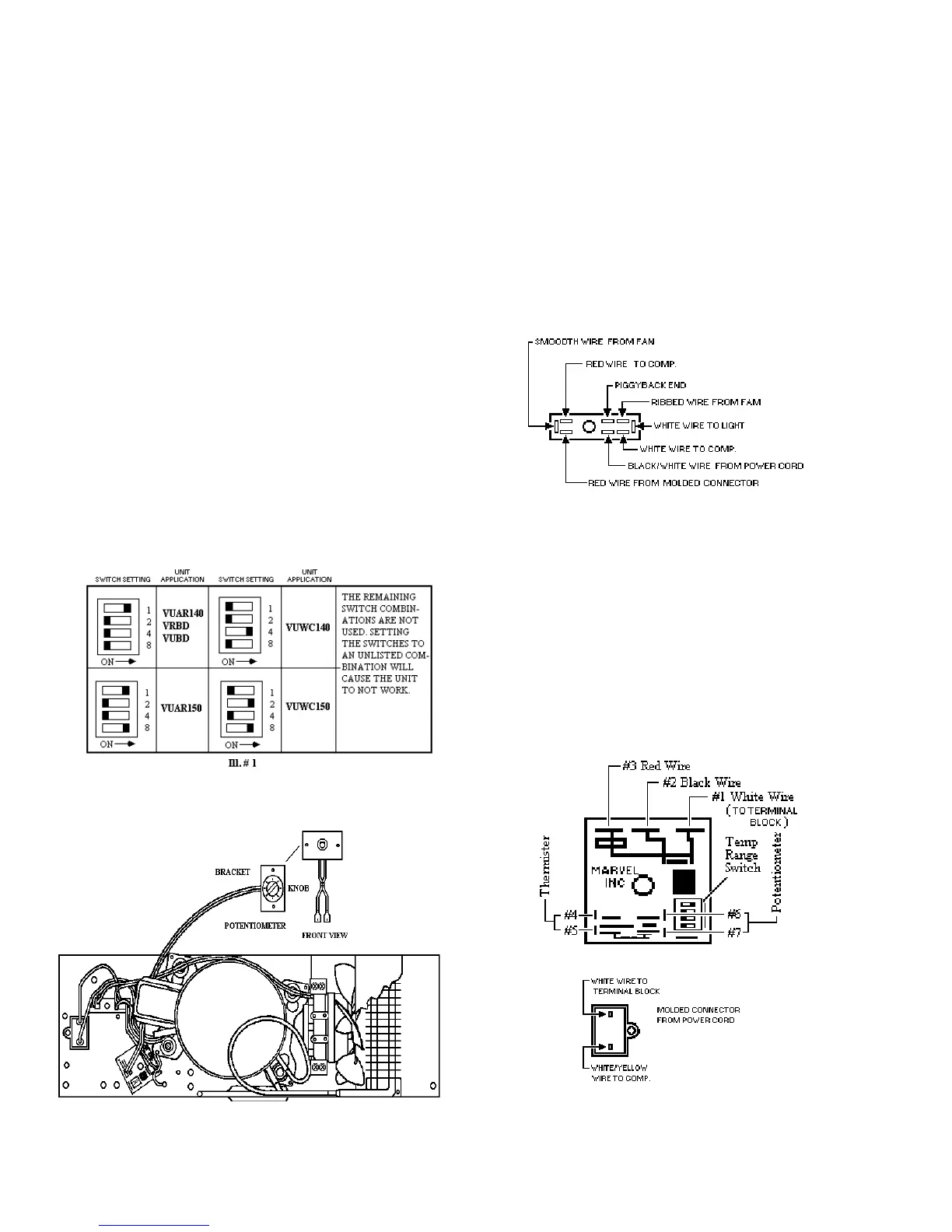
8. Set dip switches for the correct unit.(Ill
# 1)
9. Mount control on base plate in location
shown in the supplied drawing.
10. Plug in molded connector from the
power cord to control (match up
according to the color of the wires).
11. Install neutral wire to control.
12. Install Potentiometer according to
supplied drawing.
13. Route wire back and plug into control.
14. Feed thermistor from the back and
install on evaporator plate
15. Route remaining thermistor wire along
insulated tube and cable tie securely.
16. Plug thermistor into control.
17. Put unit back together.
TERMINAL BLOCK



 To Previous Page