苏州万佳电器有限公司
Suzhou wanjia Electric Co.,Ltd.
General Settings
To access Setting interface, hold both the MODE button and the DOWN button
simultaneously for 1s.
All the settings are implemented on a parked bike of no speed.
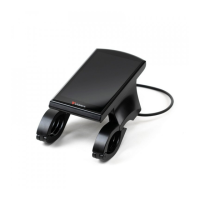
1.Backlight Settings
The settable range is from Level 1 to Level 5. Level 1 is the darkest, Level 5 is the brightest.
The default value is decided by the controller when the display leaves factory. Press the
UP/DOWN button to change the brightness levels. Press the MODE button to confirm and
exit the settings.
Backlight Brightness Settings Interface
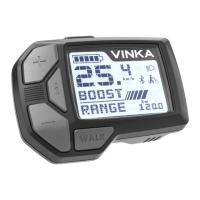
2. Unit settings
U represents unit settings, “1” is mile and “0” is kilometer. The default value is “0”.
Enter the UNIT Type, press the UP or DOWN button to choose the desired setting item,
and then press the MODE button to confirm and store the changed settings.
Mile toggling Settings Inter


 To Next Page