15
Contents
Previous
Page
First
Page
Next
Page
Previous
View
Mounting the camera (optional Quickfit adaptor)
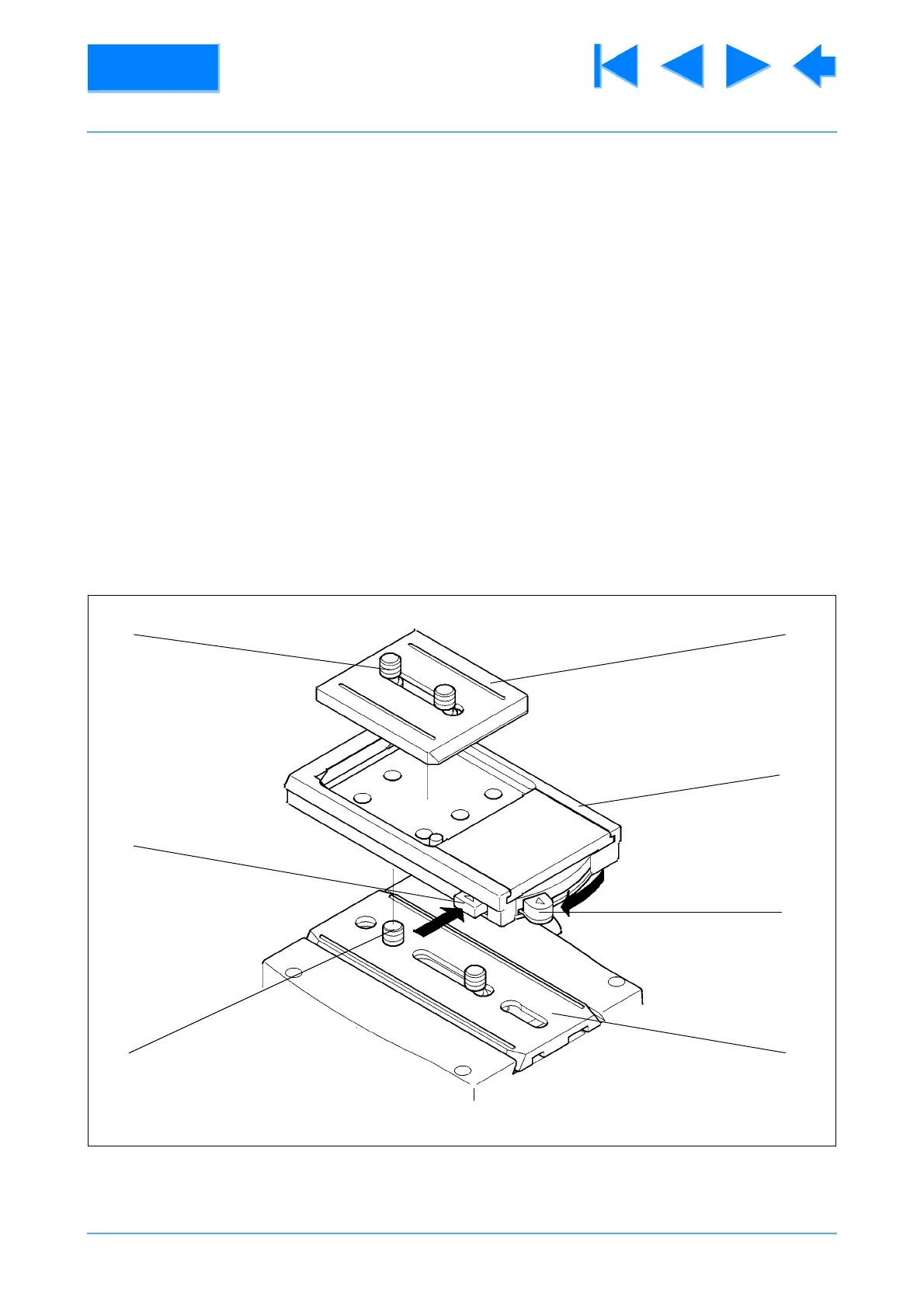
8 To mount the camera using the optional Quickfit adaptor, proceed as follows (Fig 2.1):
8.1 If not already attached, secure the Quickfit adaptor (15) to the slide plate (6) with the two screws
provided (5).
8.2 Free the Quickfit wedge (14) from the adaptor by simultaneously pushing in on the safety catch
(17) and operating the wedge release (16).
8.3 Fit the Quickfit wedge to the camera with the two screws (18) provided.
8.4 Insert the forward end of the wedge into the forward end of the adaptor, pushing against the
spring tension of the lock. Lower the rear of the wedge into the adaptor until an audible click indicates
that the wedge is engaged with the adaptor.
Fig 2.1 Optional Quickfit Adapter
(14)
(15)
(16)
(6)(5)
(17)
(18)










 To Next Page