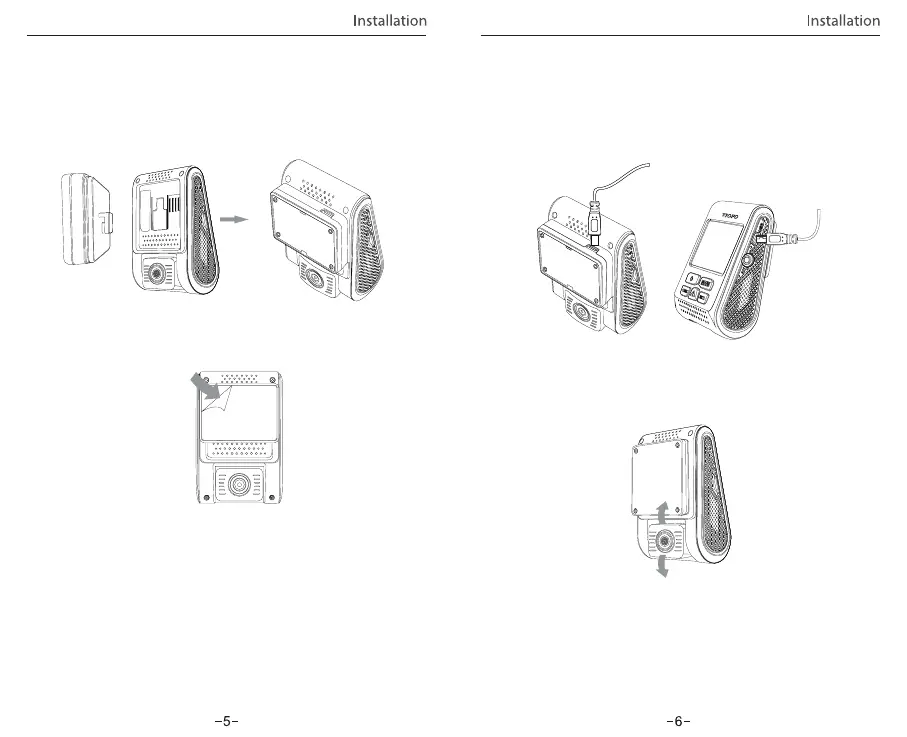
① Slide the mount into the slot on the back of the camera.
1) Install the Mount
Installation Method
• Do not turn on ‘Motion Detection’ unless your vehicle is parked.
If ‘Motion Detection’ is enabled while driving, the camera may
not record continuously.
• It is recommended to keep the G-sensor set to ‘Low’ (default
setting).
Adjust the angle by moving the lens up / down.
② Peel the glue protector off the sticker.
③ Choose a suitable location to install / mount the camera;
ensuring that it provides the best possible view.
Plug the USB charging adapter into your vehicle’s 12V/24V
female power socket. Insert the Mini USB cable’s male port
into the camera’s female Mini USB port.
① For GPS version mount, use the female Mini USB port on the
mount or on the camera’s side.
② For non-GPS version mounts, use the female Mini USB port
on the camera’s side.
3) Adjust the View Angle
2) Connect to Car Charger
Note:
Tips:



 To Next Page