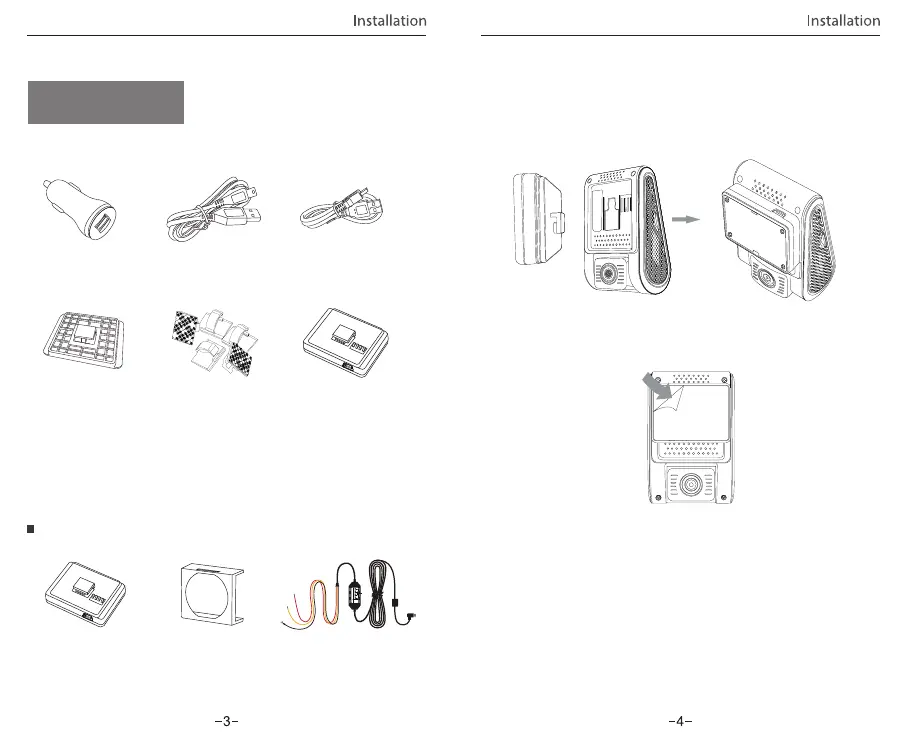
USB Data Cable
4m Car Charger
USB Cable
TM
TM
Non-GPS Mount
Clips
Note:
The long mini USB cable is for charging, the short USB cable is for
transferring files while connecting the camera with computer.
Car Charger
Adapter
GPS Mount (optional)
Optional Accessory
Circular Polarizer Filter Hardwire KitGPS module
① Slide the mount into the slot on the back of the camera.
1) Install the Mount
Accessories
Installation Method
② Peel the glue protector off the sticker.
③ Choose a suitable location to install / mount the camera;
ensuring that it provides the best possible view.
Plug the USB charging adapter into your vehicle’s 12V/24V
female power socket. Insert the Mini USB cable’s male port
into the camera’s female Mini USB port.
2) Connect to Car Charger
VIOFO Hardwire Kit for Car Dash Camera
INPUT:
RED
— POWER
BLACK
— GND
YELLOW
— ACC
Input: 12 / 24V; Output: 5V2A Max
Installation



 To Next Page