The CPL (Circular Polarizing Lens) can be used to reduce reflections and
glare from the window glass and road surfaces that can otherwise damage
image quality, this works in the same way as polarized sunglasses, getting
more saturated and beautiful video.
When installing the CPL, you need to align the
white mark on the CPL with the corresponding
mark on the camera.
The remote control has an adhesive mount on the back, choose a
suitable location on your dashboard to stick it to. Power on the camera
and then press the video lock button on the remote control for 3 seconds
to pair it with the camera, the LED indicator on the remote will turn blue if
successfully paired.
Install CPL
Install Bluetooth Remote Control
19 20
Install Optional Accessories
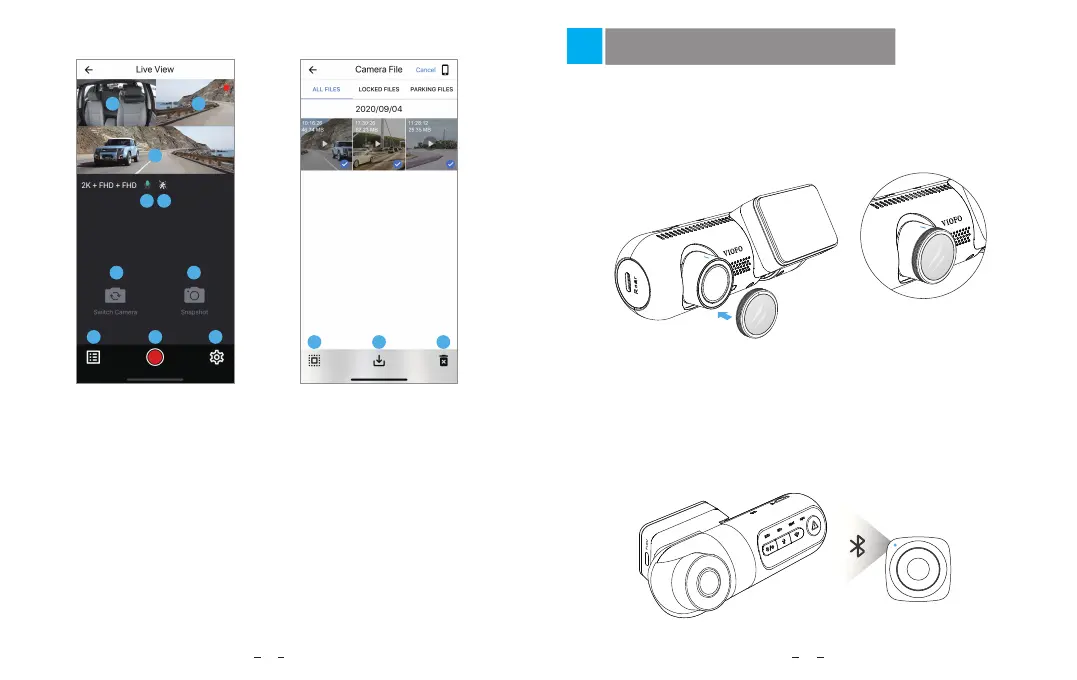
1 - Interior Camera Live Video
2 - Rear Camera Live Video
3 - Front Camera Live Video
4 - Audio Recording Status
5 - Motion detection Status
6 - Switch Camera Video Source
7 - Take a Video Snapshot
8 - Go to Video File Lists
9 - Start / Stop Recording
10 - Go to System Settings
11 - Video File Lists
12 - Download Video Files
13 - Delete Video Files
Preview Video
1 2
3
4
6
8 9 10
7
5
11 12 13



 To Next Page