10
Connection
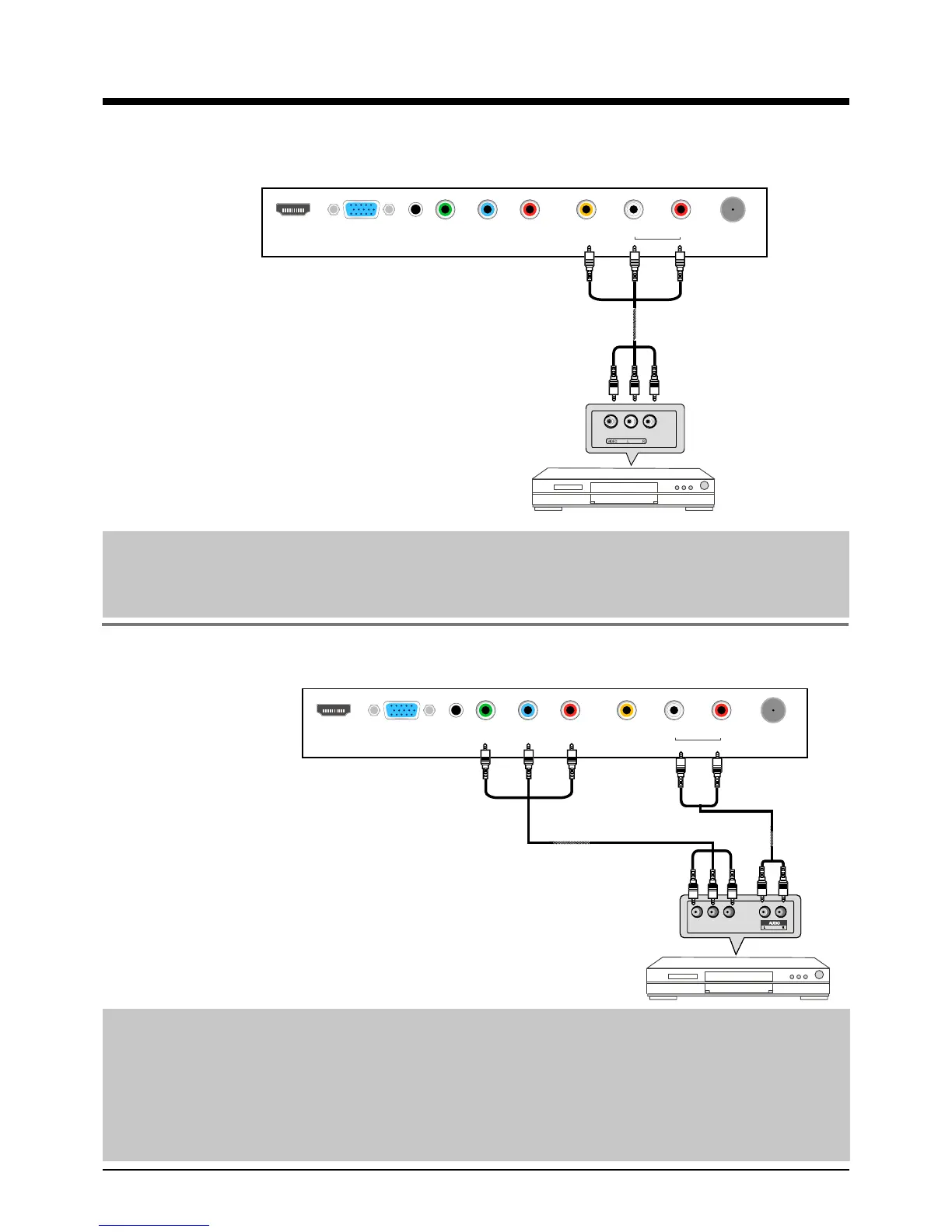
AV Input Connection
Note: All cables shown are not included with the TV.
- Connect the VIDEO and AUDIO output jacks on the DVD or VCR to the AV IN jacks on the TV
set with a RCA cable.
- Match the jacks colors: Video=yellow, Audio left=White, Audio right=red.
- Turn on the DVD/VCR, and select “AV” in the input source menu.
YPbPr Connection
Note: All cables shown are not included with the TV.
- Connect the YPbPr output jacks on the DVD or VCR to the YPbPr input jacks on the TV set
with a YPbPr cable. The picture quality is improved compared to a regular VCR to the video
input.
- Match the jacks colors: Y=Green, Pb=Blue, Pr=red.
- Connect the audio output jacks on the DVD or VCR to the audio input jacks on the set with an
audio cable.
- Turn on the DVD/VCR, and select “YPbPr” in the input source menu.
HDMI VGA PC Y Pb Pr VIDEO L R RF
audio in Audio in
RCA Video Cable RCA Audio Cable
DVD or VCR
HDMI VGA PC Y Pb Pr VIDEO L R RF
audio in Audio in
DVD or VCR
YPbPr Cable
Audio Cable
Y Pb Pr


 To Next Page