7
Section 4: Stand Installation
Keep the foam underneath the monitor before attaching the stand.
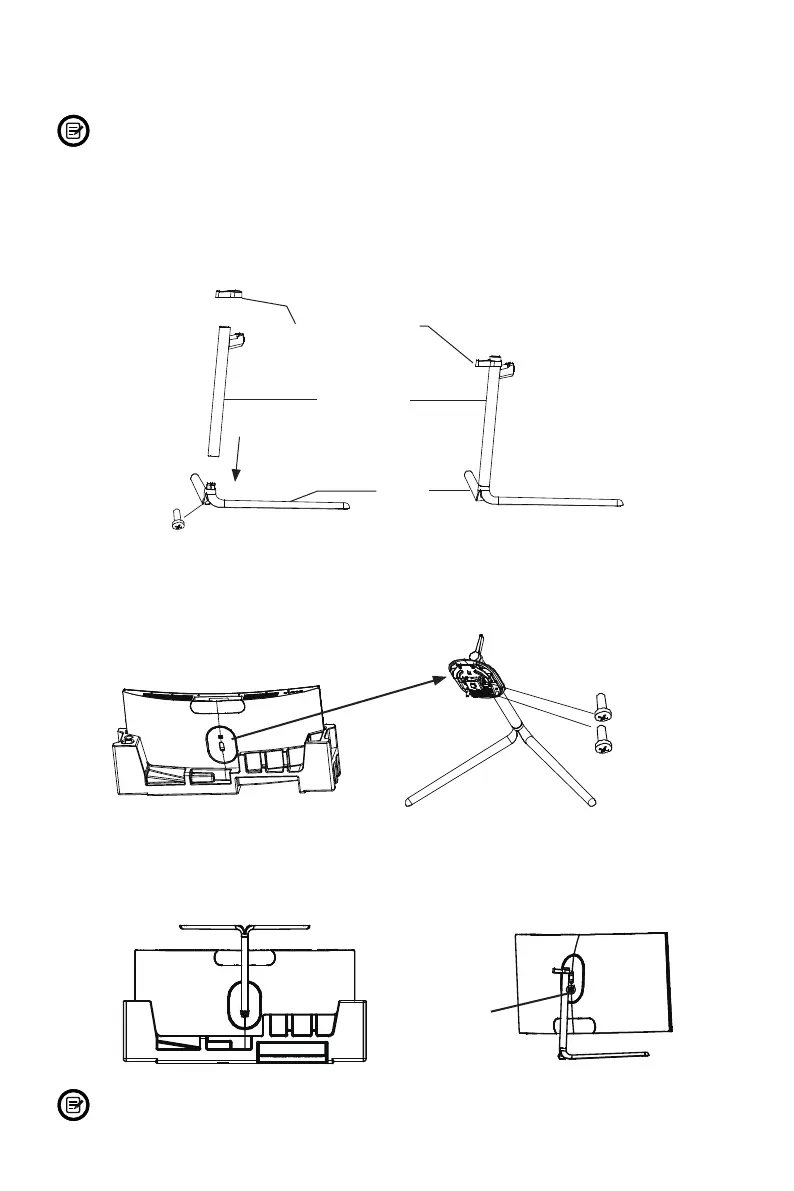
1. Open the package and take out the monitor with foam still attached. Gently place
it top-down on a desktop or table.
2. Take out the stem, headphone clip and base. Use the included screwdriver and
one screw to fasten base to the stem.
Screw x 1
Stand Stem
Headphone Clip
Base
3. Remove the foam covering the bottom of the monitor, then remove the adapter
from the back of monitor. Use two NO. 1 screws to fasten adapter onto the stem.
Adapter
Screws x 2
4. With the stand fully assembled, reattach it onto the back of monitor. Then remove
the remaining foam on monitor and stand it up on a at, level desktop or table.
Press the button to remove the monitor from the bracket if mounting.
Button
Make sure the monitor is laid on a at surface before removing the stand.


 To Next Page