14
10.2 – PIP (Picture in Picture) Input Information
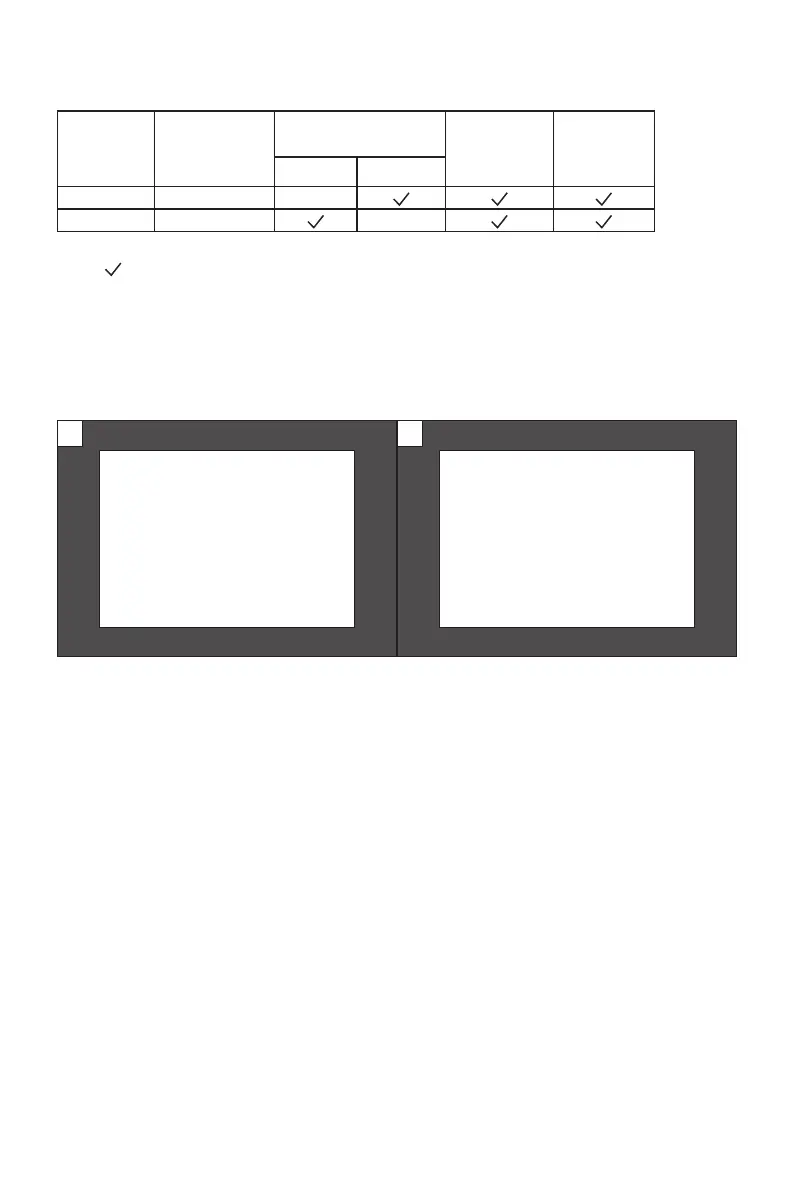
Mode Primary Screen
Source
Picture in Picture
Additional Source
Swap
Windows
Picture
Mode
DP HDMI
Mode 1 DP X
Mode 2 HDMI X
Note: ” ” means this feature is supported while “X” means it is not supported.
10.3 – PBP (Picture by Picture) Resolution Information
While using this feature and in order to obtain an optimal viewing experience, it is
recommended to set both panels to the same resolution.
It is recommended to set the
rst panel to 1720 x 1440 @
144Hz resolution.
1
It is recommended to set the
second panel to 1720 x 1440
@ 144Hz resolution.
2
At this resolution, tearing and visual deformation should be minimized.


 To Next Page