7
1 2 3 4
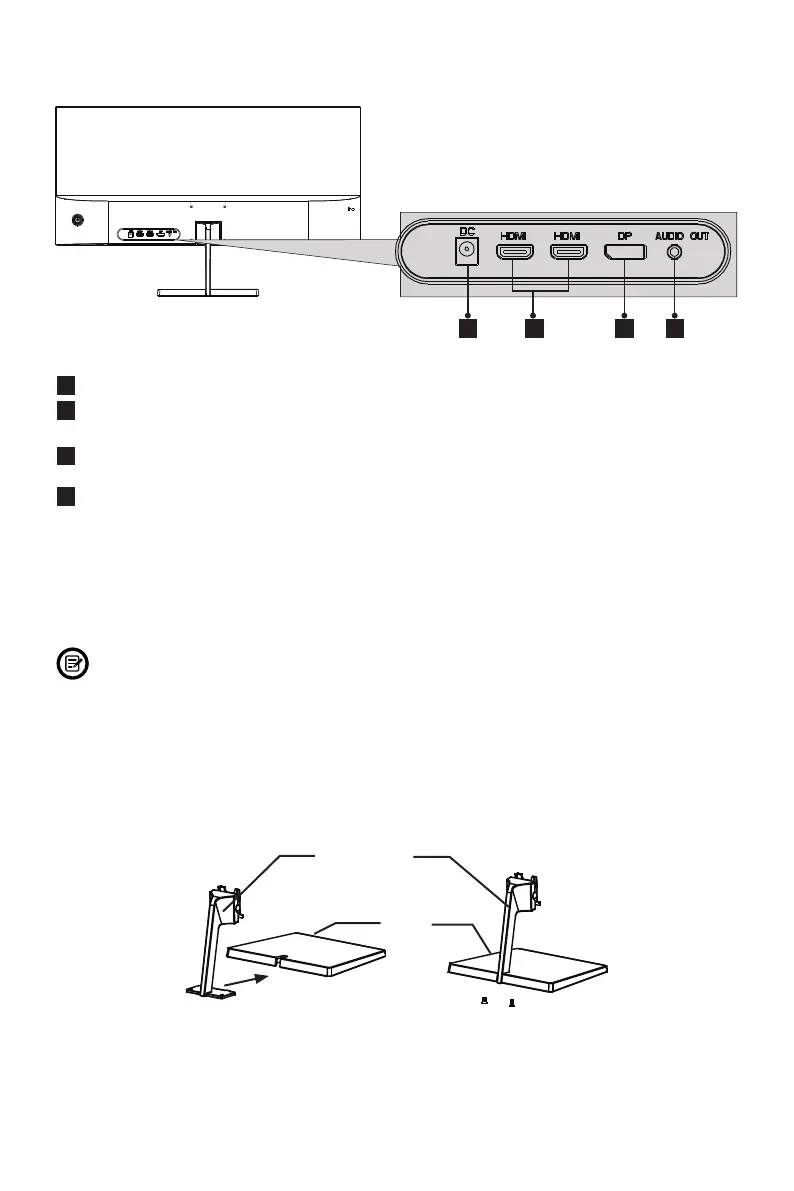
3.2 – Monitor Ports
1
Power Connector: Insert the power cable to supply power to the monitor.
2
HDMI Connectors: Insert one end of the HDMI cable into the computer’s
HDMI output and connect the other end to the monitor’s HDMI port.
3
DP Connector: Insert one end of the DP cable into the computer’s DP output
and connect the other end to the monitor’s DP port.
4
Audio Output: Insert the audio cable for output of audio signals.
Section 4: Stand Installation
Keep the foam underneath the monitor before attaching the stand.
1. Open the package and take out the monitor with foam still attached. Gently place
it face-down on a desktop or table.
2. Take out the stem and base. Use the included screwdriver and two screws to
fasten base to the stem.
Screws x 2
Stand Stem
Base


 To Next Page