15
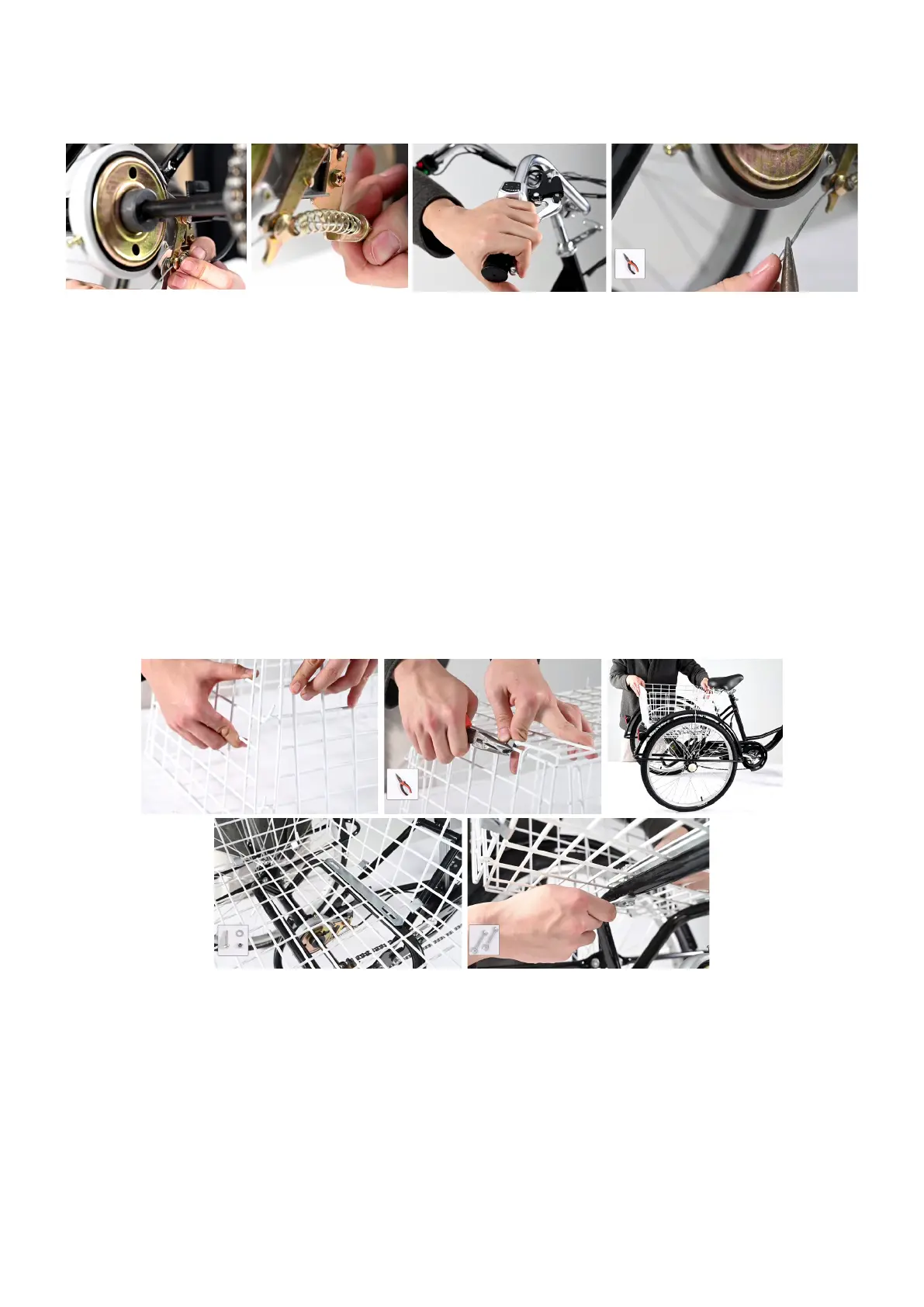
12. Installing the Rear Brake
1. Place the spring (12) between the rear brake cable support and the locking bolt on the rear
frame as shown.
2. Feed the rear brake cable through the support, spring, and bolt.
3. Press the bolt, tightening its nut with your 10mm wrench.
4. Tighten the cable’s locking nut by hand.
5. Test the rear brake by pressing the rear brake handle.
6. Attach the other brake cable cap, squeezing it with your pliers.
13. Installing the Basket
Note:
For best results, use work gloves to prevent injury.
1. Connect the 5 sides of the basket (28) as shown.
2. Secure each side with the 16 metal connecting pieces (17).
3. Remove the 4 sets of nuts, washers, and bolts from the rear frame.
4. Fit the basket onto the rear frame, placing the connecting slats (27) into the basket where
their bolt holes are aligned with those on the rear frame.
5. Replace these fasteners, tightening the M8 nuts with your 13mm wrench.


 To Next Page