Viscount Allegro
28
2. CONTROL PANEL
A-1 B-1 C0 D0 E0 F0 G0 A0 B0 C1 D1 E1 F1 G1 A1 B1 C2 D2 E2 F2 G2 A2 B2 C3 D3 E3 F3 G3 A3 B3 C4 D4 E4 F4 G
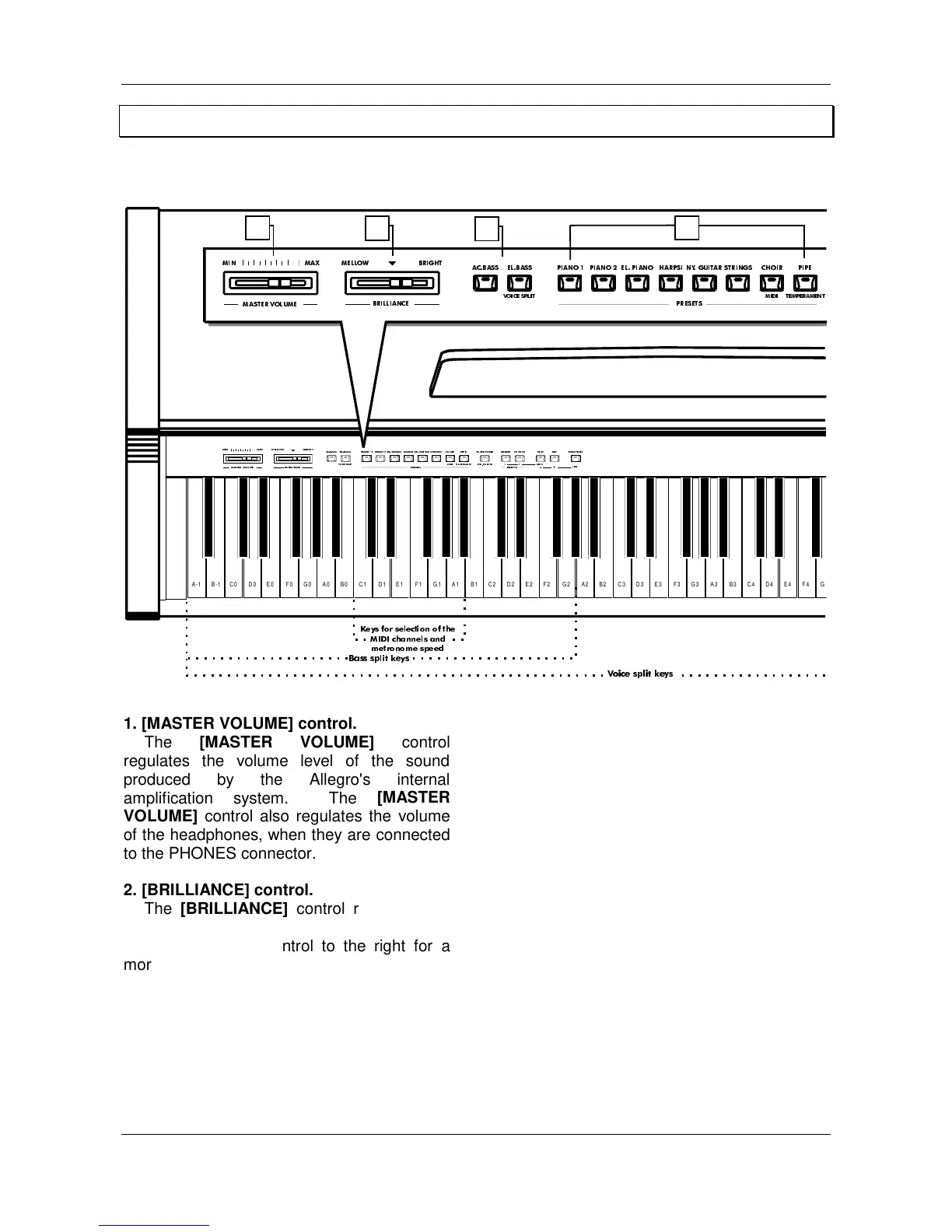
1. [MASTER VOLUME] control.
The
[MASTER VOLUME]
control
regulates the volume level of the sound
produced by the Allegro's internal
amplification system. The
[MASTER
VOLUME]
control also regulates the volume
of the headphones, when they are connected
to the PHONES connector.
2. [BRILLIANCE]
control.
The
[BRILLIANCE]
control regulates the
brilliance of the sound produced by the
Allegro; move the control to the right for a
more and more brilliant sound, or to the left
for a more mellow sound.
3. [AC.BASS] and [EL.BASS] buttons.
The ACOUSTIC BASS (AC.BASS) button
allows the typical acoustic bass timbre to be
added to Allegro's sound. For a typical
electric bass sound, press the ELECTRIC
BASS (EL.BASS) button
4. Timbre selection keys.
The Allegro offers a choice of timbres.
Simply press one of the preset keys to select
the corresponding voice. The LED above the
key will light up to indicate which timbre has
been chosen. The Allegro also has a
LAYER
mode which allows two timbres to be played
simultaneously along the whole extension of
the keyboard.
5. [TRANSPOSER] button.
The
[TRANSPOSER]
button gives access
to the Allegro’s
TRANSPOSER
function,
which allows the pitch of the whole keyboard
to be transposed up or down.
1
2
3
4



 To Next Page