RR
R
Stereo System
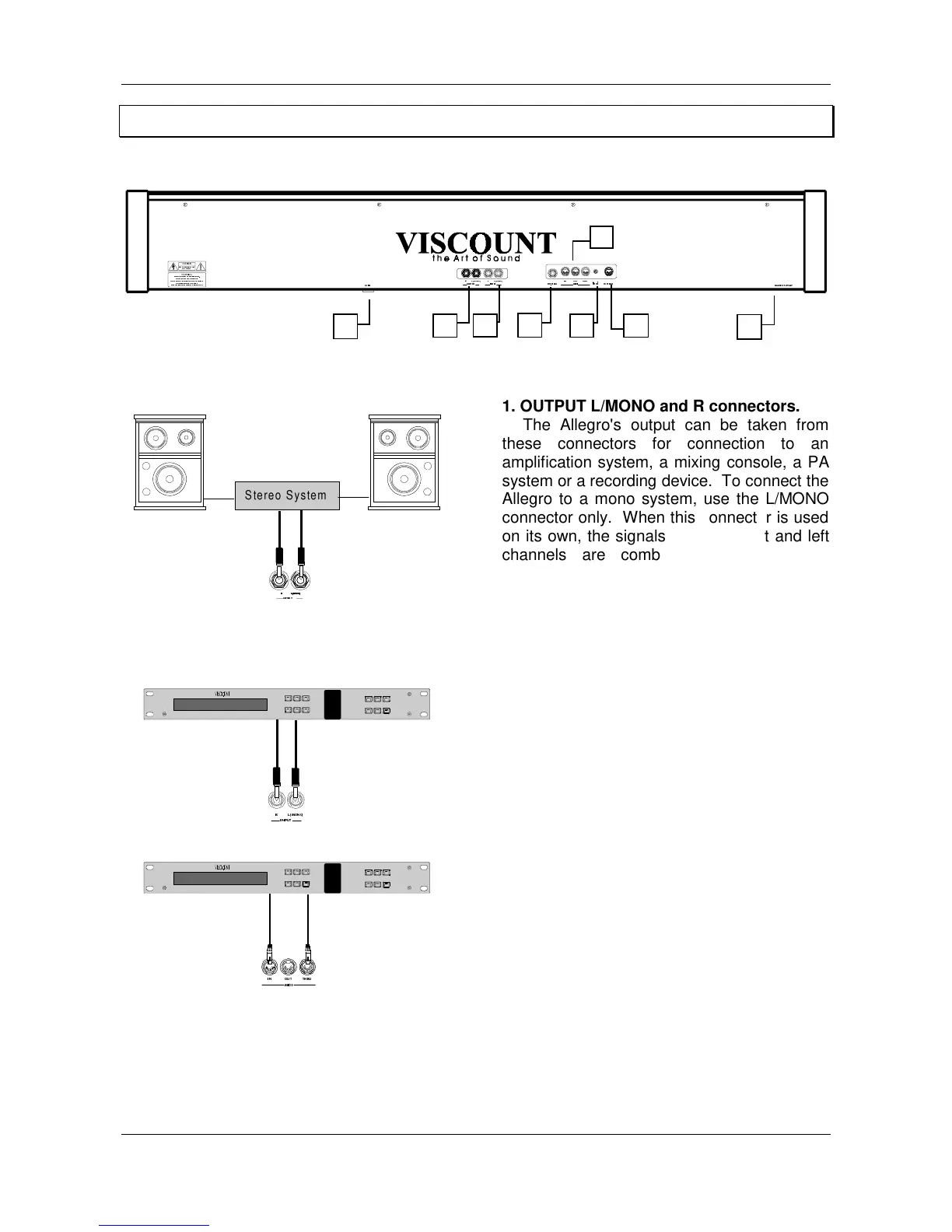
1. OUTPUT L/MONO and R connectors.
The Allegro's output can be taken from
these connectors for connection to an
amplification system, a mixing console, a PA
system or a recording device. To connect the
Allegro to a mono system, use the L/MONO
connector only. When this connector is used
on its own, the signals from the right and left
channels are combined and transmitted
through the L/MONO connector, so that none
of the Allegro's sound is lost. However, the
STEREO configuration, better suited to the
Allegro's outstanding sound characteristics, is
always recommended.
2. INPUT L/MONO and R connectors.
These connectors are provided essentially
for use with external sound generator
modules. The stereo outputs from the remote
sound generation module are connected to
the INPUT L/MONO and R connectors,
allowing the device's sound to be reproduced
through the Allegro's amplification system.
3. MIDI IN, OUT and THRU connectors.
The MIDI IN connector (or port) receives
the MIDI data from an external MIDI device
which can be used to control the Allegro. The
MIDI OUT connector transmits the MIDI data
generated by the Allegro. The MIDI THRU
port allows the Allegro to be used as part of a
chain of MIDI devices of any complexity,
sending the MIDI codes received by the MIDI
IN port.
1
5
3
2
6
7
8
4










 To Next Page