Owner's Manual – Viscount CantorumVI
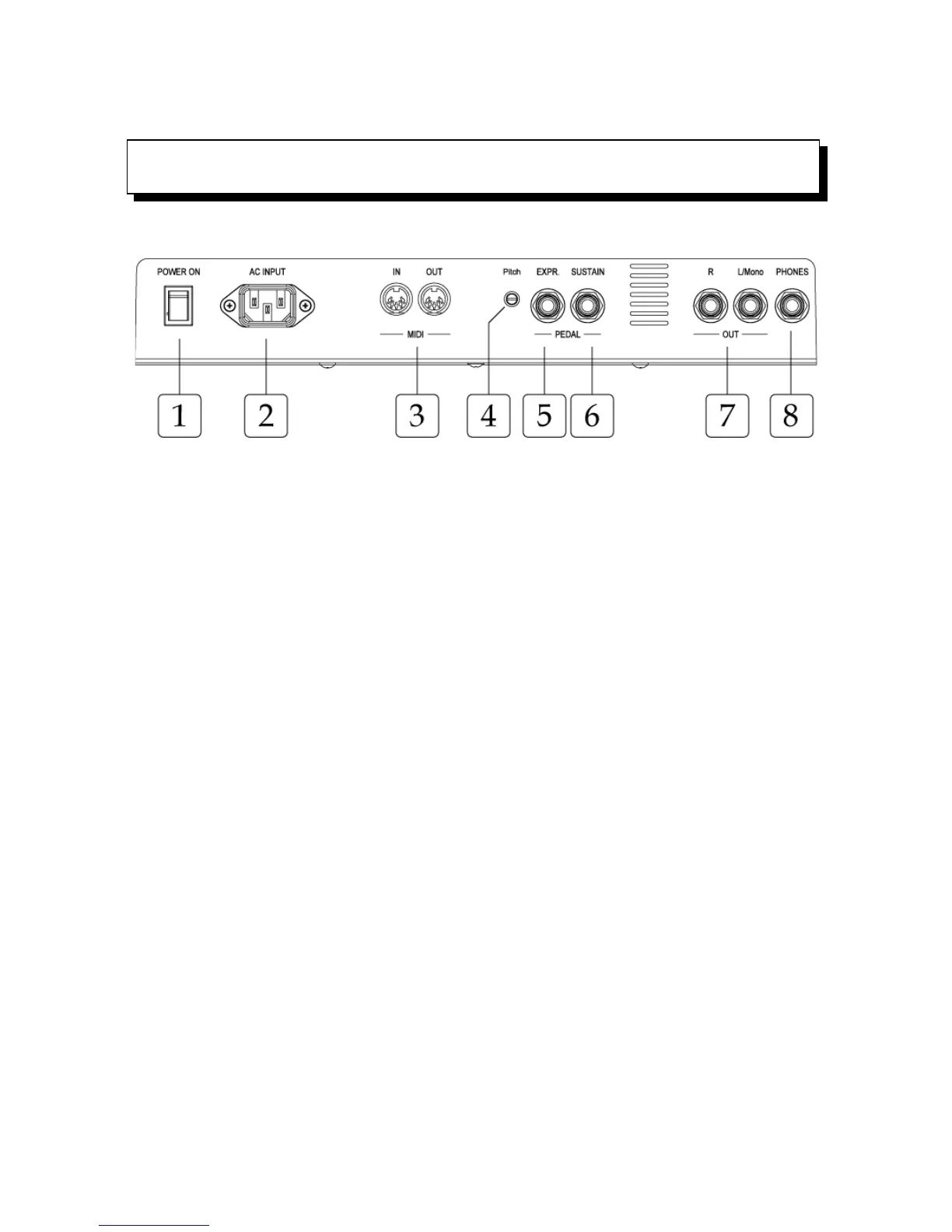
1.[POWER ON]: to switch CantorumVI on.
2.[AC INPUT]: AC Power source.
3.[MIDI]: The 5-pin DIN plugs provide connection to other MIDI musical instruments (see section
4.5 for an introduction to Musical Instrument Digital Interface). The [IN] connector receives MIDI
messages from external sources, the [OUT] connector sends MIDI messages generated by the
CantorumVI.
4.[PITCH]: Corrects the fine tuning by ±100 cents.
5.[EXPR.PEDAL]: 6.35mm-Jack socket to connect an expression pedal.
6.[SUSTAIN]: damper pedal connector, to be used with the piano sound. Use on/off switch pedals.
7.[OUT]: two 6.35mm-Jack socket line outputs for external organ amplification.
8.[PHONES]: Jack socket for connection of stereo headphones. Once they are connected, the
organ’s internal loudspeakers switch off.
EN - 8













 To Next Page