Owner's Manual – Viscount CantorumVI
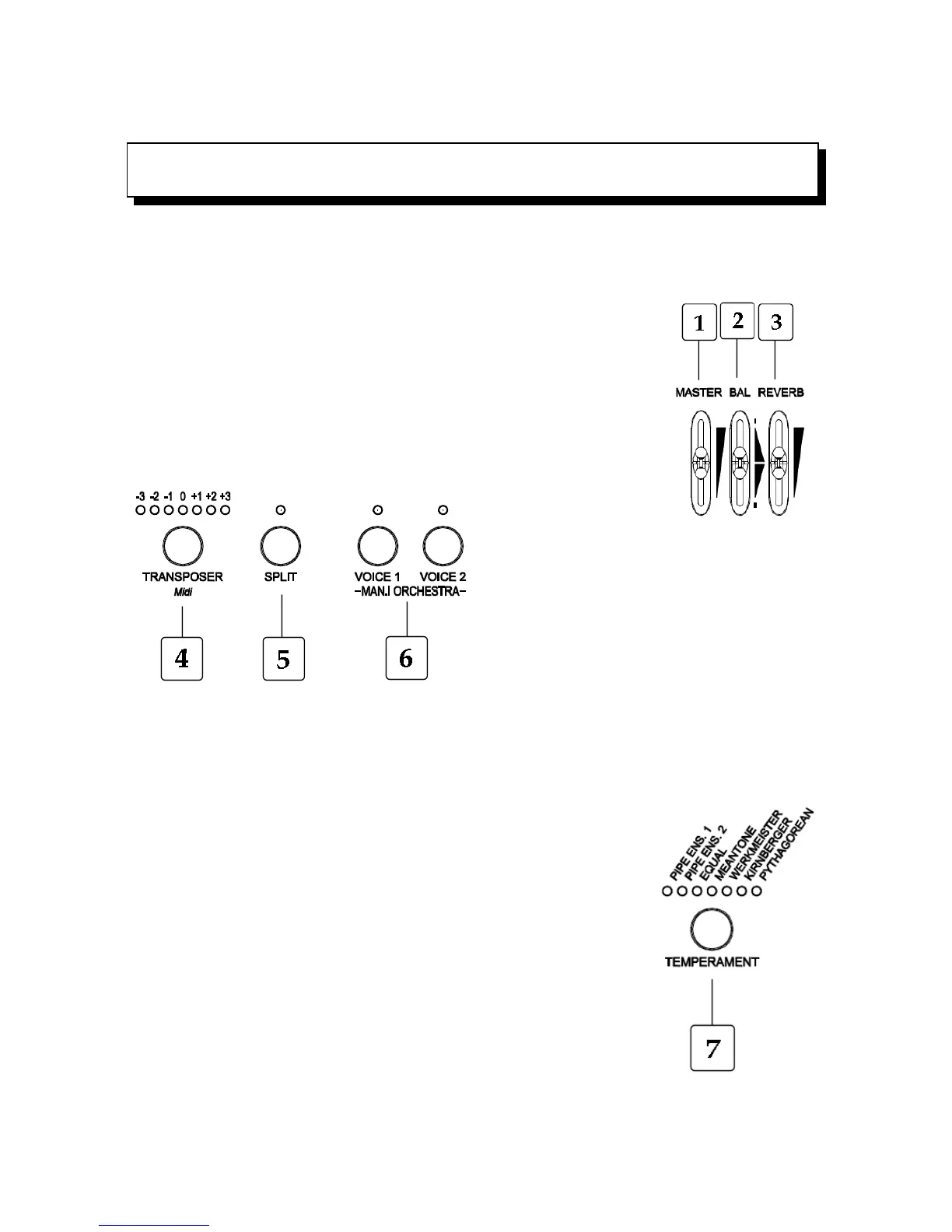
The Front panel of your instrument gives access to all the features and functions. Here are the
button names.
1.[MASTER VOL.]: Controls the master volume.
2.[BALANCE]: Balances the volume of the left part (Bass and Manual 1)
and the right part (Manual 2) of the keyboard.
3.[REVERB VOL.]: Controls the Reverb amount.
4.[TRANSPOSER]: sets
the instrument’s tuning
within a range of -3/+3 semitones
in steps of one semitone.
5.[SPLIT]: Activate/Deactivate keyboard's split.
In fact (see paragraph 4.1) the keyboard can play
as if there are two separate manuals, one using
Manual II voices and the other using Manual I
and Bass voices. Split point is set on E4 (left
included) by default. Moreover, the two keyboard parts can also play orchestral voices: two for left
part, three for right part.
6.[MAN.I ORCHESTRA]: Activate/Deactivate orchestral voices on Manual I. The two voice
buttons can be associated with any one of the eight orchestral voices (see paragraph 4.2).
7.[TEMPERAMENT]: this parameter provides a selection of historical
temperaments from various ages and different national origins. To select
one, press the button several times until you reach the desired
temperament (the respective LED will turn on).
The available temperaments are: Equal, Meantone, Werckmeister,
Kirnberger and Pythagorean.
EN - 4













 To Next Page