visionmetering.com
Page 4 Copyright 2015 © Vision Metering, LLC
1.4 Reading
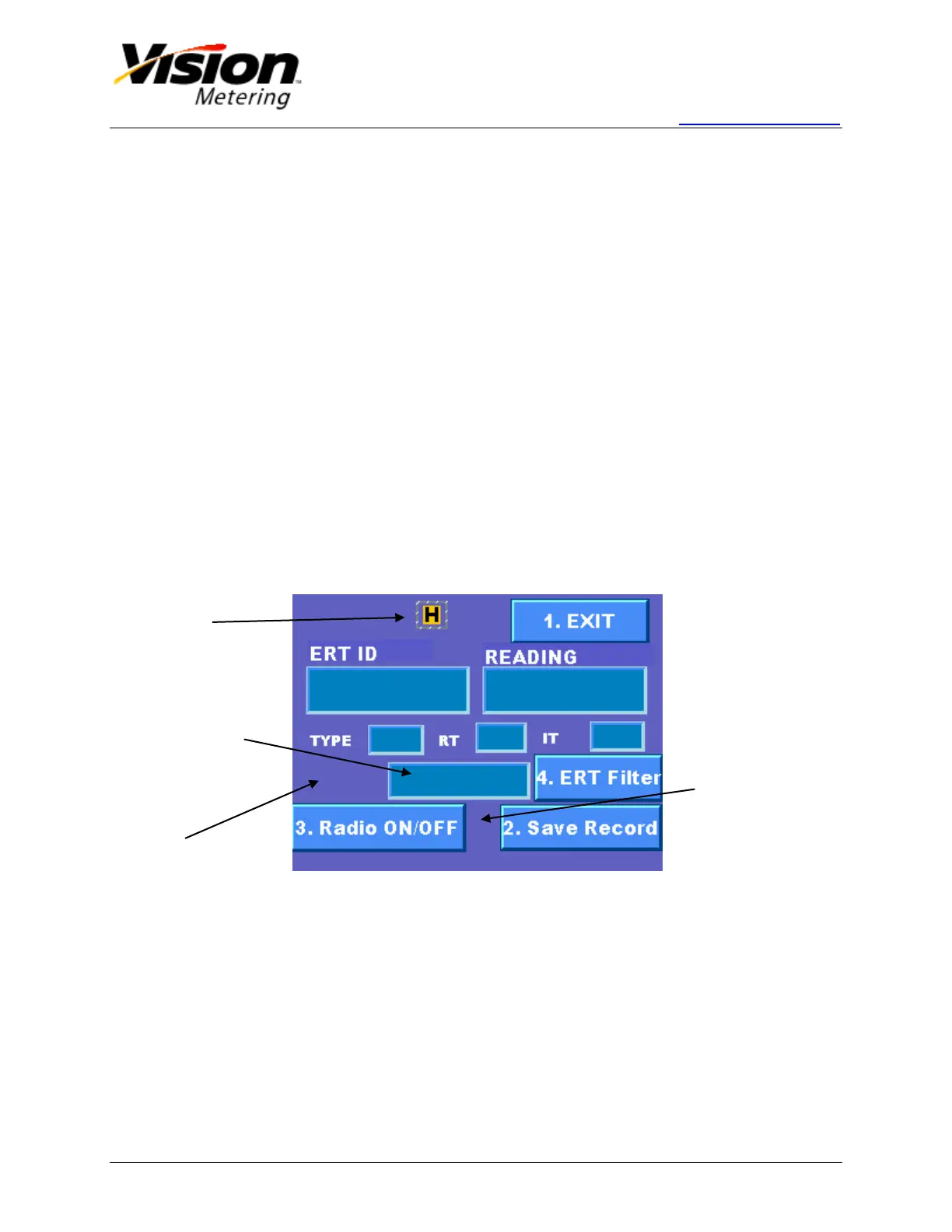
Pressing '0' on the keypad or pushing the Reading button on the LCD will access the
ERT messages Reading Screen.
To obtain a reading, the radio must be turned on, by pressing '3' on the keypad or
pushing the Radio ON/OFF button on the display. A wakeup tone will be
transmitted if the “wakeup tone” option was selected. Once the radio receiver is
on, a “wakeup” signal symbol as well as a red antenna icon will appear on the
display.
The device must be placed no further than 5 inches from the meter if in standard
sensitivity mode.
If Autosave option was selected, an icon (diskette) will appear next to the Save
Record button once message is received. It is also possible to save manually by
pressing '2' on the keypad or pushing Save Record button on the display if
Autosave option is not chosen.
A yellow icon 'H' will appear if the High Sensitivity mode is turned on.
Custom messages can be written by pressing the center window and using the
keypad to type. Note that once started writing a message, the keypad can only be
used to type. Any other action must be performed using the touch screen.
Supported ERT protocols include SCM, SCM
+
, IDM, and DoD.
Figure 2
Indicates
High
Sensitivity


 To Next Page