visionmetering.com
Page 6 Copyright 2015 © Vision Metering, LLC
1.6 Options
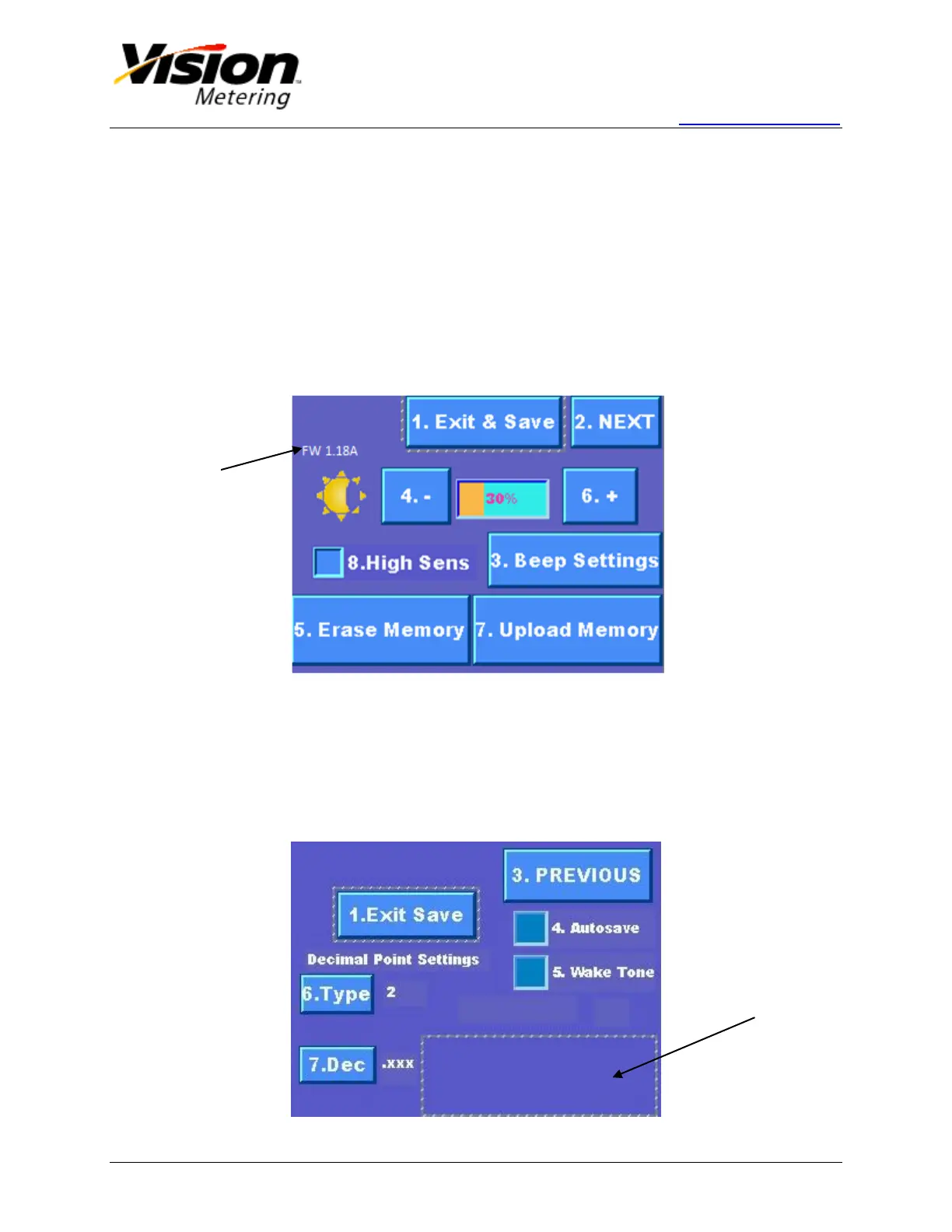
From the main screen, pressing '3' on the keypad or pushing the Options button on the
display will lead to the Options screen.
The brightness of the backlight can be adjusted. Pressing '4' on the keypad or
pushing the '-' button will lower the brightness. Pressing '6' or '+' will raise it.
High sensitivity can be selected by pressing '8' on the keypad or checking the
High Sens checkbox. This option will increase the effective distance range of the
hand held device.
Pressing '3' on the keypad or pushing the Beep Settings button on the display will
redirect to the beep settings screen. Beeps can be set to sound for every action,
upon packet reception, or never.
Figure 5
Pressing '2' on the keypad or pushing the NEXT button on the display will advance to
additional options.
Autosave-automatically stores meter readings in internal flash memory.
Wake Tone-selection will cause the device to transmit RF modulated tone once
radio receiver is enabled. Transmission of the signal lasts for 10 seconds.
Decimal Point Settings-sets number decimal points for each ERT reading type.
Touch
screen slider
bar appears
to select
Wake Tone


 To Next Page