visionmetering.com
Page 5 Copyright 2015 © Vision Metering, LLC
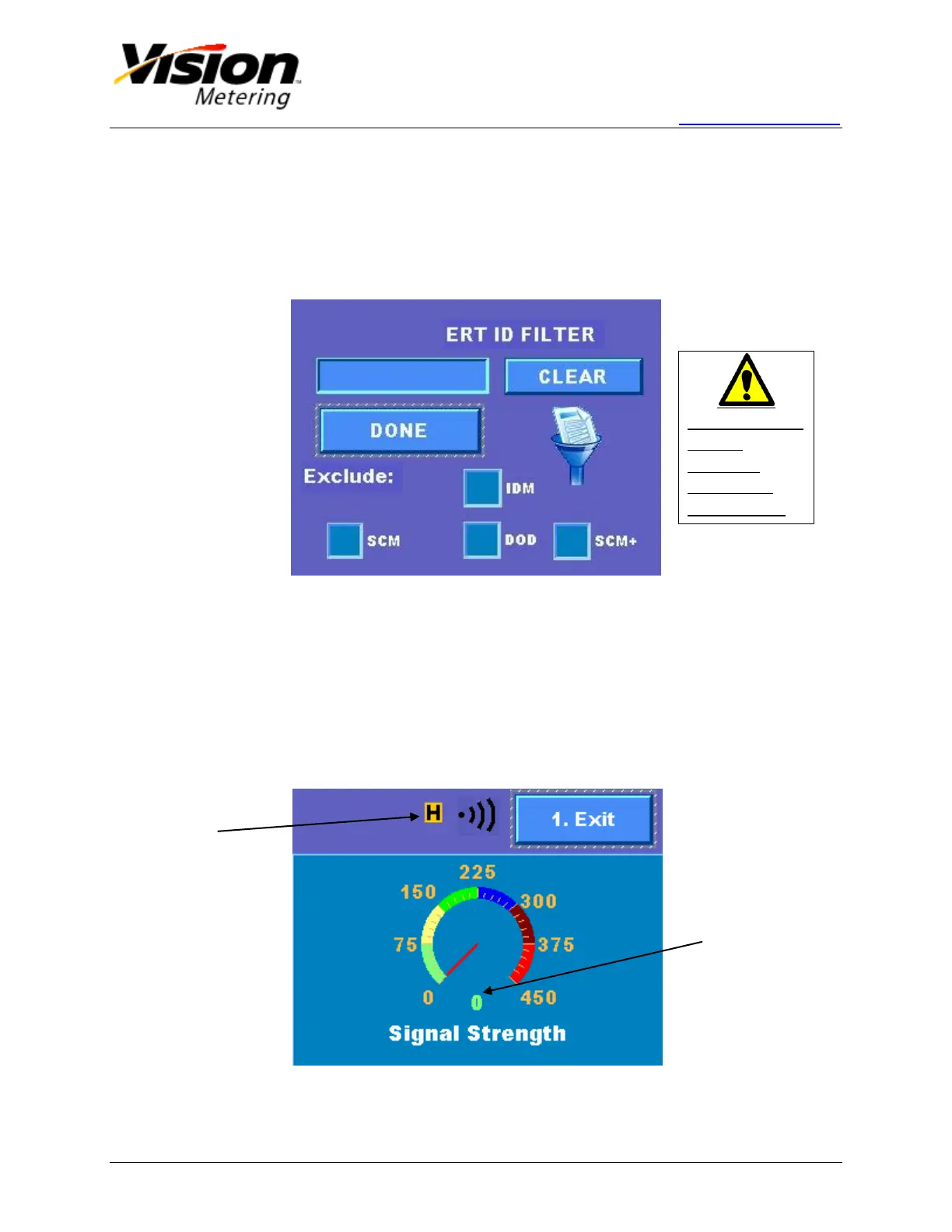
Pressing '4' or pushing the ERT Filter button on the display will access the ERT ID
Filter screen. Once a filter ID is entered using the keypad, messages from other modules
will be ignored, and only the device with the specified ERT ID will be read. Selecting
items can only be accomplished by pressing the touch screen, not through the keypad.
Checking one or more Exclude options will filter out the selected protocols.
Figure 3
1.5 Signal Strength
From the main screen, pressing '2' on the keypad or pushing the Signal Strength button
on the display will lead to the Signal Strength screen.
The needle of the gauge shows the RF strength of the signal coming from the
module.
The scale of the power meter is divided into 3 sections, red being poor, yellow is
moderate and green representing a strong signal.
Figure 4
Indicates
High
Sensitivity
This screen can
only be
navigated
through the
touch screen.


 To Next Page