EasyManua.ls Logo

Vision Tech Shop TVD-60 - User Manual

Default Icon
16 pages
Print Icon
To Next Page IconTo Next Page
Loading...
TVD
Multifunction Scale
V1.0

Other manuals for Vision Tech Shop TVD-60

Question and Answer IconNeed help?

Do you have a question about the Vision Tech Shop TVD-60 and is the answer not in the manual?

Summary

TVD Scale Keys Description

Power Connection and Battery Operation

Basic Operation of the Multifunction Scale

Powering the Scale On and Off

Instructions for turning the weighing scale on and off using the power switch.

Zeroing the Scale

Procedure for zeroing the scale to ensure accurate measurements, accounting for environmental factors.

Using the Tare Function

How to use the tare function to subtract the weight of a container for net weight measurement.

Parts Counting Operation

Tolerance Checking Setup

Setting Target Weight Limits

Steps to set the upper and lower limits for target weight in check weighing mode.

Setting Target Quantity Limits

Guide on setting upper and lower limits for target quantity in check counting mode.

Weight Accumulation Features

Clearing Memory and Automatic Accumulation

Printing Weighing Data

Automatic Power Off Function

Scale Specifications

Error Message Troubleshooting

RS232 Output and Print Formats

Serial Interface Diagram

Summary

TVD Scale Keys Description

Power Connection and Battery Operation

Basic Operation of the Multifunction Scale

Powering the Scale On and Off

Instructions for turning the weighing scale on and off using the power switch.

Zeroing the Scale

Procedure for zeroing the scale to ensure accurate measurements, accounting for environmental factors.

Using the Tare Function

How to use the tare function to subtract the weight of a container for net weight measurement.

Parts Counting Operation

Tolerance Checking Setup

Setting Target Weight Limits

Steps to set the upper and lower limits for target weight in check weighing mode.

Setting Target Quantity Limits

Guide on setting upper and lower limits for target quantity in check counting mode.

Weight Accumulation Features

Clearing Memory and Automatic Accumulation

Printing Weighing Data

Automatic Power Off Function

Scale Specifications

Error Message Troubleshooting

RS232 Output and Print Formats

Serial Interface Diagram

Overview

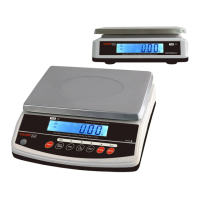
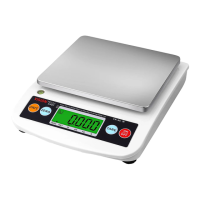
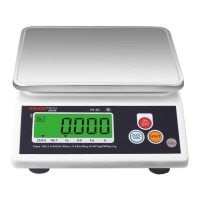
The TVD Series Multifunction Scale is a versatile weighing device suitable for general weighing, check weighing, simple parts counting, percent weighing, accumulation, and units conversion. It is designed for a range of applications, offering capacities from 3kg to 30kg (6lb to 60lb).

Key Features and Specifications:

  • Display: Large 24mm LCD with white LED backlight for clear visibility. It features a 6-digit display with 0.94-inch digits.
  • Keypad: Equipped with 7 embossed membrane keys for user interaction.
  • Units: Supports multiple weighing units including kilograms (kg), grams (g), pounds (lb), and ounces (oz).
  • Power: Operates on an input of AC 100-240V with a DC 12V/500mA output. It includes a 6V/4Ah rechargeable battery.
  • Battery Life: Provides approximately 58 hours of continuous use with the backlight on and up to 70 hours without the backlight.
  • Housing: Features an ABS plastic housing with a stainless steel platter.
  • Platter Size: The platter measures 9.1 x 11.8 inches (230 x 300mm).
  • Operation Temperature: Designed to operate in temperatures ranging from 14°F to 104°F (-10°C to +40°C).
  • Resolution: Offers a resolution of 1/6000.
  • Readability:
    • TVD-6: 0.001 lb, 0.02 oz, 0.5 g, 0.0005 kg
    • TVD-12: 0.002 lb, 0.05 oz, 1 g, 0.001 kg
    • TVD-30: 0.005 lb, 0.1 oz, 2 g, 0.002 kg
    • TVD-60: 0.01 lb, 0.2 oz, 5 g, 0.005 kg
  • Dimensions: 12.4 (W) x 13.8 (D) x 4.7 (H) inches / 315 (W) x 349.9 (D) x 118.5 (H) mm.
  • Weight: Net weight is 9.9 lb (4.5 kg), and gross weight is 11.2 lb (5.1 kg).

Usage Features:

  • Power On/Off: The power switch is located below the right side of the scale. Pressing it forward turns the scale on, initiating a self-test mode before entering weighing mode. Pressing it again turns the scale off.
  • Zero Function: The ZERO key returns the display to zero, ensuring accurate weighing even with environmental influences.
  • Tare Function: The TARE key allows users to subtract the weight of a container, displaying only the net weight of the object. Only one tare value can be set at a time. To clear the tare, remove the load and press TARE again.
  • Unit Selection: The UNIT key allows selection between kg, g, lb, and oz in weighing mode.
  • Percent Weighing: This function enables setting a sample weight as 100%, then displaying subsequent weights as a percentage of the original sample.
  • Parts Counting: The scale can count parts by setting a sample quantity (e.g., P 10, P 20, P 50, P 100, P 200). The PCS key switches between parts weighing and parts counting.
  • Tolerance Checking (Check Weighing/Counting/Percentage): The LIMIT key is used to set high and low limits for target weight, quantity, or percentage. The display shows HI, OK, or LO indicators based on whether the load is above, within, or below the set limits. A beep mode can be configured to sound when the load is within tolerance (Beep 1) or beyond tolerance (Beep 2). This function is available only when the weight is more than 20d (20 divisions) and is not valid if the lower limit is greater than the upper limit. To disable check weighing, set both limits to zero.
  • Accumulation: The scale supports both manual and automatic accumulation.
    • Manual Accumulation: In normal weighing mode, with a stable zero display, press the ACC/TTL PRINT key to add the current stable weight to the accumulation memory. The display will show the accumulation count and total value for two seconds. It can store up to 99 operations or until the maximum display value is reached.
    • Automatic Accumulation: This feature can be enabled via parameter settings (ACC>ON), allowing the scale to automatically accumulate weights after stabilization.
  • Memory Recall: Pressing the ACC/TTL PRINT key in normal weighing mode will briefly display the accumulation times and total accumulated values for two seconds.
  • Memory Clear: To clear the accumulation memory, press ACC/TTL PRINT to view accumulated values, then press PCS while the accumulation is displayed.
  • Printing: The ACC/TTL PRINT key sends weighing data to a connected printer or PC. Printer settings (e.g., B9600, ACC ON, LP-50) must be configured. The scale supports RS-232 output and can connect to DEP-50 receipt printers and DLP-50 label printers.
  • Backlight Setting: The backlight can be configured for auto-on/off (El au), always on (El on), or always off (El off) via the menu settings.
  • Power Auto Off: The scale can be set to automatically turn off after a period of inactivity (3, 5, 15, or 30 minutes) if there are no weight changes or key presses. This function can also be disabled (Of 0).
  • Check Internal Counts: During self-test, pressing ZERO and % U.W keys will display internal counts. Pressing PCS returns to weighing mode.

Maintenance Features:

  • Battery Charging: The scale should be charged for at least 12 hours before first use. A red LED indicates charging, while a green LED indicates a full charge. The battery indicator symbol on the display signals low battery, prompting a recharge. If used without proper charging, "BAT-LO" will flash, and the scale will shut off automatically after approximately 1 hour.
  • Error Messages: The scale displays various error messages to indicate issues such as underload, zero setting errors, A/D value out of range, percentage errors, initialization errors, over range, calibration errors, and low battery. Solutions are provided for each error, including checking the platform, recalibrating, or recharging the battery.
  • RS232 Interface: The device includes a 9-pin D-connector for serial communication. Pin 2 (RXD) receives data, Pin 3 (TXD) transmits data, and Pin 5 (GND) is for signal ground. If data is not received by a printer, it may be necessary to inter-change pin 1 and pin 2 connections.

Vision Tech Shop TVD-60 Specifications

General IconGeneral
BrandVision Tech Shop
ModelTVD-60
CategoryScales
LanguageEnglish

Related product manuals