Operating the PTX-PRO 3-11PTX-PRO User and Technical Manual
FMT Tab
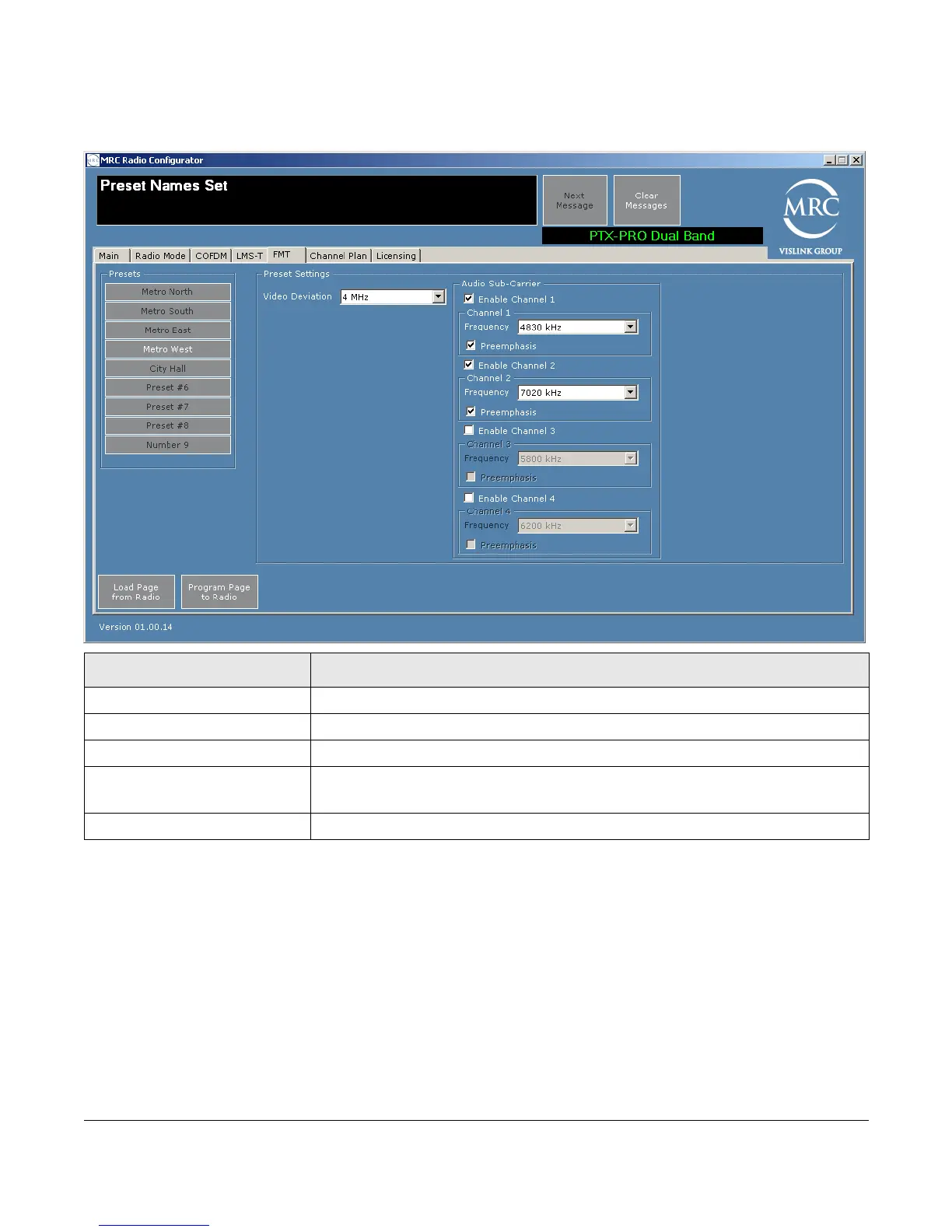
The frequency modulation transmitter (FMT) tab lets you set the FMT parameters.
Load Page from Radio—To load parameters for this page from the PTX-PRO, click on this
button.
Program Page to Radio—To apply parameter modifications to the PTX-PRO, click on this
button.
Field Options
Presets Click on the preset to display the parameter values of that preset.
Video Deviation Choose 3 or 4 MHz.
Enable Channel 1 (2, 3, 4) Enable to access additional channel specifications.
Frequency When the channel is enabled, Choose one of the following frequencies:
4830, 5200, 5800, 6200, 6800, 7020, 7500, 8065, 8300, 8590.
Preemphasis Check to enable; leave blank to disable.



 To Next Page