TRUGOLF
22 23
VISTA 10/12
DIAGNOSTICS
E6Golf has built in DIAGNOSTICS to help troubleshoot the TruTrack tracking
system. DIAGNOSTICS will automatically run if there is a problem when you
launch E6Golf, Exit Practice or a Round to return to the Main Menu.
NOTE: You can also access the DIAGNOSTICS from the Main Menu > Options or
In-game by selecting the E6 icon, then select the DIAGNOSTICS option.
There are several possibilities that may cause the DIAGNOSTICS to run.
1. Overhead light is o.
2. One or more Optical Sensors are covered.
3. Overhead light is turned on, but the beam is not focused within the
yellow dashed lines as shown below.
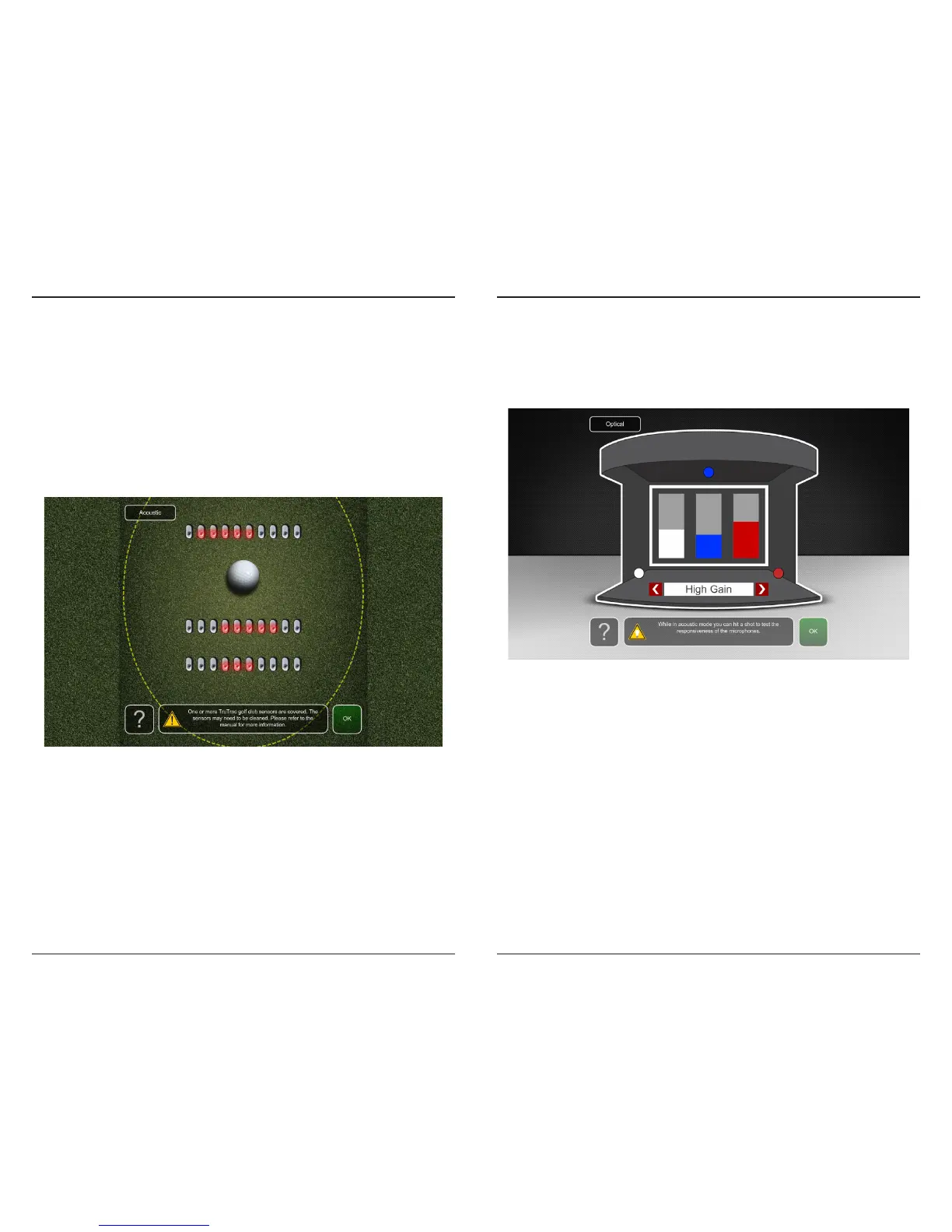
OPTICAL SENSORS
Blocked or covered sensors are indicated in red.
Keep the sensor holes clear of any debris or overhanging grass turf that would
block their view of the spotlight. If sensors are blocked, follow these steps:
1. Trim any overhanging grass with a pair of scissors
2. Vacuum an debris or grass trimmings from the holes
Club Head Sensors are working correctly, if you move a golf club just above
a row of sensors, the sensors should change to red corresponding to the
position of the club over the associated sensors.
To access the ACOUSTIC DIAGNOSTICS select the ACOUSTIC button at the
top of the screen or click OK to return to E6Golf.
ACOUSTIC SENSORS
ACOUSTICS DIAGNOSTICS allows you to test and verify connections of
the three acoustic ball impact sensors. One is located in the top center of
the frame and the other two are located near the oor on the right and
left sides of the frame (refer to pg 13). Each of the bars correspond to an
acoustic ball sensor of their same color.
Tap each sensor and verify that the corresponding color bar responds.
If incorrect, connect the correct mic cables to TruTrack. Do this until all
sensors are connected correctly.
If any of the indicator bars do not respond when the ball is hit or tapped,
this could indicated one or more of the follow:
1. Microphone is not connected to the cable.
2. Cable is not connected to TruTrack (see pg 14).
3. Microphone is covered.
4. Microphone or cable is defective.
If one or more sensors is nonresponsive replace microphones with the
extras that were sent with the simulator. Tap sensors to verify that the
related indicated bar is reacting, if not or to order addition mics contact
TruGolf Customer Support.
To access the OPTICAL DIAGNOSTICS select the OPTICAL button at the top
of the screen or click OK to return to E6Golf.


 To Next Page
 Loading...