TRUGOLF
4 5
VISTA 10/12
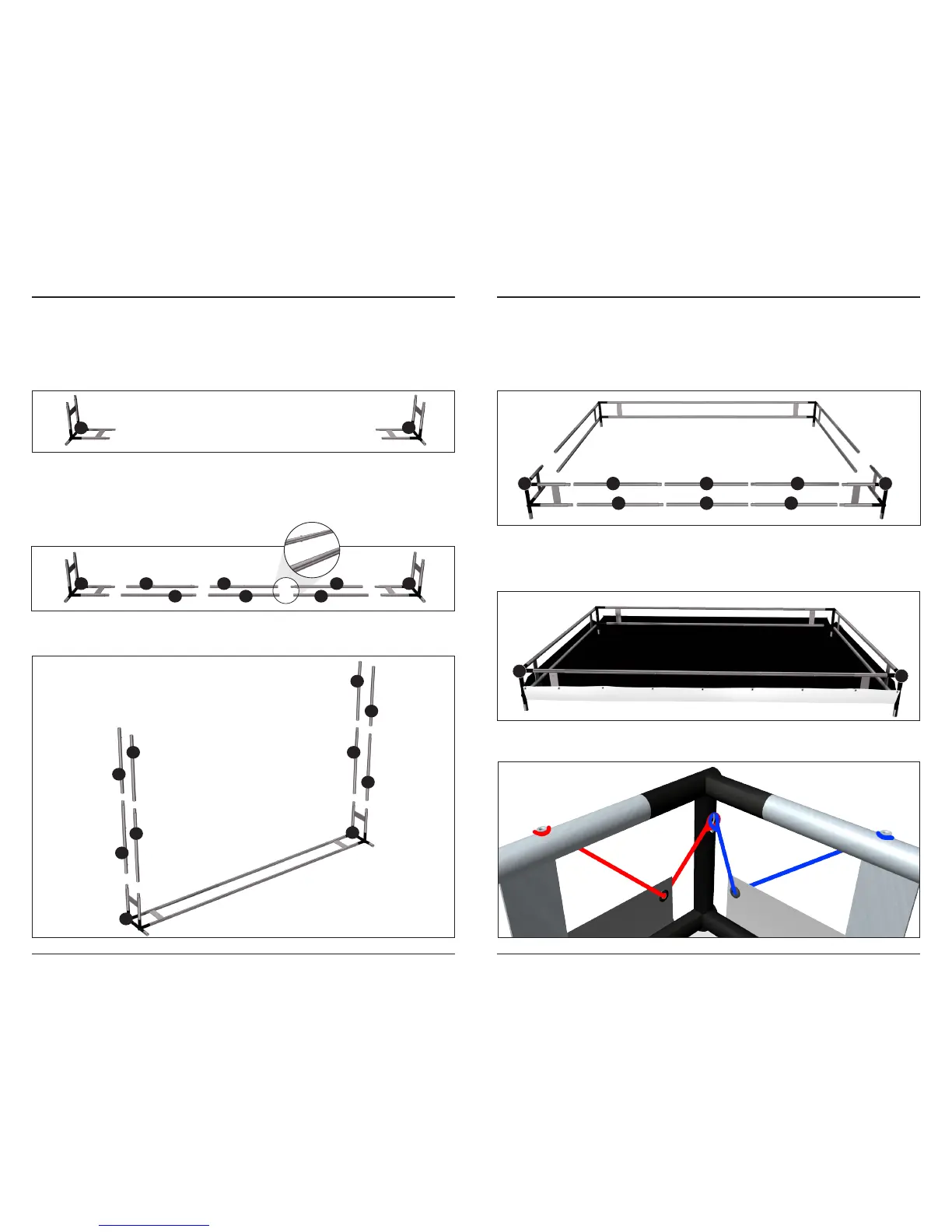
ASSEMBLE FRAME
STEP 1 | CORNER PIECES
Start assembling the frame with the back corner pieces labeled [A] & [B].
Place these several feet from the back wall and 10 feet apart.
STEP 2 | CONNECT CORNERS
Connect the frame tubular pieces by sliding the male & female ends together
until the SPRING BUTTON pushes through the hole and locks the pieces
together. Connect corners [A] & [B] together using the pieces shown below.
STEP 3 | ASSEMBLE SIDES
Connect the side frame pieces to the base as shown below.
STEP 4 | TOP CORNER PIECES
Assemble the top portion of the frame. Connect [C] & [D] to the sides, then
insert the top frame pieces between [C] & [D] as shown below.
Tip: To make assembling the frame top easier, tip the frame forward and lay it
on the ground.
STEP 5 | ATTACH THE SCREEN
From within the frame, unfold the SCREEN, black side up. Make sure the
edge labeled TOP is between Corners [C] & [D].
On each corner loop the bungee cord ends over the hooks that are mounted
on frame as shown below.
A 1
11
2
12
3
13
B
B
A
A
B
20
10
14
419
9
15
5
C 8
18
7
17
6
16
D
C
D


 To Next Page