TRUGOLF
16 17
VISTA 10/12
M
O
N
I
T
O
R
P
R
O
J
E
C
T
O
R
C
O
M
P
U
T
E
R
S
E
C
U
R
I
T
Y
D
O
N
G
L
E
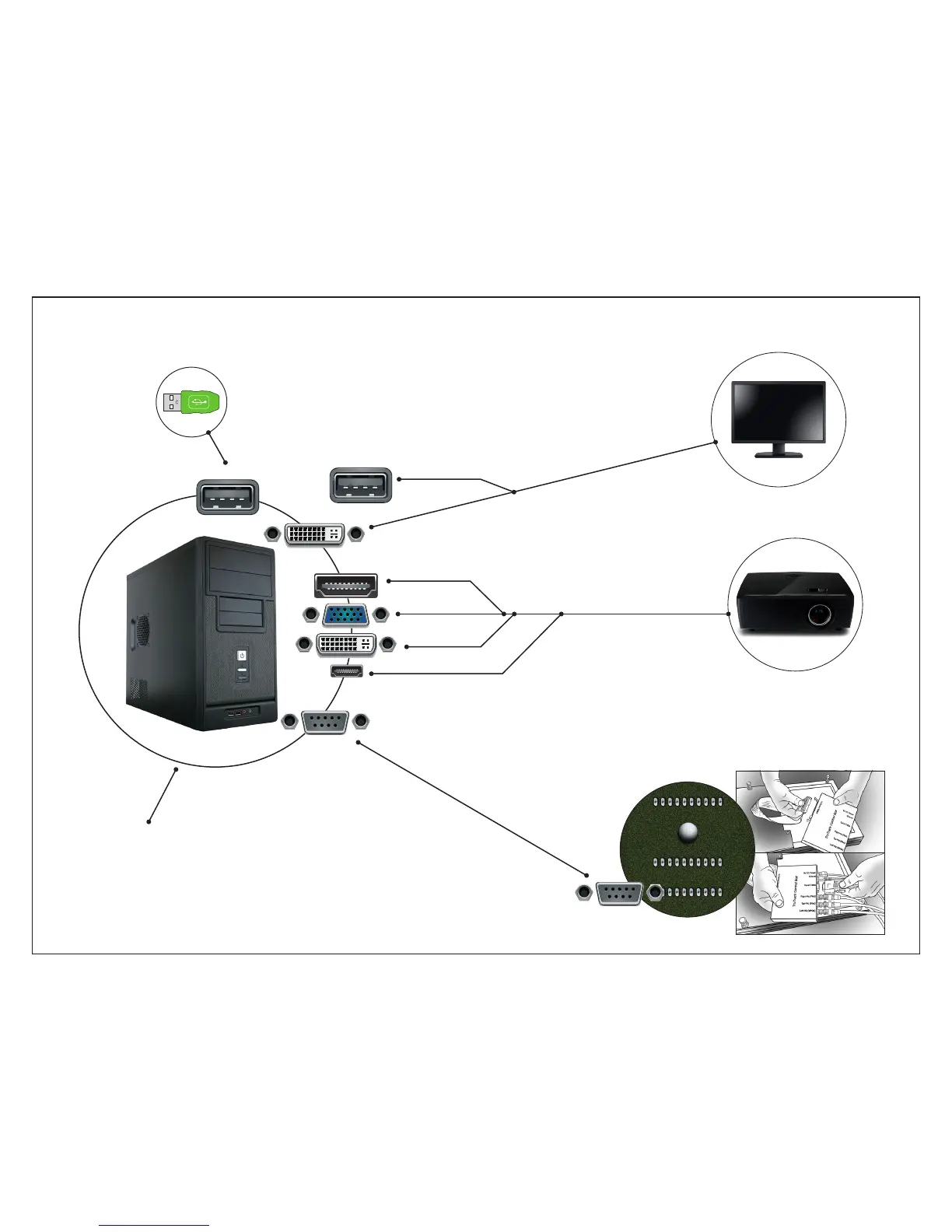
COMPUTER COMPONENTS DIAGRAM
[1] Connect USB Devices to
any available USB PORT.
• Mouse
• Keyboard
• Security Dongle
(Required for E6Golf Software)
[2] Connect MONITOR
to COMPUTER using
both a USB and DVI
CONNECTION
T
R
U
T
R
A
C
K
HDMI
DVI
VGA
DVI
SERIAL
USB
USB
[3] Connect COMPUTER to
PROJECTOR using HDMI or
other available CONNECTION.
[4] Connect the Computer* to the
TRUTRACK CONTROL BOX
using the SERIAL CABLE.
(*Serial Port Required.)
[5] Connect POWER CABLES to COMPUTER,
MONITOR, PROJECTOR, & TRUTRACK, then
insert into surge protector or power outlet.
MINI HDMI
SERIAL
TO CLONE IMAGE ON
DISPLAYS SEE PG 19


 To Next Page