• Automatically assesses test quality.
• Large, easy to read display.
• Built-in quality of blow indicator.
• Can be used with SafeTway mouthpiece or Eco BVF.
• Download test results via USB and export to PDF report
using Vitalograph Reports software.
2. Setting Up the Vitalograph COPD-6 USB
To get the COPD-6 USB ready for use:
1. Remove the detachable battery door at rear of unit. Fit two
AAA 1.5V batteries. Replace battery door.
2. Turn on via the On/Off Button. (The same button is used
to power down.)
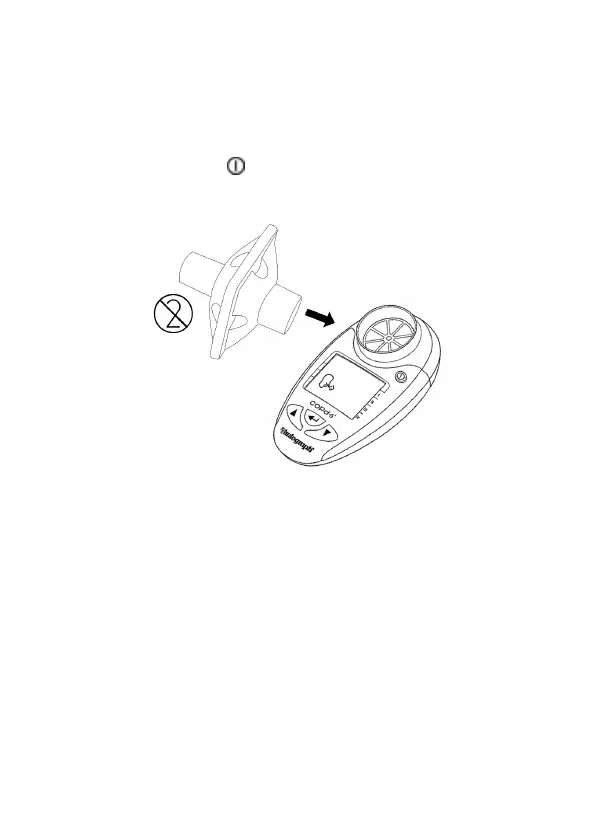
3. Attach a mouthpiece to the owhead, see Figure 2.
Figure 2. Mouthpiece inserted into owhead
4. Vitalograph intends that a new Eco Bacterial Viral Filter
(Eco BVF) be used for every subject to prevent cross
contamination. Using a new Eco BVF provides a signicant
level of protection of the subject, the device and the user
against the risk of cross contamination during spirometry
manoeuvres. Eco BVF and SafeTway mouthpieces are
single use items and must be disposed of after use.


 To Next Page