SIMPLY INIMITABLE.
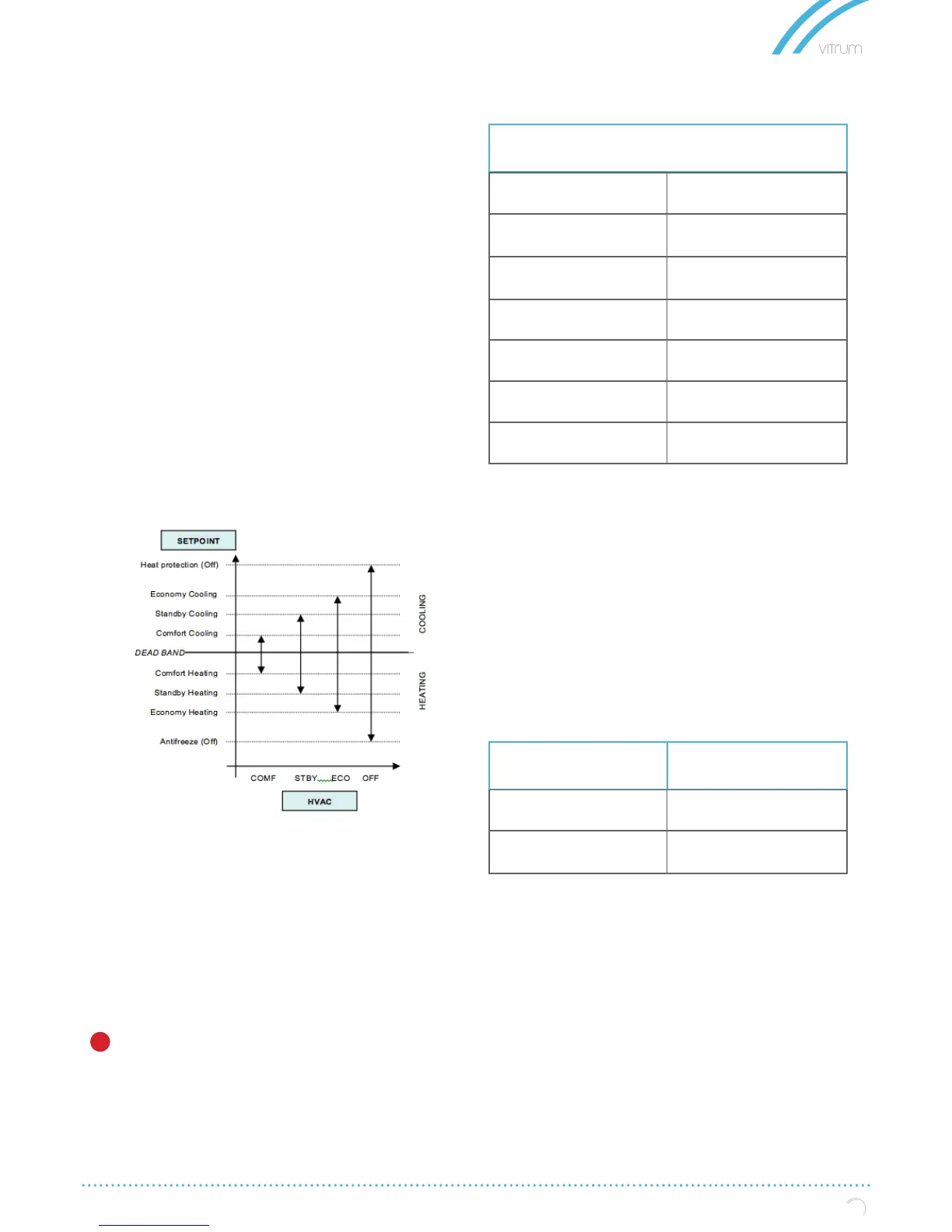
Using the object HVAC MODE (1 byte size), you can set
the thermostat in one of the following modes: OFF;
ECONOMY; STANDBY; COMFORT; each mode is asso-
ciated with a setpoint set by a ETS parameter.
OFF mode is associate to setpoint antifreeze in
heating mode and high temperature protection in
cooling mode.
HVAC MODE object (automatic heat / cool)
Behaviour for this value of parameter “Thermostat
control mode” is the same as above described but
the switching from heating to cooling mode and vice
versa is automatic. With this setting it is necessary to
set an insensitive zone as in parameter “Dead zone”.
Whenever temperature becomes greater than :
Setpoint comfort heating + (Dead Band / 2) active
control is cooling; when temperature becomes less
than: Setpoint comfort cooling - (Dead Band / 2) acti-
ve control is heating.
COMFORT object
COMFORT object (1 bit size) is visible only when “Ther-
mostat control mode” parameter is selected with the
value HVAC MODE.
When a telegram “1” is received thermostat goes
in COMFORT mode (it applies for both heating and
cooling)
On receipt of a telegram “0”, thermostat returns to the
mode set by HVAC MODE object.
COMFORT mode can be set also with timing: after
a time set by a parameter thermostat returns in the
previous mode.
WINDOW CONTACT object
This object, if enabled, has higher priority than HVAC MODE,
SETPOINT MODE, COMFORT objects.
When a telegram is received (“0” or “1”) on the communication
object WINDOW CONTACT thermostat enters a power saving
mode:
• BUILDING PROTECTION (if running in HVAC MODE)
• Setpoint antifreeze / high temperature protection (if
running in SETPOINT MODE)
SETPOINT COMFORT object
SETPOINT STANDBY object
SETPOINT ECONOMY object
These 2 byte objects are used to set the setpoint va-
lues for COMFORT, STAND-BY, ECONOMY mode.
Whenever change, the setpoint are in saved in me-
mory.
After download these setpoint are reset to values ac-
cording to ETS parameter; on power up these object
are set according to last values before power down.
• Use these communication objects to change
current setpoint for every HVAC Mode according to
the current active control (heating or cooling)
SETPOINT OBJECTS
Telegram received on:
Comfort Object
Comfort Overwrite Time
Setpoint changed:
Time limited
Time unlimited
1.. 255 (minutes)
COMFORT ( OBJ # 25)
STANDBY ( OBJ # 24)
ECONOMY ( OBJ # 23)
COMFORT ( OBJ # 28)
STANDBY ( OBJ # 27)
ECONOMY ( OBJ # 26)
Setpoint comfort heating
Setpoint comfort heating
Setpoint economy heating
Setpoint comfort cooling
Setpoint standby cooling
Setpoint economy cooling
KNX PARAMETER SETTINGS
11


 To Next Page