3. Product composition
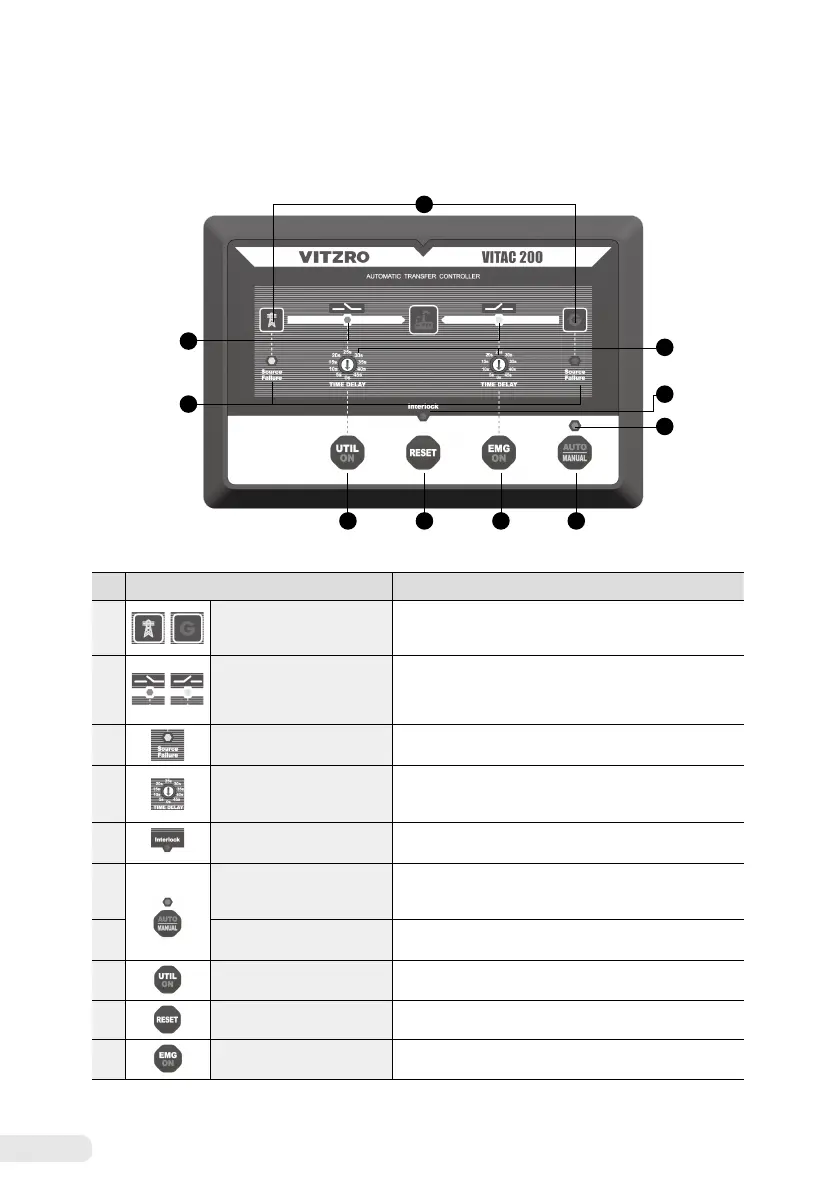
3. 1 Composition of the front unit
1
2
5
10 9 8 7
3
6
4
No. Item Detailed description
①
Status, emergency
power status display LED
☞
Green lamp on :
Power on (normal power supply)
☞
Green lamp blinking :
Abnormal power (OVR, UVR, OFR, UFR)
☞
Lamp off :
Power off, LED damage, product damage
②
Commercial, emergency
switch status display LED
☞
Green lamp on :
Open
☞
Red lamp on :
On
☞
Green lamp blinking :
In switching over (LED of the switched side blinks)
☞
Lamp off :
Power off, LED damage, product damage
③
Commercial, emergency
switchover failure display LED
☞
Red lamp on :
Switchover failure
1)
☞
Lamp off :
Normal
④
Rotary switch to set the
commercial and emergency
switchover delay
☞
Rotary switch to set the commercial and emergency
switchover delay
Setting range : 0 ~ 45 seconds (setting in 5 seconds)
⑤
Switchover interlock
2)
input status LED
☞
Red lamp on :
Input on
☞
Lamp off :
Input off
⑥
Auto/Manual status displayed
LED
☞
Red lamp on :
Auto
☞
Green lamp on :
Manual
☞
Lamp off :
Power off, LED damage, product damage
⑦
Auto/Manual
selection button
☞
Operation in an Auto state :
Changes to Manual
☞
Operation in a Manual state :
Changes to Auto
⑧
Button to turn on the
commercial power side switch
☞
Turns on the commercial power side switch
⑨
Reset button
☞
S/W Reset
⑩
Button to turn on the
emergency power side switch
☞
Turns on the emergency power side switch
(Detailed description of the front unit)
1) Determined to be switchover failure only when switchover fails after making an attempt three times.
2) Switchover operation will not be performed even though the automatic switchover situation occurs, when inputting the switchover interlock.
*
Precautions when manipulating buttons: Buttons will be activated only when pressed and held more than 1.5 seconds.


 To Next Page