5. 2 Parameters related to system setting
5. 3 How to set major parameters
VITAC 200 may malfunction if you change major parameters at your own discretion.
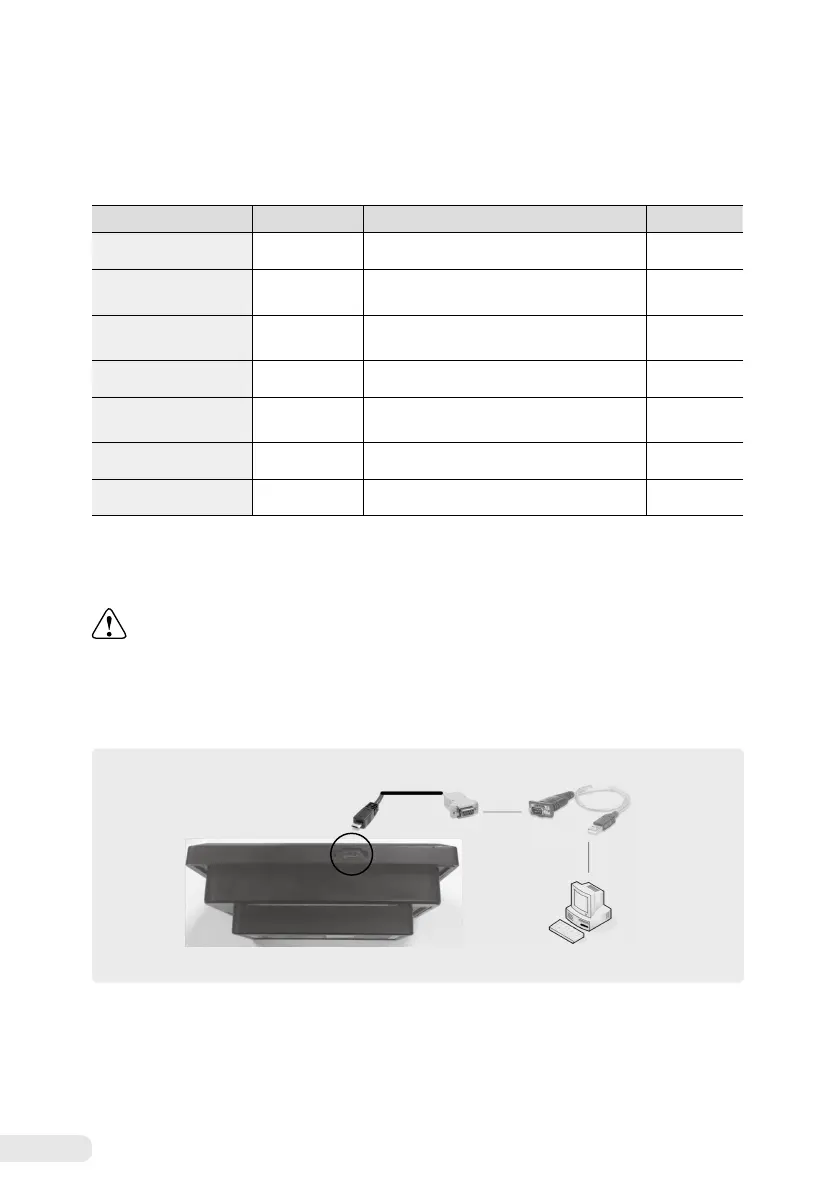
1) Communication environment configuration
①
Connect the “Micro-B USB to D-sub” cable to the “Micro-B USB” port of VITAC 200.
②
Connect the “Micro-B USB to D-sub” cable and “USB to Serial” cable.
③
Connect the USB terminal of the “USB to Serial” cable to the PC in which VICOM-Manager is installed.
※
The “USB to Serial” cable and “USB to Serial” cable for communication are not provided. Therefore, you need to purchase separately.
Micro-B USB Port
Micro-B USB to D-sub Cable
USB to Serial cable
PC with VICOM installed
Item Setting range Description
Default value
Rated frequency
50 / 60 [Hz] Sets the rated frequency 60 [Hz]
Automatic recovery
Enable / Disable
Sets automatic recovery activation according
to power priority
Enable
Switchover interlock
Enable / Disable
Sets the activation of the switchover interlock
function
Enable
Power priority
A Side / B Side Sets power priority A Side
Input/Open signal
output time
50 ~ 5000 [ms] Input/Open signal output time 500 [ms]
Number of retry times
0 ~ 10 [times] Number of retry times 3 [times]
Retry times
1 ~ 99 [S] Sets the waiting time to try switchover again 3 [S]
① ②
③


 To Next Page