D
D
D
L
L
L
P
P
P
P
P
P
r
r
r
o
o
o
j
j
j
e
e
e
c
c
c
t
t
t
o
o
o
r
r
r
–
–
–
U
U
U
s
s
s
e
e
e
r
r
r
’
’
’
s
s
s
M
M
M
a
a
a
n
n
n
u
u
u
a
a
a
l
l
l
3.
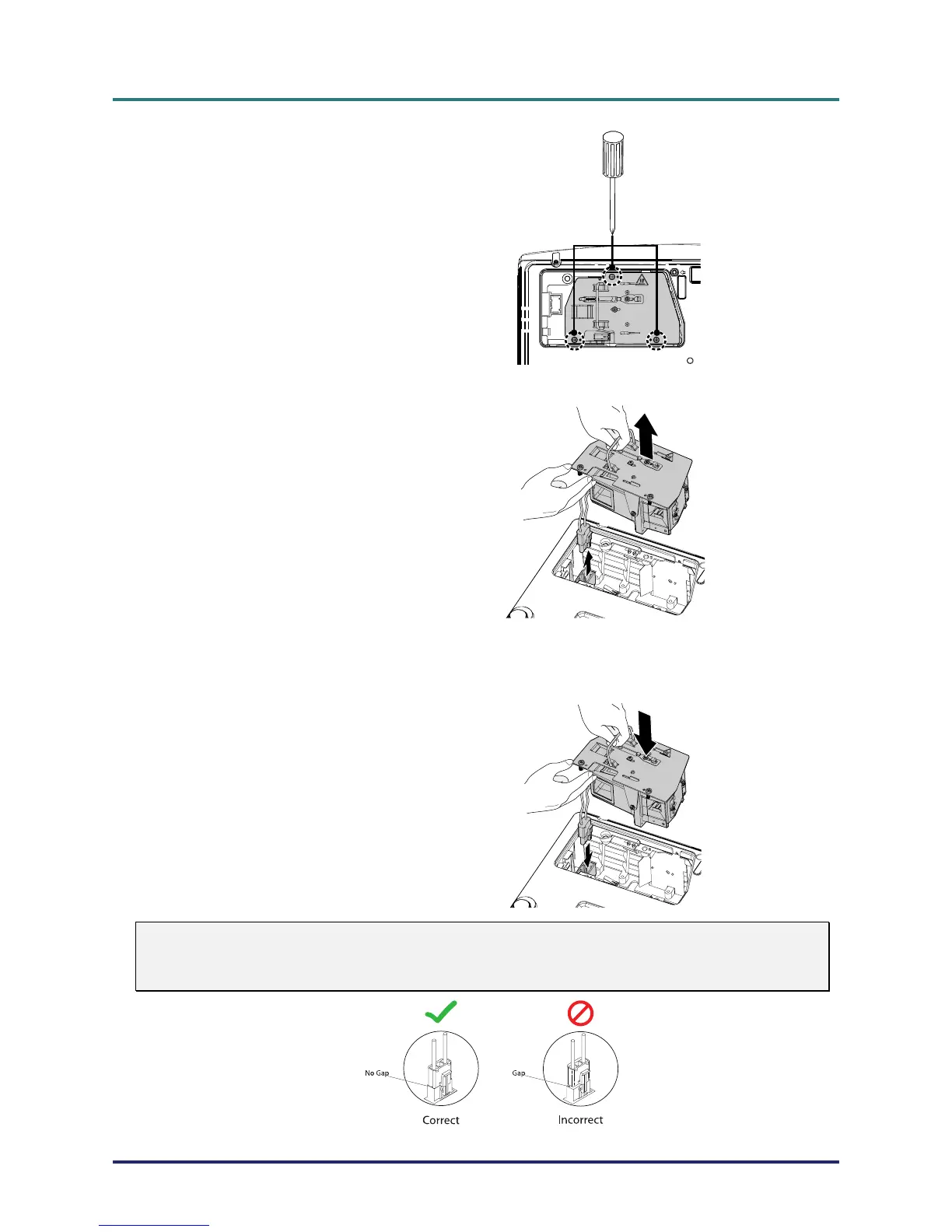
Remove the three screws
from the lamp module.
4.
Lift the module handle up.
5.
Disconnect the lamp connec-
tor.
6.
Pull firmly on the module
handle to remove the lamp
module.
7.
Reverse steps 1 to 6 to install
the new lamp module.
While installing, align the
lamp module with the
connector and ensure it is
level to avoid damage.
Note: The lamp module
must sit securely in place and
the lamp connector must be
connected properly before
tightening the screws.
Warning:
Lamp Connector must be installed flush with the connector base as shown in the image below.
A gap between the Lamp Connector and the connector base will cause damage to the projector.
The following images illustrate correct and incorrect Lamp Connector installations.
– 37 –



 To Next Page