D
D
D
L
L
L
P
P
P
P
P
P
r
r
r
o
o
o
j
j
j
e
e
e
c
c
c
t
t
t
o
o
o
r
r
r
–
–
–
U
U
U
s
s
s
e
e
e
r
r
r
’
’
’
s
s
s
M
M
M
a
a
a
n
n
n
u
u
u
a
a
a
l
l
l
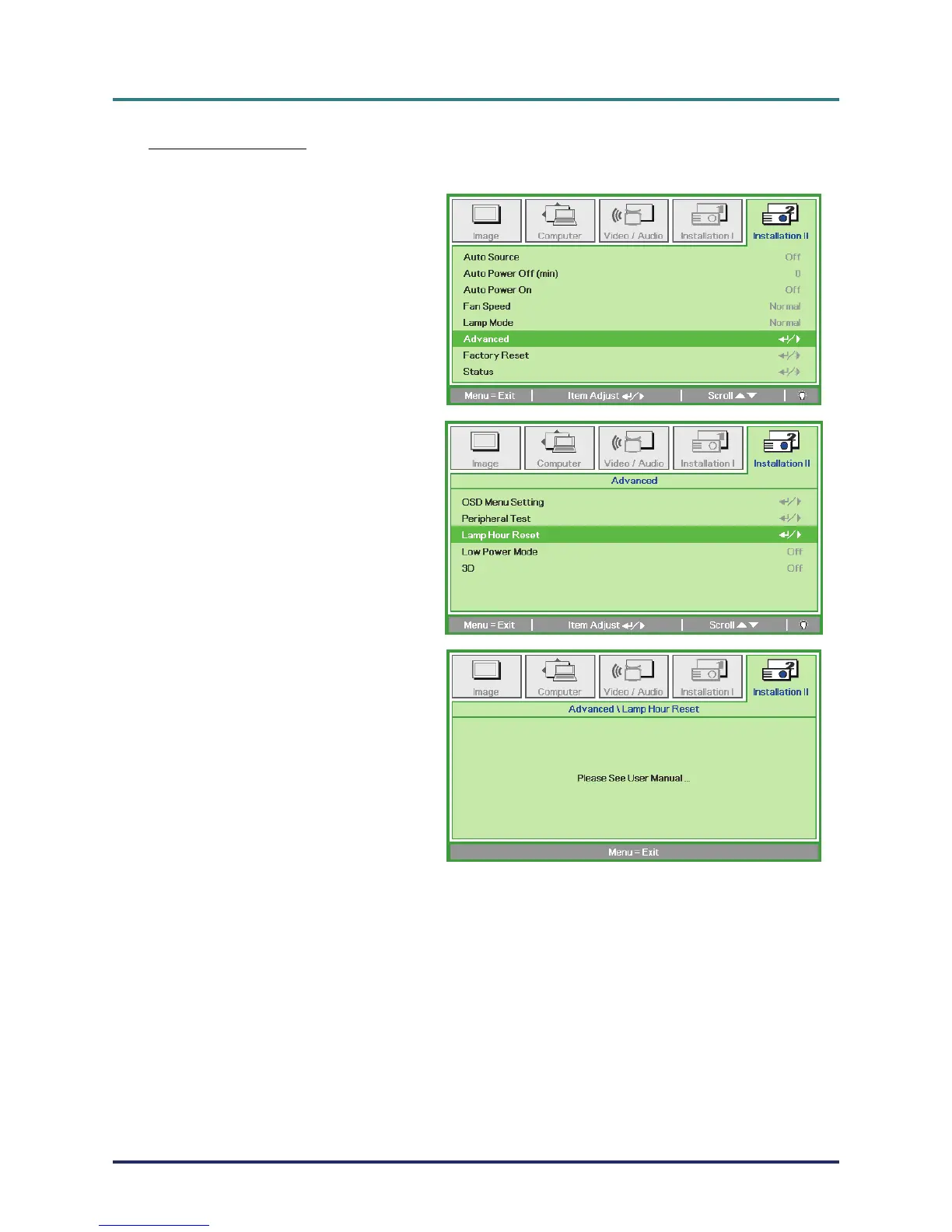
Resetting the Lamp
After replacing the lamp, you should reset the lamp hour counter to zero. Refer to the following:
1.
Press the MENU button to open the
OSD menu.
2.
Press the cursor ユモ button to move
to the Installation II menu. Press the
cursor button to move down to
Advanced.
3.
Press the cursor ヤメ button to move
down to Lamp Hour Reset.
4.
Press the cursor モ or Enter button.
A message screen appears.
5.
Press ヤメユモ buttons to reset the
lamp hour.
6.
Press the MENU button to get back
to Installation II.
– 37 –



 To Next Page