VIVOTEK
User's Manual - 47
Color: Select to display color or black/white video streams.
Power line frequency: Set the power line frequency consistent with local utility settings to eliminate image
ickering associated with uorescent lights.
Video orientation: Flip - vertically reflect the display of the live video; Mirror - horizontally reflect the
display of the live video. Select both options if the Network Camera is installed upside-down (e.g., on the
ceiling) to correct the image orientation. Please note that the preset locations will be cleared after you
congure the ip/mirror option.
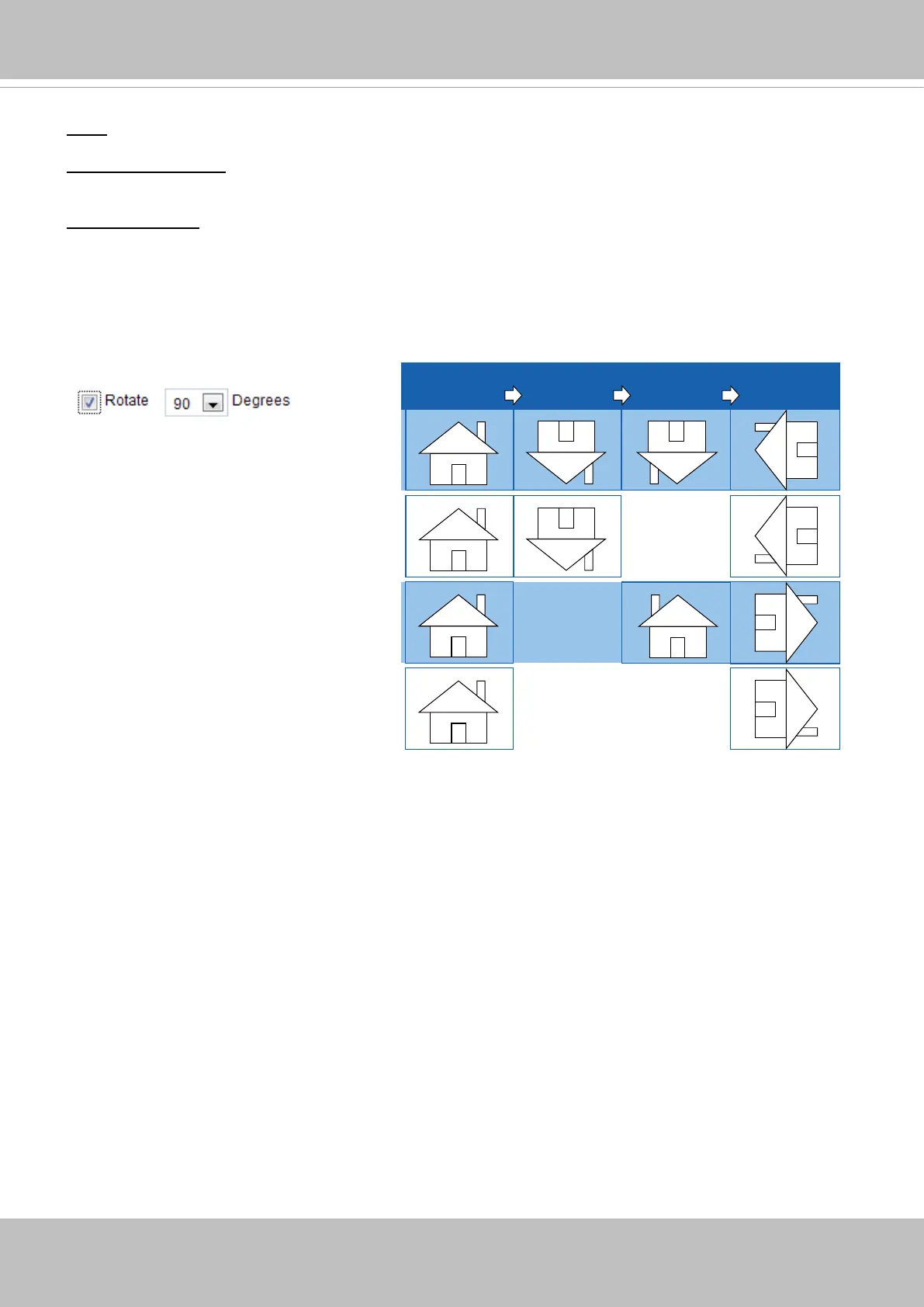
Rotate -
MirrorNormal Flip Rotate 90°
clockwise
The camera may be installed on a vertical, side-facing, or tilted surface in order to accommodate the
interior or exterior design of a building. The interior of a building can be shaped as a narrow rectangular
space, such as a corridor. The conventional HD image, such as that of a 16:9 aspect ratio, will be
incongruous with its wide horizontal view. With video rotation, the camera can more readily cover the
eld of view on a tall and narrow scene.
The rotation here indicates clockwise
rotation. Rotation can be applied with
flip, mirror, and physical lens rotation
(see below) settings to adapt to different
mounting locations.
The gures in the illustration are shown in
a consecutive order.



 To Next Page