EN - 7
English
Power over Ethernet (PoE) (MD8562)
POW
ER
C
O
LL
I
S
ION
L
I
N
K
RE
CEIVE
PARTITIO
N
1
2
3
4
5
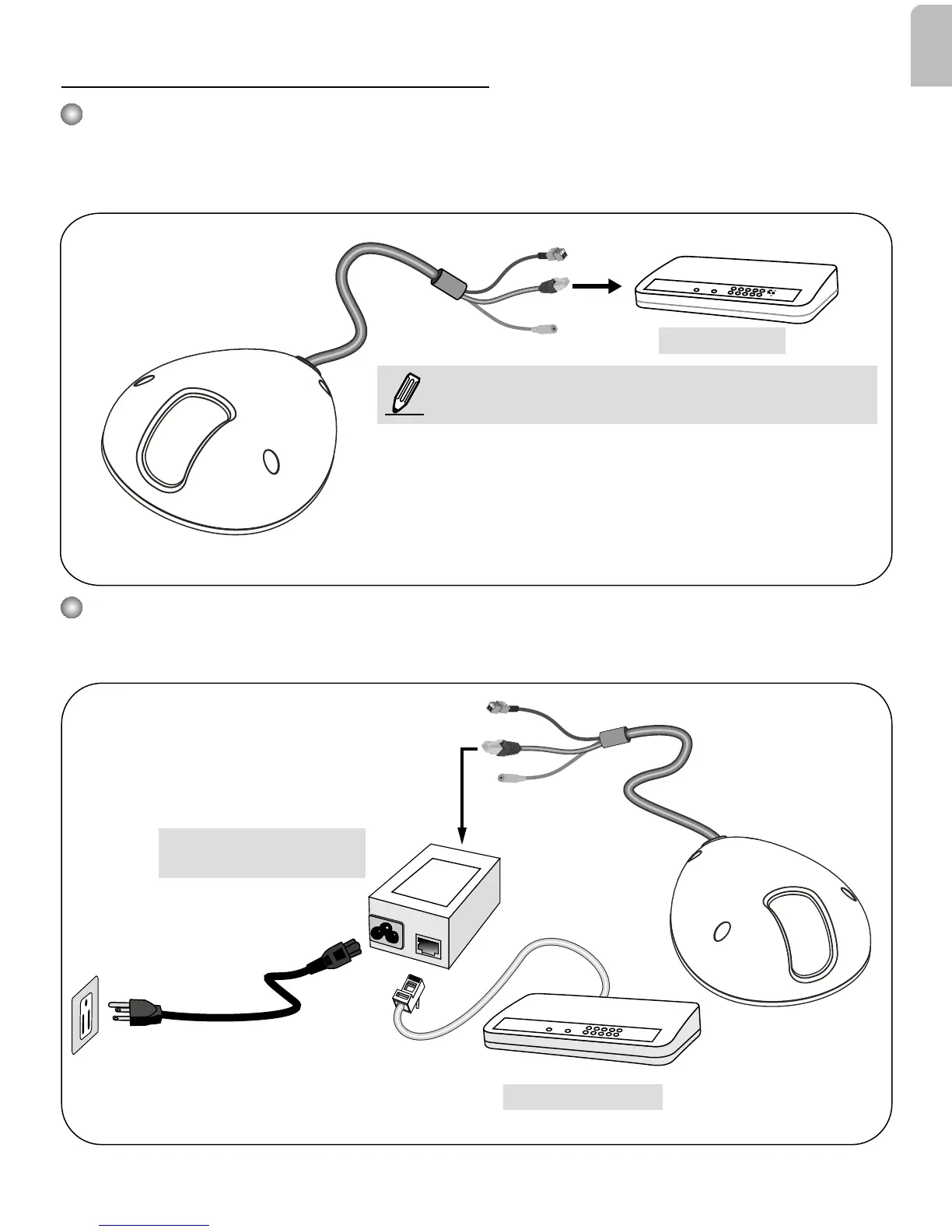
PoE Switch
When using a non-PoE switch
Use a PoE power injector (optional) to connect between the Network Camera and a non-PoE
switch.
When using a PoE-enabled switch
This Network Camera is PoE-compliant, allowing transmission of power and data via a single
Ethernet cable. Follow the below illustration to connect the camera to a PoE-enabled switch via
Ethernet cable.
POW
ER
C
O
LL
I
S
ION
L
I
N
K
RECEIVE
PARTITIO
N
1
2
3
4
5
PoE Power Injector
(optional)
Non-PoE Switch
NOTE:
1. This equipment is only to be connected to PoE networks
without routing to outside plants.
2. For PoE input connection, use only UL listed I.T.E. with
PoE output.
3. The DC power adaptor, if used, should comply with:
O/P: 12Vdc, 1.5A min., L.P.S. certied.








 To Next Page