
 Need help?
Do you have a question about the Vivotek MD8562 and is the answer not in the manual?
Step-by-step instructions for mounting the camera hardware.
Configuration for internet access via router, static IP, or PPPoE.
Instructions for setting up the camera using PoE.
Utilizing IW2 to install the camera on the LAN.
How to access the camera using web browsers.
Instructions for enabling ActiveX controls for browser access.
Format for accessing streams with RTSP players.
Configures streaming protocols like UDP and TCP.
Offers a full interface for advanced camera settings.
Step-by-step guide for updating the camera's firmware.
Restores camera settings to their factory defaults.
Setting the administrator password for system access.
Controls user access levels and manages accounts.
Enables secure communication via HTTPS protocol.
Limits the number of concurrent streaming connections.
Configures allowed and denied IP addresses for access control.
Configures network connection type (LAN, PPPoE).
Sets up PPPoE for internet access.
Configures HTTP authentication modes (basic, digest).
Configures RTSP streaming authentication modes.
VIVOTEK's free DDNS service setup.
Controls brightness, saturation, contrast, sharpness, and gamma.
Adjusts exposure level, time, and gain control.
Controls e-PTZ functions for camera movement and viewing.
Configures events triggered by user-defined sources.
Defines adaptive recording, source, schedule, and capacity.
Specifies the external HTTP-based application programming interface.
 General
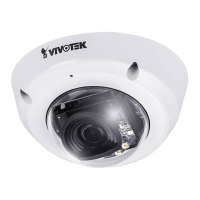
| Resolution | 1920 x 1080 |
|---|---|
| Compression | H.264, MJPEG |
| Power Supply | IEEE 802.3af Class 2 PoE |
| Maximum Resolution | 1920 x 1080 |
| Day/Night | Yes |
| Removable IR-cut Filter | Yes |
| Network Interface | 10/100 Mbps Ethernet |
| Operating Temperature | -20°C to 50°C |
| Lens Type | Vari-focal |
| Focal Length | 2.8 mm |
| Field of View (Horizontal) | 113° ~ 38° |
| IR Illuminators | Built-in IR illuminators |
| Minimum Illumination | 0.05 lux (color) |
| Maximum Frame Rate | 30 fps |
| Supported Protocols | IPv4, IPv6, TCP, UDP, HTTP, HTTPS, FTP, DHCP, NTP, DNS, DDNS, SMTP, SNMP, RTSP, RTP, UPnP, 802.1x, QoS |
| Interface | RJ-45 |
| Weather Resistance | IP66 |
| Vandal Resistance | IK10 |
| Shutter Time | 1/5 ~ 1/32, 000 sec. |
| Power Consumption | Max. 6.49 W |



 To Next Page

