English - 18
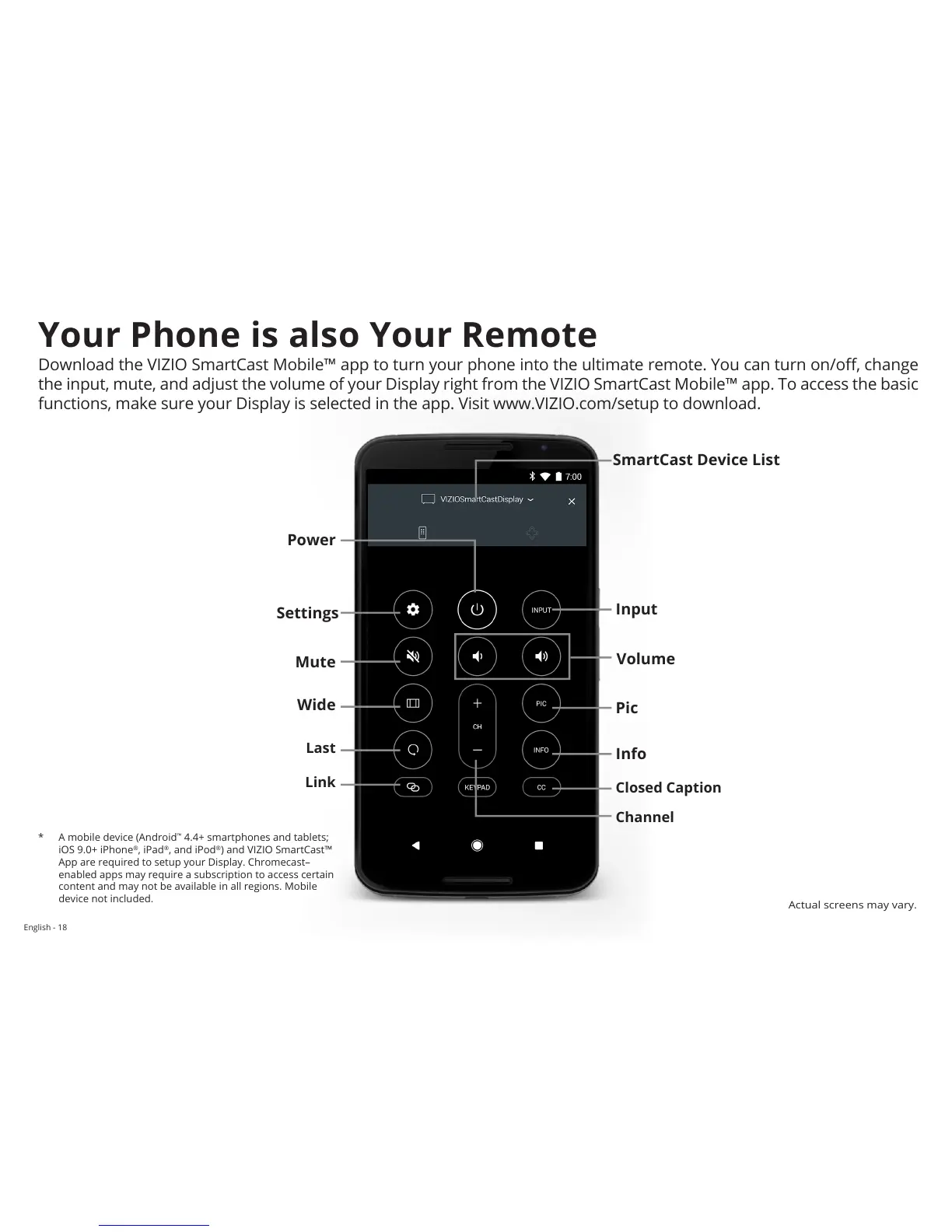
Power
Wide
Last
Link
Mute
Volume
Input
Pic
Info
Closed Caption
Channel
Settings
SmartCast Device List
Your Phone is also Your Remote
Download the VIZIO SmartCast Mobile™ app to turn your phone into the ultimate remote. You can turn on/o, change
the input, mute, and adjust the volume of your Display right from the VIZIO SmartCast Mobile™ app. To access the basic
functions, make sure your Display is selected in the app. Visit www.VIZIO.com/setup to download.
* A mobile device (Android
™
4.4+ smartphones and tablets;
iOS 9.0+ iPhone
®
, iPad
®
, and iPod
®
) and VIZIO SmartCast™
App are required to setup your Display. Chromecast–
enabled apps may require a subscription to access certain
content and may not be available in all regions. Mobile
device not included.
Actual screens may vary.


 To Next Page